TreePaste
A Windows tool that pastes copied files while preserving their folder structure. Choose the paste starting level from a tree view and paste from exactly where you need.
Overview
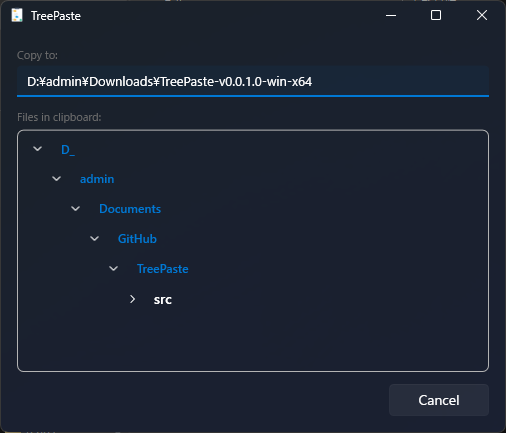
TreePaste is a desktop application for preserving source folder hierarchy when pasting files and folders copied in Explorer. Instead of a one-step paste, it visualizes copied items as a tree so you can choose the exact hierarchy level used as the paste starting point.
The Problem It Solves
Explorer gives you exactly two outcomes when you paste. Copy a folder and you get the whole subtree including the folder itself. Copy the files inside it and you get a flat set of files with the structure gone. There is no way to say “keep the structure, but start it three levels down.”
Consider a report buried in a project tree:
D:\Projects\ClientA\2026\Reports\Q1\summary.xlsx
D:\Projects\ClientA\2026\Reports\Q1\appendix.xlsx
D:\Projects\ClientA\2026\Reports\Q2\summary.xlsx
If you want Reports\Q1\summary.xlsx to land in the destination — keeping the
Reports and Q1 folders but dropping Projects, ClientA
and 2026 — Explorer cannot do it in one step. The usual workaround is to paste everything and
then delete the unwanted parent folders by hand, which is where mistakes happen.
TreePaste shows the copied items as a tree and lets you click the level that becomes the root of the paste.
Select Reports and the destination receives Reports\Q1\summary.xlsx, with everything
above it discarded.
Background
In real file management workflows, a normal paste often includes too many parent folders or loses structure that should remain intact. TreePaste was built to reduce these mistakes by making folder hierarchy visible before execution and letting you select where the paste begins.
The design goal was that the tool should never interrupt the flow of work. It stays in the tray rather than occupying a window, it is summoned by a global shortcut rather than by finding and clicking an icon, and it infers the destination from the Explorer window already in front of you rather than asking you to browse for it.
Key Features
- Starts in the system tray and runs in the background
- Press Ctrl+Alt+V anytime to open the window
- Shows copied files and folders from the clipboard as a tree
- Select the paste starting level by clicking a folder node
- Automatically detects the active Explorer path as the paste destination
- Falls back to Desktop when no Explorer window is found
- Supports Fluent Design and automatically adapts colors to the current Windows color mode
How to Use
- Launch TreePaste (it stays in the system tray).
- Copy files or folders in Explorer (Ctrl+C).
- Open the destination folder in Explorer.
- Press Ctrl+Alt+V to open TreePaste.
- Select the paste starting point from the tree.
- Execute the paste.
Step 3 matters more than it looks: the destination is read from whichever Explorer window is in the foreground at the moment you press the shortcut. Bringing the target folder to the front before invoking TreePaste is what makes the destination correct.
How Destination Detection Works
Rather than asking the user to pick a destination folder, TreePaste reads it from the window you were just looking at. The lookup runs in three stages:
-
Get the foreground window with
GetForegroundWindow, then resolve its owning process viaGetWindowThreadProcessId. -
If that process is
explorer, enumerate the open shell windows through theShell.ApplicationCOM object, match the one whoseHWNDequals the foreground window handle, and read itsLocationURLto obtain the displayed folder path. - If the foreground window is not an Explorer window — or the shell lookup yields nothing — fall back to the Desktop so the paste always has a valid target.
Matching on the window handle rather than simply taking the first shell window is what makes the behavior predictable when several Explorer windows are open at once: the destination is always the specific window that had focus, not an arbitrary one.
Notes and Known Behavior
- The destination follows focus. If a non-Explorer window (a browser, an editor) is in the foreground when you press Ctrl+Alt+V, there is no Explorer path to read and the paste targets the Desktop. Click the destination folder window first.
- The tree reflects the clipboard at the moment you open the window. Copy the files first, then invoke TreePaste.
- Ctrl+Alt+V is a system-wide shortcut. If another resident application has already registered the same combination, whichever registered it first receives the key.
- Colors follow the Windows color mode. Switching between light and dark mode is picked up without reconfiguring the app.
System Requirements
- OS: Windows 10 / 11 (x64)
- .NET: .NET 10
- UI framework: WPF
Building from Source
With the .NET 10 SDK installed, build the solution directly:
dotnet build src/TreePaste/TreePaste.slnx
To produce a runnable build, publish for the win-x64 runtime in Release configuration.
The output is written under src/publish/win-x64/.
Repository
Source code and usage details are available on GitHub.