Overview
The WPF DataGrid control provides built-in column sorting out of the box.
When CanUserSortColumns is set to true (the default), clicking a column header sorts the rows by that column.
Built-in sorting covers the common cases, but real applications frequently need programmatic sorting, custom comparison rules, or a way to reset the grid to its unsorted state.
This article covers the essentials and explores patterns for each of those requirements.
Prerequisites / Environment
- Framework / Language: .NET 6 or later / C# 10
- Target control: WPF
DataGrid(System.Windows.Controls) - Architecture: applicable to both code-behind and MVVM
- Verification environment: .NET 10 / Windows 11
The examples assume the grid is bound to an observable collection of a Product type that exposes Name and Price properties.
The figures in this article come from displaying a DataGrid in the environment above, varying only the column declarations, and reading SortMemberPath and CanUserSort on each column.
The following points were confirmed in that environment:
- A
DataGridTextColumnwithout an explicitSortMemberPathpicks up the path from itsBinding. - A template column with no
Bindingends up with an emptySortMemberPathand cannot be sorted.
Enabling Default Sorting
By default, every column in a DataGrid is sortable as long as its SortMemberPath can be resolved against the bound data source:
<DataGrid ItemsSource="{Binding Products}"
          AutoGenerateColumns="False"
          CanUserSortColumns="True">
  <DataGrid.Columns>
    <DataGridTextColumn Header="Name"  Binding="{Binding Name}"  SortMemberPath="Name" />
    <DataGridTextColumn Header="Price" Binding="{Binding Price}" SortMemberPath="Price" />
  </DataGrid.Columns>
</DataGrid>
Clicking the Name header once sorts ascending, and clicking again reverses to descending.
The default behavior does not return to an unsorted state, so clear logic must be implemented explicitly when needed — see How to Reset DataGrid Sorting in WPF for that pattern.
The figure below records what lands in SortMemberPath and CanUserSort for each way of declaring a column.
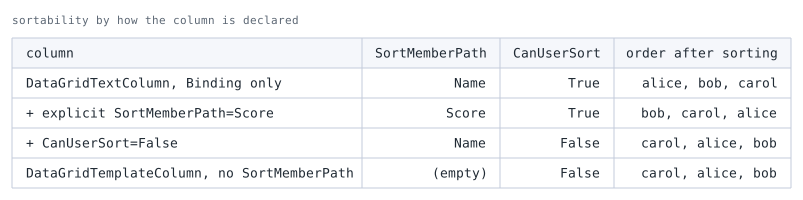
order after sorting is the order after sorting ascending by that column's SortMemberPath; a column that cannot sort keeps the original order.SortMemberPath is filled in from the Binding path even when it is not written. Stating it in the XAML above makes the intent explicit; omitting it produces the same result.
The last row is the one to note. A DataGridTemplateColumn without a Binding ends up with an empty SortMemberPath, and CanUserSort becomes False as well.
It stays out of sorting even with CanUserSortColumns set to True. Making a template column sortable requires stating SortMemberPath explicitly.
Sorting via Code-Behind
Sorting can be triggered programmatically by manipulating DataGrid.Items.SortDescriptions:
using System.ComponentModel;

dataGrid.Items.SortDescriptions.Clear();
dataGrid.Items.SortDescriptions.Add(
    new SortDescription(nameof(Product.Price), ListSortDirection.Descending));
dataGrid.Items.Refresh();
Reset the column-header sort glyph too so the UI stays in sync:
foreach (var col in dataGrid.Columns)
    col.SortDirection = null;

var priceCol = dataGrid.Columns.First(c => c.SortMemberPath == nameof(Product.Price));
priceCol.SortDirection = ListSortDirection.Descending;
Without this glyph update the header arrow still points at the previous column, even though the rows are ordered correctly, which makes the sorted state look inconsistent to the user.
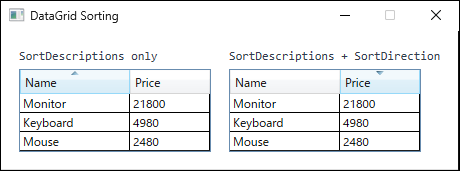
Name ascending, and then had their SortDescriptions replaced with Price descending. The left grid updated only SortDescriptions, so the rows follow Price descending while the arrow stays on the Name column. The right grid also updated SortDirection, so the arrow points at Price descending.Custom Sort Logic with ListCollectionView
For comparison rules that SortDescriptions cannot express — such as a case-insensitive string sort or sorting by an expression not exposed as a public property — use ListCollectionView.CustomSort. (SortDescriptions can still sort by a public property whose getter computes a value; the limit is comparisons not exposed as a property.) Multi-level sorting does not need it: add several SortDescription entries instead.
CollectionViewSource.GetDefaultView returns an ICollectionView, which does not expose CustomSort. For an in-memory collection the concrete type is ListCollectionView, but a view over another source (such as a DataView) is not, so narrow the type with a pattern match rather than an unconditional cast that could throw InvalidCastException:
if (CollectionViewSource.GetDefaultView(dataGrid.ItemsSource) is ListCollectionView view)
{
    view.CustomSort = Comparer<Product>.Create((a, b) =>
        StringComparer.OrdinalIgnoreCase.Compare(a.Name, b.Name));
}
CustomSort takes precedence over SortDescriptions. To switch back to SortDescriptions-based sorting, set view.CustomSort = null first — clearing SortDescriptions alone leaves CustomSort in effect — and then configure SortDescriptions.
Notes
SortMemberPathis required only when it differs from the column’sBindingpath. For a plainDataGridTextColumnbound to a simple property, sorting works without it, but specifying it explicitly avoids surprises when the binding path is complex.- Calling
Items.Refresh()rebuilds the entire view and resets the current cell and selection. On large collections this is noticeable, so prefer settingSortDescriptionsbefore the grid is populated when possible. CustomSortis a property ofListCollectionView, the default view returned for in-memory collections. A view over another source — such as theBindingListCollectionViewreturned for aDataView— is not aListCollectionViewand offers noCustomSort, which is why the pattern match above skips it. For those sources the ordering must come from another mechanism, such asSortDescriptionsor sorting at the data source.- Sorting changes only the display order, not the underlying collection. Code that iterates the bound collection directly still sees the original order.
Summary
| Scenario | Recommended approach |
|---|---|
| Simple column sorting | CanUserSortColumns="True" (default) |
| Programmatic sort | SortDescriptions + update SortDirection |
| Custom sort logic | ListCollectionView.CustomSort |
For most line-of-business apps the default mechanism covers the common cases.
Reach for CustomSort only when the data requires special ordering that SortDescription cannot express.