Overview
By default, the WPF DatePicker renders selected dates using the system locale format (e.g. 4/15/2026 on en-US).
This behavior is inconvenient when an application must present dates in a fixed layout regardless of the machine’s regional settings, such as yyyy/MM/dd for logs or dd MMM yyyy for reports.
This article shows how to customise that format so the control always renders dates in the format the application requires, and compares the trade-offs of each approach.
Prerequisites / Environment
- Framework / Language: .NET 6 or later / C# 10
- Target control: WPF
DatePicker(System.Windows.Controls) - Architecture: applicable to both code-behind and MVVM
- Verification environment: .NET 10 / Windows 11 (Japanese regional settings)
The figures in this article come from varying the DatePicker settings in the environment above and reading the string shown in its text part.
The following points were confirmed in that environment:
SelectedDateFormatoffers onlyShortandLong, so it cannot produce an arbitrary format.SelectedDateFormatdefaults toShort, and that default comes from the default style rather than from the dependency property metadata.- Rewriting the text part inside the template does produce an arbitrary format.
The techniques below rely on the default DatePicker control template, which contains a DatePickerTextBox in its visual tree.
A fully retemplated DatePicker may not expose that element, in which case changing the picker’s own text relies on the code-behind approach or on handling the format inside the custom template. The converter shown later formats companion displays, not the picker itself.
The text a DatePicker actually shows can be confirmed by varying the setting and reading it back.
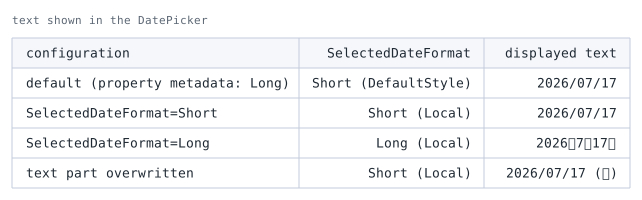
DatePicker holding 2026-07-17. The parenthesis in the second column is where the value came from, read through DependencyPropertyHelper.GetValueSource.SelectedDateFormat offers only Short and Long. Neither can state an arbitrary format.
That is why the workarounds described below are needed.
Setting nothing yields Short, but that is not the default value registered in the dependency property metadata.
The metadata default is Long; Short comes from the default style. The DefaultStyle in the second column of the table is that source.
The last row overwrites the text part inside the template directly. A format carrying the weekday, which neither built-in form can express, is reachable that way.
Setting the Format in XAML
DatePicker exposes a SelectedDateFormat property with two values: Short (default) and Long.
For full control, the control template’s DatePickerTextBox must be targeted through a style:
<DatePicker x:Name="datePicker" SelectedDate="{Binding SelectedDate}">
  <DatePicker.Resources>
    <Style TargetType="DatePickerTextBox">
      <Setter Property="Text"
              Value="{Binding SelectedDate,
                              RelativeSource={RelativeSource AncestorType=DatePicker},
                              StringFormat='yyyy\/MM\/dd'}" />
    </Style>
  </DatePicker.Resources>
</DatePicker>
The separators are escaped as \/ so they render literally. Left unescaped, / is a date-separator placeholder that the binding’s culture can replace with another character, which would break the fixed layout the article aims for. The same effect can be achieved by quoting the separators as '/' (for example yyyy'/'MM'/'dd), the form used later in this article.
Placing the two side by side gives the following.
The default display follows the target element’s Language property (xml:lang in XAML), so both carry en-US to keep the comparison independent of the machine locale.
<!-- Default display -->
<DatePicker xml:lang="en-US" SelectedDate="2026-04-15" Width="190" />

<!-- With the style above applied -->
<DatePicker xml:lang="en-US" SelectedDate="2026-04-15" Width="190">
  <DatePicker.Resources>
    <Style TargetType="DatePickerTextBox">
      <Setter Property="Text"
              Value="{Binding SelectedDate,
                              RelativeSource={RelativeSource AncestorType=DatePicker},
                              StringFormat='yyyy\/MM\/dd'}" />
    </Style>
  </DatePicker.Resources>
</DatePicker>
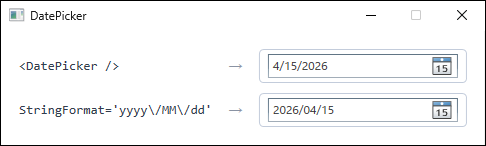
DatePicker controls given the same SelectedDate. Both carry xml:lang="en-US" so that the difference in format is visible. The upper one uses the default display, which follows that setting and renders 4/15/2026. The lower one applies the style from this section, which fixes the separators and the year-month-day order.What escaping with \/ fixes is the separator and the field order, not the calendar itself.
Evaluating the same yyyy\/MM\/dd with only the culture changed gives the following (measured on .NET 10).
xml:lang |
Rendered |
|---|---|
en-US / ja-JP / de-DE |
2026/04/15 |
th-TH (Buddhist era) |
2569/04/15 |
ar-SA (Hijri) |
1447/10/27 |
fa-IR (Persian) |
1405/01/26 |
To pin the calendar as well, set ConverterCulture on the binding so the culture itself is fixed.
Setting the Format in Code-Behind
In code-behind, subscribe to the SelectedDateChanged event and format the text manually:
using System.Globalization;
using System.Windows.Controls;

private void DatePicker_SelectedDateChanged(object sender, SelectionChangedEventArgs e)
{
    if (datePicker.SelectedDate.HasValue)
    {
        datePicker.Text = datePicker.SelectedDate.Value
            .ToString("yyyy/MM/dd", CultureInfo.InvariantCulture);
    }
    else
    {
        datePicker.Text = string.Empty;
    }
}
Passing CultureInfo.InvariantCulture fixes the separator regardless of the machine’s regional settings; without it, ToString("yyyy/MM/dd") uses the current culture and the / follows that culture’s date separator.
Using a Converter for Companion Displays
A converter cannot change what the DatePicker itself shows: its displayed text is produced by the control template from SelectedDate, not by the bound value, and SelectedDate is a DateTime?, so binding a string-returning converter to it does not apply.
Where a converter is the right tool is a companion display — a summary label or status bar that must show the same date in the chosen format:
using System;
using System.Globalization;
using System.Windows;
using System.Windows.Data;

public class DateFormatConverter : IValueConverter
{
    public object Convert(object value, Type targetType, object parameter, CultureInfo culture)
        => value is DateTime d ? d.ToString("yyyy/MM/dd", CultureInfo.InvariantCulture) : string.Empty;

    public object ConvertBack(object value, Type targetType, object parameter, CultureInfo culture)
        => DateTime.TryParseExact(value as string, "yyyy/MM/dd",
               CultureInfo.InvariantCulture, DateTimeStyles.None, out var d)
            ? d : DependencyProperty.UnsetValue;
}
Bind a TextBlock to the same source through the converter:
<TextBlock Text="{Binding SelectedDate, ElementName=datePicker,
                  Converter={StaticResource DateFormatConverter}}" />
The converter centralises the format string in one place, so a single edit changes every companion display that reuses it.
Common Format Strings
The format string passed to ToString or StringFormat follows the standard .NET custom date and time specifiers:
| Pattern | Example output | Notes |
|---|---|---|
yyyy/MM/dd |
2026/04/15 |
Zero-padded; / follows the culture |
dd MMM yyyy |
15 Apr 2026 |
MMM depends on the culture |
MMMM d, yyyy |
April 15, 2026 |
MMMM uses the full month name |
yyyy/MM/dd HH:mm |
2026/04/15 09:30 |
Combines date and time in one string |
Note that / and : are not literals: they are the date-separator and time-separator placeholders, which the runtime replaces with the current culture’s separators (a culture whose separator is . renders 2026.04.15). Characters such as - and , are literals and are preserved verbatim.
To keep a fixed layout regardless of the machine’s regional settings, pass CultureInfo.InvariantCulture to ToString (as the converter above does), or escape the separators as yyyy'/'MM'/'dd. Without an explicit culture, ToString and StringFormat use the current culture, which may differ between machines.
Notes
- The XAML
StringFormatapproach only affects the displayed text. The underlyingSelectedDatevalue is unchanged, so bindings that read the date directly are unaffected. - The
SelectedDateChangedapproach overwrites theTextproperty manually. If the user then types into the box, two-way parsing must still succeed, so avoid formats the parser cannot round-trip. - Converters that return
string.Emptyfor a null date prevent aNullReferenceExceptionwhen no date is selected.
Summary
| Method | Pros | Cons |
|---|---|---|
| Style + StringFormat | Declarative, no code | Limited to StringFormat syntax |
| SelectedDateChanged | Simple, explicit | Code-behind coupling |
| Value Converter | MVVM-friendly, reusable | Formats companion displays, not the picker |
The appropriate approach depends on the project’s architecture.
To change the picker’s own text, the Style + StringFormat or code-behind approach is required; the converter is best for companion displays that must show the same date and grow in number.