Overview
A WPF ListBox enables UI virtualization through VirtualizingStackPanel when displaying large data sets.
With virtualization active, the containers (ListBoxItem) for off-screen items are discarded and regenerated when needed.
If selection state is managed on the container, previously selected items can appear to be missing from SelectedItems after scrolling.
The widely known remedy is to give each item’s ViewModel an IsSelected property and TwoWay-bind ListBoxItem.IsSelected to it through ItemContainerStyle.
However, that configuration alone is insufficient.
Unrealized containers have no binding, so a Ctrl + A or a Shift range selection that extends off-screen never reaches the data.
Worse, once those containers are realized by scrolling, the false on the data side is written back to the UI and the selection that had been established is lost.
This article demonstrates that asymmetry with measurements, then presents a configuration that pairs SelectionChanged with the binding to make synchronization work in both directions.
Prerequisites / Environment
- Framework / Language: .NET 10 / C# 14 (the samples compile unchanged on .NET 6 / C# 10 or later)
- Target control: WPF
ListBox(System.Windows.Controls) - Architecture: MVVM (each item ViewModel exposes
IsSelected) - OS: Windows 11 (WPF is Windows-only)
- Verification environment: display scaling 100%, default theme (Aero2)
The examples below assume UI virtualization is active (the ListBox default) and that a collection of roughly 10,000 items is bound to the ListBox.
SelectionMode is Extended to handle multiple selection.
The behavior is unchanged from .NET 6 onward.
The figures in this article were obtained by running an actual application in this environment and counting SelectedItems.Count alongside the number of items whose IsSelected is true.
Cause / Background
Under ListBox UI virtualization, containers are rebuilt as the user scrolls.
Selection state is vulnerable to virtualization when handled in the following ways:
- Managing selection by referencing
ListBoxItemdirectly - Building
SelectedItemsby walking containers in the visual tree - Failing to restore selection state on regenerated containers
What is lost is not the data itself, but the container-dependent selection synchronization.
With VirtualizationMode="Recycling", containers are reused, which makes inconsistencies more likely: a recycled container may retain a previous selection state, or fail to have one restored.
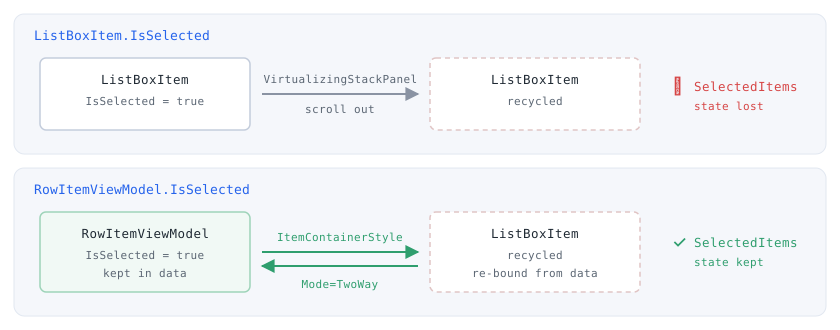
IsSelected: once scrolling rebuilds the container, nothing remains from which to restore it. The bottom row holds IsSelected on the data and binds it two-way through ItemContainerStyle, so a regenerated container re-reads its state from the data.Realized Containers Do Not Scale with Item Count
With virtualization active, only as many ListBoxItem instances exist as the visible range requires.
Measured on a 600px-tall ListBox, the number of realized containers stayed constant at 31 across collections of 100, 10,000, and 100,000 items.
Those measurements appear in the figure under “Keeping Virtualization Intact” below.
ItemContainerStyle applies only to ListBoxItem instances that have been generated.
With 10,000 items bound, those 31 are the ones that have a container; the remaining 9,969 have no corresponding ListBoxItem at all.
With no container, there is no binding to place on it.
Raising the item count leaves the number of realized containers at 31, so the proportion of items without a container grows with the collection.
The belief that “state is safe as long as it lives on the data” holds only in the data-to-container direction.
The write-back direction, from container to data, works only for the 31 realized items.
Solution: Give Each Item an IsSelected Property
As the foundation for handling multiple selection in MVVM, give each item ViewModel an IsSelected property.
With selection state on the data side, the value survives container disposal and regeneration.
Item ViewModel
Implement IsSelected with change notification on the ViewModel that represents each row.
using System.ComponentModel;
using System.Runtime.CompilerServices;

public class RowItemViewModel : INotifyPropertyChanged
{
    private bool _isSelected;

    public int Id { get; }
    public string Name { get; }

    public bool IsSelected
    {
        get => _isSelected;
        set
        {
            if (_isSelected == value) return;
            _isSelected = value;
            OnPropertyChanged();
        }
    }

    public RowItemViewModel(int id, string name)
    {
        Id = id;
        Name = name;
    }

    public event PropertyChangedEventHandler? PropertyChanged;

    protected void OnPropertyChanged([CallerMemberName] string? propertyName = null)
        => PropertyChanged?.Invoke(this, new PropertyChangedEventArgs(propertyName));
}
Change notification on IsSelected is required so that changes made on the ViewModel side propagate to already-realized ListBoxItem containers. Notification is not needed for initial display or container regeneration, since the binding reads the current value at that point, but INotifyPropertyChanged is necessary for two-way synchronization.
Screen-Level ViewModel
Hold the full list and expose the selected items from the data side.
using System.Collections.ObjectModel;
using System.Linq;

public class MainViewModel
{
    public ObservableCollection<RowItemViewModel> Items { get; } = new();

    public MainViewModel()
    {
        for (int i = 1; i <= 10000; i++)
        {
            Items.Add(new RowItemViewModel(i, $"Row {i}"));
        }
    }

    public RowItemViewModel[] GetSelectedItems()
        => Items.Where(x => x.IsSelected).ToArray();
}
GetSelectedItems scans the data (IsSelected) rather than containers, so it retrieves every selection already reflected in IsSelected, regardless of scroll position or virtualization state.
XAML
Use ItemContainerStyle to TwoWay-bind ListBoxItem.IsSelected to each item’s IsSelected.
<ListBox x:Name="RowListBox"
         ItemsSource="{Binding Items}"
         SelectionMode="Extended"
         ScrollViewer.CanContentScroll="True"
         VirtualizingPanel.IsVirtualizing="True"
         VirtualizingPanel.VirtualizationMode="Recycling">
    <ListBox.ItemTemplate>
        <DataTemplate>
            <StackPanel Orientation="Horizontal">
                <TextBlock Text="{Binding Id}" Width="80"/>
                <TextBlock Text="{Binding Name}"/>
            </StackPanel>
        </DataTemplate>
    </ListBox.ItemTemplate>

    <ListBox.ItemContainerStyle>
        <Style TargetType="ListBoxItem">
            <Setter Property="IsSelected"
                    Value="{Binding IsSelected, Mode=TwoWay, UpdateSourceTrigger=PropertyChanged}" />
        </Style>
    </ListBox.ItemContainerStyle>
</ListBox>
When a container is regenerated, the binding re-reads the IsSelected value and restores the selection state.
This is where the commonly published guidance ends.
The ItemContainerStyle Binding Alone Loses Selections
Against the configuration above, selecting all items with Ctrl + A (SelectAll) and then paging down was measured.
For comparison, a configuration that writes back to the data through SelectionChanged, and one that uses both, were measured at the same time.
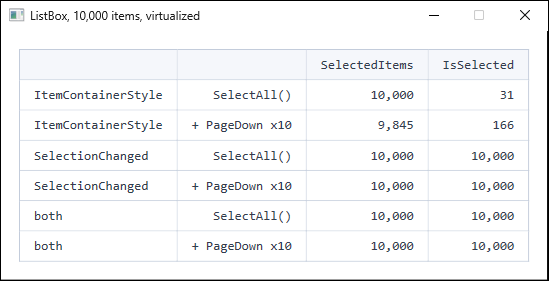
SelectAll() on a virtualized ListBox bound to 10,000 items, then scrolling ten pages. With only the ItemContainerStyle binding, scrolling destroys part of the selection.Three things follow from the table.
1. Immediately after SelectAll(), only 31 items reached the data.
SelectedItems correctly holds 10,000 entries.
On the data side, however, IsSelected became true for only the 31 items whose containers were realized.
The 9,969 items without a binding never received the selection.
2. Scrolling destroys the selection that had been established.
After ten pages of scrolling, SelectedItems fell from 10,000 to 9,845.
Newly realized containers read the data-side IsSelected (still false) and overwrite their own selection state with it.
Far from protecting the selection, the ItemContainerStyle binding actively erases it along this path.
3. SelectionChanged keeps both in agreement.
The configuration that handles the event and writes back to the data reported 10,000 on both sides, immediately after SelectAll() and after scrolling.
e.AddedItems and e.RemovedItems on SelectionChanged include every changed item, regardless of whether its container is realized.
Recommended Configuration: Binding Plus SelectionChanged
Use both rather than either one. The responsibilities divide as follows.
| Direction | Handled by | Coverage |
|---|---|---|
| UI selection action → data | SelectionChanged |
All items |
| Data → UI (restore on container realization) | ItemContainerStyle binding |
Realized containers |
Because SelectionChanged writes every item back to the data, containers realized later read the correct value (true) through the binding.
That is why the “both” rows in the table above agree at 10,000 on each side.
Place the following handler in code-behind.
private void RowListBox_SelectionChanged(object sender, SelectionChangedEventArgs e)
{
    // Unrealized items have no binding, so selection changes are reflected to the
    // data here. e.AddedItems / e.RemovedItems contain every changed item,
    // regardless of container realization state.
    foreach (RowItemViewModel item in e.AddedItems)
    {
        item.IsSelected = true;
    }

    foreach (RowItemViewModel item in e.RemovedItems)
    {
        item.IsSelected = false;
    }
}
SelectionChanged is not raised by user interaction alone.
It also fires on a SelectAll call, on assignment to SelectedItem, and — in the configuration described here — when a container is realized and the binding restores its selection state.
The handler above therefore receives a call assigning true to an item that is already true every time a container is restored.
Rejecting an unchanged value in the setter, as RowItemViewModel does above, keeps that path from emitting redundant change notifications.
To preserve MVVM, invoke the same logic from an attached behavior or from an EventTrigger in the Microsoft.Xaml.Behaviors.Wpf package.
System.Windows.Interactivity (the Blend SDK) has been superseded by Microsoft.Xaml.Behaviors and should not be used for new work.
<ListBox ItemsSource="{Binding Items}"
         SelectionMode="Extended"
         xmlns:b="http://schemas.microsoft.com/xaml/behaviors">
    <b:Interaction.Triggers>
        <b:EventTrigger EventName="SelectionChanged">
            <b:InvokeCommandAction Command="{Binding SelectionChangedCommand}"
                                   PassEventArgsToCommand="True" />
        </b:EventTrigger>
    </b:Interaction.Triggers>
    <!-- ItemTemplate and ItemContainerStyle as shown above -->
</ListBox>
PassEventArgsToCommand="True" hands the command a SelectionChangedEventArgs.
e.AddedItems and e.RemovedItems are handled exactly as in the code-behind version.
Wire the event up in XAML.
<ListBox x:Name="RowListBox"
         ItemsSource="{Binding Items}"
         SelectionMode="Extended"
         SelectionChanged="RowListBox_SelectionChanged"
         VirtualizingPanel.IsVirtualizing="True"
         VirtualizingPanel.VirtualizationMode="Recycling">
    <!-- ItemTemplate and ItemContainerStyle as shown above -->
</ListBox>
Changing Selection from the Data Side
When IsSelected is set on the ViewModel, the effect is immediately visible only on realized containers.
Setting 5,000 items to true adds only the visible range to SelectedItems.
This does not mean the selection is lost.
Once that row is realized — through ScrollIntoView, for example — the binding reads true from the data and the item joins SelectedItems.
In measurement, selecting a single off-screen item on the data side left SelectedItems at 0, and scrolling to that row raised it to 1.
Therefore, when application logic needs the selected set, count the data-side IsSelected rather than reading SelectedItems.
The GetSelectedItems method shown earlier serves that purpose.
Handling Shift Range Selection
Because this approach keeps SelectionMode="Extended", Shift range selection and Ctrl additive selection remain WPF standard behavior.
When a Shift range selection occurs, the ListBox adds the selected range to SelectedItems and reports it through e.AddedItems on SelectionChanged.
Items outside the visible range are still included in e.AddedItems, so the handler from the previous section updates IsSelected for all of them.
Without the handler, only the realized containers are updated, exactly as with Ctrl + A.
Keeping Virtualization Intact
Everything above assumes virtualization is actually working.
Setting ScrollViewer.CanContentScroll to False changes the scroll unit from item-based to pixel-based and disables virtualization.
The impact was measured as follows.
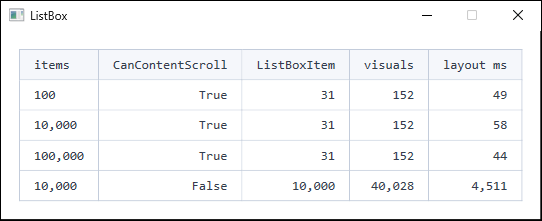
ScrollViewer.CanContentScroll values, taking the minimum of five runs. The three True rows show that a thousandfold increase in item count changes neither the container count, the visual count, nor the layout time. With False, containers are built for every item and layout time grows by two orders of magnitude. Elapsed time depends on the execution environment, so read the values as ratios rather than absolute numbers.While CanContentScroll stays True, raising the item count a thousandfold from 100 to 100,000 leaves realized ListBoxItem containers at 31 and the total visual count at 152.
Cost being independent of item count is precisely what virtualization buys.
With False at 10,000 items, realized containers rise from 31 to 10,000 and the total visual count from 152 to 40,028.
The difference in layout time reaches two orders of magnitude.
Setting CanContentScroll="False" in pursuit of smooth pixel-based scrolling sacrifices virtualization and becomes impractical at large item counts.
VirtualizingPanel.ScrollUnit="Pixel" provides pixel-based scrolling while keeping virtualization intact.
Notes and Limitations
1. Do Not TwoWay-Bind SelectedItems Directly
SelectedItems is a collection, but WPF standard controls do not support binding it two-way (it is a read-only collection rather than a dependency property).
For multiple selection in MVVM, pairing the IsSelected pattern with SelectionChanged is the practical choice for both implementation and maintenance.
2. Derive the Selected Set from the Data
ListBox.SelectedItems does reflect unrealized items for selections made through UI interaction.
Changes made to IsSelected on the ViewModel side, by contrast, do not appear in SelectedItems until that item’s container is realized.
The two do not always agree, so consolidate the selected set that application logic consumes onto the data side (IsSelected).
3. Avoid Container-Dependent Logic
Relying on ItemContainerGenerator.ContainerFromIndex or visual tree traversal exposes code to virtualization and container recycling.
Code that enumerates containers to aggregate selection misses off-screen items.
The same constraint applies to TreeView for hierarchical data (Selecting and Expanding a WPF TreeView Node from Code, and Why SelectedItem Is Read-Only).
4. Do Not Stop at the ItemContainerStyle Binding
This is the most important caveat in this article.
The ItemContainerStyle binding exists only on realized containers.
Allowing Ctrl + A or wide Shift selections without pairing it with SelectionChanged means scrolling will reduce the selection.
5. Small Lists Are Fine with Plain SelectedItems
At a scale where every container is realized — a few dozen items — none of these asymmetries surface.
Reading ListBox.SelectedItems directly is sufficient.
The configuration in this article becomes necessary only at item counts where virtualization actually engages.
6. ItemTemplate Contents Affect Rendering Cost
Even with virtualization enabled, the templates for the 31 realized containers are constructed repeatedly.
A heavy ItemTemplate affects perceived speed as containers are regenerated during scrolling.
Control choice inside templates is covered in Why WPF Slows Down with Many Labels and When to Switch to TextBlock.
Summary
With virtualization enabled on a WPF ListBox, managing selection state on the container makes SelectedItems appear to vanish after scrolling.
The remedy is to hold selection state on the data side and, critically, to make that synchronization work in both directions.
- Give each item ViewModel an
IsSelectedproperty - TwoWay-bind
ListBoxItem.IsSelectedtoIsSelected(data → UI) - Write
e.AddedItems/e.RemovedItemsfromSelectionChangedback to the data (UI → data) - Have application logic read the data-side
IsSelectedrather thanSelectedItems - Keep
SelectionMode="Extended"and rely on standard Shift / Ctrl selection - Keep
CanContentScroll="True"to preserve virtualization, and useVirtualizingPanel.ScrollUnit="Pixel"when pixel-based scrolling is required
The binding alone, or SelectionChanged alone, covers only one direction.
For multiple selection over lists of thousands to tens of thousands of items, combine both.
For small lists with few selections and no need for virtualization, using the standard SelectedItems directly is simpler.