Overview
A rebuild fails because the output file is locked by a debug session that was never stopped.
Task Manager shows the application still listed as a running process, with no window attached to it.
This is a routine occurrence in WPF development.
The symptom does not have a single cause.
WPF shutdown passes through two distinct gates — the application shutting down and the process exiting — and the cause and the fix differ completely depending on which gate stalled.
Cases where changing ShutdownMode has no effect, or where the process survives an explicit Application.Current.Shutdown() call, usually come from misidentifying the gate.
This article establishes a single test that separates the two gates, and reports process lifetimes measured for representative configurations.
Every value quoted here was obtained by running the code in the environment described below.
Prerequisites / Environment
- Framework: .NET 6 or later / WPF (all measurements taken on .NET 10 / Windows 11)
- Language: C# (all code shown uses syntax valid from C# 7.0 onward)
- Target features:
Application.ShutdownMode,Application.Windows,System.Threading.Thread,Dispatcher - Architecture: standalone desktop application (identical for MVVM and code-behind)
- Diagnostic tool:
dotnet-stack, installed separately withdotnet tool install --global dotnet-stack - Verification environment: .NET 10 / Windows 11
- Measurement method: a test application with an explicit
Maincloses its window automatically after a fixed delay and records the process lifetime and the timestamp of each event to a file. The measurement is implemented as atools/screenshot-capturescene, so the figure is re-measured every time it is captured
The code below is reduced to the parts relevant to the topic.
Trace lives in System.Diagnostics; Thread, ManualResetEventSlim and ApartmentState in System.Threading; Application, Window and ExitEventArgs in System.Windows; and Dispatcher in System.Windows.Threading.
Problem
Closing the window succeeds and the window disappears from the screen.
The process, however, remains, and surfaces in one of the following ways.
- The Visual Studio debug session never ends, and the next build fails on a locked output file.
- Task Manager keeps an entry under the Processes tab with no window attached.
- Restarting the application fails because a single-instance check detects the previous process.
What makes this confusing is that the symptom presents two entirely different states with the same appearance.
In one, the WPF application itself is still alive; in the other, WPF shut down correctly and only the operating-system process survives.
The Application.Exit event is never raised in the first state, and is raised normally in the second.
Changing ShutdownMode without distinguishing the two leaves the second state untouched.
Two Gates
Two gates stand in series between closing a window and the process disappearing.
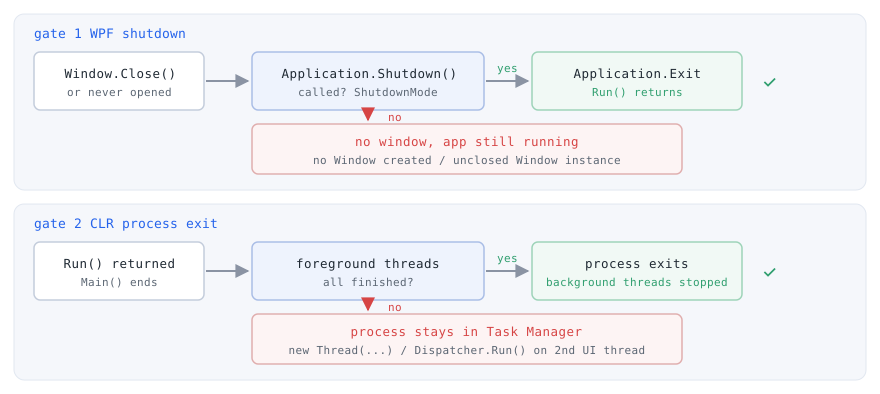
Gate 1: WPF application shutdown
WPF ends an application when Application.Shutdown is called.
ShutdownMode determines the condition under which that Shutdown call happens implicitly.
Under the default OnLastWindowClose, Shutdown is called implicitly when the last window closes (Application.ShutdownMode property).
Two things are at work in that condition.
A window closing is the trigger, and no window remaining at that moment is the qualifying condition.
The missing trigger is easy to overlook: calling Application.Run() without ever creating a window leaves Application.Windows empty while no close event is ever raised, and the application does not shut down under OnLastWindowClose (confirmed by measurement).
On the qualifying side, the windows that count are not limited to the ones drawn on screen.
A Window reference is added to Application.Windows as soon as the instance is created on the UI thread, whether or not it is ever visible.
It is removed after the Closing event has been handled and before the Closed event is raised (Application.Windows property).
As a result, a single Window that was instantiated but never closed keeps Application.Windows non-empty when the visible window closes, and the implicit Shutdown never happens.
This is where the state of an application that keeps running with nothing on screen originates.
Independently of ShutdownMode, Shutdown is also called when the user ends the Windows session by logging off, shutting down or restarting, provided SessionEnding is either unhandled or handled without cancellation (Application.Shutdown method).
Gate 2: process exit
Passing gate 1 raises Application.Exit and returns from Application.Run.
Run returning is not the same as Main ending.
Any cleanup written after Run continues on the main foreground thread, and the process does not terminate while it runs.
Even once Main ends, the process does not necessarily terminate at that point.
Forced termination and unhandled exceptions aside, a managed process terminates when all foreground threads have stopped.
A background thread does not keep the managed execution environment running, and the runtime stops any remaining background threads once the foreground threads are gone (Foreground and background threads).
The distinction comes down to how the thread was created.
- A thread created with
new Thread(...)is a foreground thread by default. - Thread pool threads are background threads.
Work passed toTask.Run,System.Threading.Timercallbacks, andSystem.Timers.Timercallbacks with noSynchronizingObjectset all run on them.
Even when the cause appears to be asynchronous work that was never stopped, work passed to Task.Run cannot hold the process open.
What holds it open is a thread created with new Thread(...) whose IsBackground was left at its default.
A second UI thread is the case where both factors combine.
new Thread(...) produces a foreground thread, and the Dispatcher.Run() called on it does not return until that dispatcher is shut down.
On top of that, a Window created on a worker thread is not added to Application.Windows, so gate 1 is passed without resistance.
The outcome is an application that raises Application.Exit correctly while the process stays alive.
Measured progress through the gates
Only the configuration was varied across runs of the same test application, while Application.Exit, the return from Application.Run, and process termination were measured.
Configurations that create a window close one visible window automatically about two seconds after startup, leaving any never-closed instance in place.
Where a background workload is present, it starts immediately and sleeps for six seconds.
| Configuration | Application.Exit |
Run() returns |
Process termination |
|---|---|---|---|
| Visible window only (control) | Raised | Returns | Immediately after the window closes |
Run() called without ever creating a window |
Never raised | Does not return | Never terminates |
One Window instantiated but never closed |
Never raised | Does not return | Never terminates |
new Thread(...) left at its default |
Raised | Returns | Stays alive until the remaining sleep elapses |
Same, plus IsBackground = true |
Raised | Returns | Immediately (the sleep is cut short) |
Task.Run(...) |
Raised | Returns | Immediately (the work is cut short) |
Dispatcher.Run() on a second UI thread |
Raised | Returns | Never terminates |
Same, plus InvokeShutdown() from Exit |
Raised | Returns | Immediately |
The measured values are shown below.
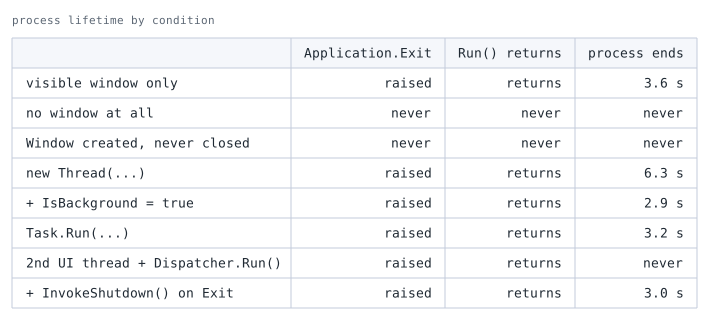
process ends is the measured time from process start to exit; never means the process was still alive after nine seconds. The window closes automatically two seconds after start, and background work is represented by a six-second sleep. Elapsed time depends on the execution environment, so read the values as differences between configurations rather than absolute numbers.The six-second sleep used for measurement stands in for the work that causes the real failure: a loop that was never stopped.
The new Thread(...) row therefore terminates after a few seconds, whereas a loop that never ends keeps the process alive indefinitely.
The IsBackground = true row shows the same thread no longer holding the process open.
That row also confirms that the remedy described below actually works.
The table shows that the presence or absence of Application.Exit is directly usable as the gate test.
The rows that read “Never raised” are the one that never creates a window and the one that leaves an unclosed window, and those are the configurations stalled at gate 1.
The other two rows, where process exit is delayed or blocked — new Thread(...) and the second UI thread — both raise Application.Exit normally, and no value of ShutdownMode resolves either of them.
The Task.Run(...) row shows that this construct can be excluded from the list of suspects.
The process terminates immediately even with a six-second sleep outstanding, meaning the work is abandoned rather than awaited.
Narrowing It Down
The first step is not a fix but a test.
As the measurements above show, whether Application.Exit is raised is by itself enough to identify the stalled gate, as long as the UI thread is responsive.
The case of a blocked UI thread is covered under Notes.
- Not raised — gate 1.
The cause is a window left inApplication.Windows, or theShutdownModesetting. - Raised but the process survives — gate 2.
The cause is a foreground thread that has not finished.
For gate 1, locate the surviving window through Application.Windows and either close it or restructure the code so it is never created.
For designs that intentionally have no window, such as a tray-resident application, set ShutdownMode to OnExplicitShutdown and call Shutdown() explicitly from the exit command.
For gate 2, identify the surviving thread and set IsBackground to true if it performs discardable monitoring or polling.
If the work must complete, leave it on a foreground thread, signal cancellation and wait with Join.
That shape waits for the work only as long as the thread reliably honours the cancellation signal.
When it does not, the process stays alive for as long as that foreground thread does.
IsBackground = true gives up that premise: the thread stops holding process exit open, at the cost of any completion guarantee (the details are under Alternatives / Comparison).
If a second UI thread is involved, stop its Dispatcher with InvokeShutdown().
Diagnosing and Fixing in Code
The diagnostic log belongs in an override of OnExit on the App class.
When the stall is at gate 1, this method is never called.
When it is called, gate 1 was passed and the remaining cause is a thread.
public partial class App : Application
{
    protected override void OnExit(ExitEventArgs e)
    {
        // Reaching this point means gate 1 was passed.
        // If the process still survives, the cause is a foreground thread.
        Trace.WriteLine($"OnExit: code={e.ApplicationExitCode}");
        base.OnExit(e);
    }
}
Trace.WriteLine is used rather than Debug.WriteLine so that the record survives in a Release build.
Calls to the Debug class are removed at compile time in configurations that do not define the DEBUG constant.
Calls to the Trace class depend on the TRACE constant in the same way, but with default settings an SDK-style C# project has the SDK append TRACE to DefineConstants regardless of configuration, so it is defined in Release builds as well (Trace class).
The destination is the Visual Studio Output window whenever a debugger is attached.
To record it to a file from a distributed build running without a debugger, add a listener such as TextWriterTraceListener to Trace.Listeners.
Using that window for diagnosis is covered in Reading WPF Binding Errors and Diagnosing Them with the Output Window.
By the time OnExit runs, WPF has already closed the remaining windows, so printing Windows.Count there always yields zero.
The place to inspect surviving windows is immediately after the exit action, not in OnExit.
Invisible windows are included in the enumeration, so printing IsVisible alongside identifies the offending instance.
private static void DumpOpenWindows()
{
    foreach (Window window in Application.Current.Windows)
    {
        Trace.WriteLine($"{window.GetType().Name} visible={window.IsVisible} title={window.Title}");
    }
}
Several constraints apply to this enumeration, all covered under Notes.
When the stall is at gate 2, dotnet-stack identifies the surviving thread.
It prints the managed stack of every thread in the process, which shows directly where execution is parked.
dotnet-stack ps
dotnet-stack report --process-id 12345
The same information is available under Debug > Windows > Threads while debugging in Visual Studio.
Neither route reports whether a thread is a foreground or a background thread.
After locating where execution is parked, inspect the creation site of that thread to determine its IsBackground setting.
Once the thread is identified, rewrite it according to its purpose.
Work that may be cut short, such as monitoring, only needs IsBackground set to true.
Because MonitorLoop takes no parameters, the Thread constructor resolves to ThreadStart.
private void StartMonitor()
{
    var monitor = new Thread(MonitorLoop) { IsBackground = true };
    monitor.Start();
}

private void MonitorLoop()
{
    // The body of the monitoring loop is omitted.
}
A thread marked with IsBackground = true is stopped at process exit without an exception being thrown in it.
Placing work that must complete, such as flushing a partially written file, on such a thread gives no completion guarantee.
A second UI thread requires Dispatcher.Run() to be ended explicitly.
The following method, intended to live on the App class, calls InvokeShutdown() when the application shuts down.
private void StartSubUiThread()
{
    Dispatcher subDispatcher = null;

    var ready = new ManualResetEventSlim();

    var thread = new Thread(() =>
    {
        subDispatcher = Dispatcher.CurrentDispatcher;
        ready.Set();
        try
        {
            // In practice the windows of this UI thread are created here.
            Dispatcher.Run();
        }
        finally
        {
            // By the time Dispatcher.Run() returns, the waiting side has left
            // Wait() and this thread has left Set(). Dispose is not thread-safe,
            // so this is the point where it cannot race.
            ready.Dispose();
        }
    });
    thread.SetApartmentState(ApartmentState.STA);
    thread.Start();
    ready.Wait();

    Exit += (sender, e) => subDispatcher.InvokeShutdown();
}
ready.Wait() is present to guarantee that the assignment to subDispatcher completes before it is read.
InvokeShutdown() ends that dispatcher’s message loop, which returns from Dispatcher.Run().
Even if the thread remains a foreground thread, leaving Run() ends the thread and gate 2 is passed.
In projects with nullable reference types enabled, declare the variable as Dispatcher? subDispatcher = null; and write the handler as subDispatcher?.InvokeShutdown();.
Changing only the declaration leaves a possible-null-dereference warning on the handler.
Choosing the Fix per Gate
Choosing a ShutdownMode
| Value | Condition for the implicit Shutdown() |
Best suited for | Caveat |
|---|---|---|---|
OnLastWindowClose (default) |
The last window closes | Ordinary windowed applications | A single invisible window instance left behind prevents shutdown |
OnMainWindowClose |
MainWindow closes |
Designs with a clear primary window that should exit while secondary windows are open | MainWindow becomes the first window created; a splash design requires assigning it explicitly |
OnExplicitShutdown |
Not triggered by opening or closing windows | Tray-resident or single-instance designs where window presence does not track application lifetime | Every exit path becomes responsible for calling Shutdown() |
Under every value, ending the Windows session still reaches Shutdown through SessionEnding.
That route works automatically even under OnExplicitShutdown.
Handling a surviving thread
| Approach | Effect | Best suited for | Constraint |
|---|---|---|---|
IsBackground = true |
The thread stops holding process exit open, and the runtime stops it at exit | Monitoring or polling that may be cut short | No completion guarantee; cleanup work may not run. The effect is limited to the thread it is set on |
Cancellation signal plus Join, kept in the foreground |
Waits for the thread to finish before proceeding | Work that must complete, such as saving or flushing | A thread that ignores cancellation keeps the process alive for as long as it runs. A Join timeout only makes the waiting side give up while the thread keeps running |
Dispatcher.InvokeShutdown() |
Ends the message loop and returns from Dispatcher.Run() |
Second and subsequent UI threads | Operations already queued on that dispatcher are aborted |
Environment.Exit |
Terminates the process immediately | A stopgap until the cause is identified | Application.Exit is not raised and persistence logic placed there does not run |
The first two entries trade off against each other: waiting for the work to finish against the thread no longer holding process exit open.
Cancellation plus Join waits for the work on the premise that the thread honours cancellation, and leaves the process alive for as long as an unresponsive thread keeps running.
What Join guarantees, however, is only that the target thread terminated — not that the save or flush succeeded, and not that the worker ran without throwing.
Record the outcome on the worker side and inspect it after Join returns.
IsBackground = true stops that thread from holding exit open and gives up any wait for the work.
Its effect is limited to the thread it is set on, so the process still survives if another foreground thread remains.
Adding a timeout to Join does not change the relationship either.
The timeout returns the waiting side only; the target thread is not stopped and keeps running, so a foreground thread keeps the process alive.
For work that must complete, the real fix is an implementation that reliably honours cancellation; IsBackground = true is not a substitute for it.
Notes
- Treat
Environment.Exitas a last resort.
It terminates the process reliably, butApplication.Exitis not raised and any persistence logic placed there does not run.
When it is used as a stopgap until the real cause is found, record that intent in the code. - Call
base.OnExit(e)when overridingOnExit.
The base implementation raises theExitevent, so omitting it prevents registered event handlers from running. - The
Application.Exittest narrows the cause only while the UI thread is responsive.
A UI thread blocked by a deadlock or a long synchronous wait also fails to reachOnExit.
The stall is still at gate 1, but the cause is neither a leftover window norShutdownMode, so confirm where the UI thread is parked withdotnet-stack reportfirst. - A modal dialog is not a blocked UI thread.
WhileWindow.ShowDialog()is displayed, a nestedDispatcherframe keeps pumping the queue.MessageBox.Showcalls the Win32MessageBoxfunction instead, whose own modal loop dispatches the thread’s messages without a nestedDispatcherframe. Either way the UI thread continues to process messages.
A dialog opened withWindow.ShowDialog()is a window left inApplication.Windows, which the ordinary leftover-window analysis already covers.
MessageBoxandCommonDialogderivatives such asOpenFileDialogdo not derive fromWindow, however, and never appear in that enumeration. OnMainWindowClosekeys off the first window created.
MainWindowis set automatically to the firstWindowinstantiated (How to get or set the main application window).
In a design that creates a splash window first, the splash becomesMainWindow.
AssignMainWindowexplicitly when using this mode.OnExplicitShutdownconverts a missed exit path directly into a surviving process.
The setting is required for tray-resident applications, but a single exit path that forgets to callShutdown()leaves the application running with no window.
A different pitfall in tray icon implementations is covered in Fixing a WPF Tray ContextMenu That Does Not Close on Focus Loss.IsBackground = trueis a declaration that the work may be abandoned.
The runtime stops such threads at process exit without an exception.
Log flushing or temporary-file cleanup assigned to such a thread may never run.- Windows created on a worker thread do not appear in
Application.Windows.
Investigating gate 1 through that enumeration alone misses windows owned by a second UI thread. -
Application.Windowsis readable only from the thread that created theApplicationobject.
Reading it from another thread for diagnostics requiresDispatcher.Invoke.A different symptom rooted in thread affinity is covered in Fixing the Cross-Thread Exception When Updating an ObservableCollection in WPF.
Summary
For a process that survives its window, first check whether Application.Exit (OnExit) is raised and settle which of the two gates has stalled.
Until that is decided, both ShutdownMode changes and thread reviews are guesswork.
If OnExit is never called, the stall is at gate 1.
Enumerate Application.Windows and look for a window that was instantiated but never closed.
When window presence does not track application lifetime, move to ShutdownMode set to OnExplicitShutdown with Shutdown() called from the exit paths.
If OnExit is called and the process still survives, the stall is at gate 2.
Identify the surviving thread with dotnet-stack report or the debugger’s Threads window, and replace it with IsBackground = true for work that may be cut short, cancellation plus Join for work that must complete, or Dispatcher.InvokeShutdown() for a second UI thread.
Work passed to Task.Run does not obstruct this gate and can be excluded from the investigation.