Overview
By default, modifying an ObservableCollection<T> bound to an ItemsControl from a thread other than the UI thread throws a NotSupportedException (registering BindingOperations.EnableCollectionSynchronization, described below, lifts this restriction).
The message reads along the lines of “This type of CollectionView does not support changes to its SourceCollection from a thread different from the Dispatcher thread” (the exact wording varies by .NET version and locale).
This article explains that the exception comes from the thread affinity of the CollectionView rather than the collection itself, and it organizes the fixes based on BindingOperations.EnableCollectionSynchronization and the Dispatcher, along with the criteria for choosing between them.
Prerequisites / Environment
- Framework: .NET 6 or later / WPF (the same applies to .NET Framework 4.5 and later)
- Language: C# / XAML (the code samples use a target-typed
new(= new();, C# 9 or later); on C# 8 or earlier, use an explicit type such as= new ObservableCollection<string>();) - Target controls:
ObservableCollection<T>,ItemsControl(includingListBox,DataGrid,ListView),CollectionView - Architecture: applicable to both MVVM and code-behind
- Assumption: the collection is updated on a background thread (
Task.Runor a worker thread) - Verification environment: .NET 10 / Windows 11 (the measured results in this article were obtained here)
Problem
Modifying a bound collection directly from a background thread raises an exception.
The following example adds items to an ObservableCollection<T> from work started with Task.Run.
File.ReadLines (from System.IO) is used as a stand-in data source; it enumerates a file’s lines lazily.
The snippets in this article are members of a ViewModel class and assume the namespaces System.Collections.ObjectModel, System.IO, System.Threading.Tasks, System.Windows, and System.Windows.Data.
public ObservableCollection<string> Items { get; } = new();

private async Task LoadAsync(string path)
{
    await Task.Run(() =>
    {
        foreach (var line in File.ReadLines(path))
        {
            // Add from a non-UI thread throws NotSupportedException
            Items.Add(line);
        }
    });
}
When Items is bound to ItemsControl.ItemsSource, the Add call reaches the CollectionView through a CollectionChanged notification.
Because that notification arrives from a non-UI thread, the CollectionView throws the exception.
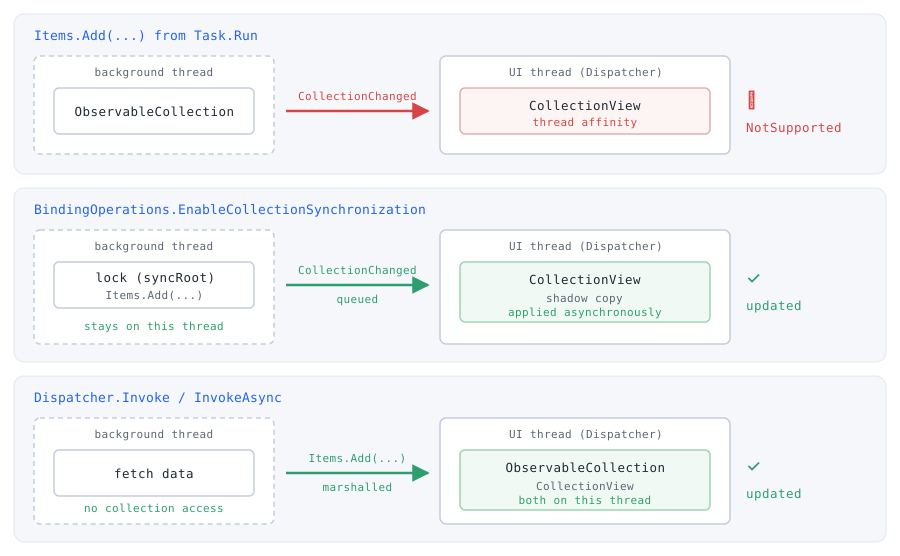
CollectionView. The two fixes work differently. EnableCollectionSynchronization makes the CollectionView participate in the same synchronization mechanism and applies queued notifications asynchronously to the shadow copy it keeps for the UI thread — the mutation itself may stay on the background thread. The Dispatcher instead marshals the collection operation onto the UI thread.Cause / Background
ObservableCollection<T> itself is not thread-safe, but that is a separate matter: the direct cause of this NotSupportedException is the CollectionView that WPF routes collection access through when displaying it.
The official documentation states that both the ItemsControl and the CollectionView have affinity to the thread on which the ItemsControl was created, that using them on a different thread is forbidden, and that doing so throws an exception.
In effect, this restriction extends to the bound collection as well.
Most WPF objects derive from DispatcherObject and carry thread affinity to their creating thread, which is normally the UI thread.
The CollectionView also derives from DispatcherObject and, by default, does not allow its bound collection to be changed from another thread.
As a result, when a CollectionChanged notification arrives from a non-UI thread, the CollectionView throws NotSupportedException because it does not permit cross-thread changes.
The root of the problem is therefore not that the collection was touched on another thread, but that the UI-thread-owned CollectionView cannot receive a change notification originating from a different thread.
Measured: the Outcome Depends on Whether the Collection Is Bound
The distinction is visible by performing the same operation on an ObservableCollection<T> that is not bound to anything.
The table below records the result of calling Add from a background thread, varying whether the collection is bound and which countermeasure is applied.
| collection | countermeasure | result | Count / Items.Count / view notifications |
|---|---|---|---|
| ObservableCollection alone | - | no exception | 1 |
| bound to ItemsControl | - | NotSupportedException | 1 / 1 / 0 |
| bound to ItemsControl | Dispatcher.Invoke | no exception | 1 / 1 / 1 |
| bound to ItemsControl | EnableCollectionSynchronization | no exception | 1 / 1 / 1 |
Measured on .NET 10 / Windows 11 by calling ObservableCollection<string>.Add from inside Task.Run. The first row is a collection bound to nothing; the remaining rows are bound to ItemsControl.ItemsSource and displayed in a window. The last column gives the collection’s Count after the Add, the ItemsControl’s Items.Count, and the number of CollectionChanged notifications the view (Items) received.
An unbound collection can be modified from a background thread without an exception.
If ObservableCollection<T> itself carried thread affinity, that row would fail as well.
The exception appears only once the collection is bound to ItemsControl.ItemsSource and a CollectionView sits in between, which confirms that the constraint belongs to the CollectionView.
Note that the absence of an exception on the unbound row does not mean the collection is thread-safe.
ObservableCollection<T> provides no protection against concurrent access, so competing updates still corrupt it in other ways.
What the row establishes is narrower: the source of NotSupportedException is the binding target.
The last column gives the collection’s count after the Add, the ItemsControl’s Items.Count, and the number of change notifications the view received.
With a single Add, the two counts were 1 in every row, but a matching Items.Count does not show that the change reached the view: without synchronization the view can read the count from the source list. In the row that threw NotSupportedException, the view received no notification; with Dispatcher.Invoke and with EnableCollectionSynchronization, it received one.
The EnableCollectionSynchronization row was measured with the application wrapping the Add in the same lock it registered. Registering alone does not put the Add inside the lock; wrapping it in the same lock is the application’s responsibility.
Two Core Approaches
There are two approaches.
- Marshal to the UI thread with the
Dispatcher— run the collection mutation itself on the UI thread. This is simple and easy to apply to existing code. - Use
BindingOperations.EnableCollectionSynchronization— provide a lock in the application and register it with WPF, which allows direct modification from a background thread. Change notifications are applied to the view asynchronously on the UI thread, so a change does not wait for them to be applied; access to the collection is still serialized by the registered lock, so the background thread can wait for the lock while the UI thread holds it.
The former moves changes onto the UI thread; the latter lets WPF safely take in changes made on another thread.
Marshal to the UI thread with the Dispatcher
Move the collection mutation to the UI thread with Dispatcher.Invoke (or InvokeAsync).
Using Application.Current.Dispatcher obtains the UI thread Dispatcher even from a view model.
This assumes a single UI thread; in an application with multiple UI threads, Application.Current.Dispatcher refers to the main thread and may not own the bound CollectionView, so capture the Dispatcher associated with the bound ItemsControl (or its CollectionView) instead.
private async Task LoadAsync(string path)
{
    var dispatcher = Application.Current.Dispatcher;
    await Task.Run(() =>
    {
        foreach (var line in File.ReadLines(path))
        {
            // Add runs on the UI thread, so no exception occurs
            dispatcher.Invoke(() => Items.Add(line));
        }
    });
}
Because the mutation runs on the UI thread, no affinity violation occurs in the CollectionView.
Invoking per item causes many round-trips to the UI thread, however, so processing several items within a single Invoke is preferable when items can be added in batches.
Share a lock with EnableCollectionSynchronization
Provide a lock object and register it with WPF by calling EnableCollectionSynchronization on the UI thread.
From then on, all application-side modifications must be protected by that same lock.
private readonly object _lock = new();
public ObservableCollection<string> Items { get; } = new();

public ViewModel()
{
    // Call on the UI thread and before using the collection on another thread
    BindingOperations.EnableCollectionSynchronization(Items, _lock);
}

private async Task LoadAsync(string path)
{
    await Task.Run(() =>
    {
        foreach (var line in File.ReadLines(path))
        {
            lock (_lock)
            {
                Items.Add(line);
            }
        }
    });
}
Once EnableCollectionSynchronization is called, the CollectionView accesses the collection using the registered lock and maintains a “shadow copy” for the UI thread.
Change notifications are queued as they arrive and applied when the UI thread has the opportunity to do so.
This allows Add to be called directly from a background thread.
As required by the documentation, the call must occur on the UI thread and before the collection is used on another thread (or attached to the control), whichever is later.
How to Choose
The two core approaches above, plus a variant and a way to avoid the problem entirely, make four in all. Which one applies is settled by the volume and frequency of the updates.
Occasional updates in small numbers call for Dispatcher.
It needs no extra setup and touches little of the existing code. The cost of a per-item round-trip to the UI thread does not matter at low counts.
Heavy, frequent updates from another thread call for EnableCollectionSynchronization.
A per-item synchronous Invoke waits for the UI thread to run each item. Sharing a lock allows direct modification from the background and removes those round-trips, although the background thread still waits whenever the UI thread holds the lock.
Adding 5,000 items one at a time, the loop took 992 ms with Dispatcher.Invoke.
With EnableCollectionSynchronization the loop finished in 6 ms, and the view had received notifications for all items after 64 ms.
When control returned to the UI thread after the loop, though, the view had received only 746 notifications; the rest were applied later on the UI thread. That count was read after the await, not at the instant the loop ended, and the UI thread can process notifications in between. Applying the changes remains work for the UI thread.
| countermeasure | background loop ms | view notifications after await | until all notified ms |
|---|---|---|---|
| Dispatcher.Invoke per item | 992 | 5,000 | 994 |
| EnableCollectionSynchronization + lock | 6 | 746 | 64 |
Measured on .NET 10 / Windows 11 by adding 5,000 items one at a time from inside Task.Run to a collection bound to a virtualized ListBox. The third column is the number of CollectionChanged notifications the view had received when control returned to the UI thread after the loop, and the last column is the time from just before Task.Run was called (including the wait for the task to start) until the view had received 5,000.
A custom synchronization mechanism such as a semaphore calls for the callback overload.
It lets WPF wait on something other than a lock. This is the most complex to implement.
Work that can apply all its changes at once calls for batching on the UI thread.
This avoids producing a cross-thread modification in the first place. The benefit of doing the work in the background shrinks, but no synchronization design is needed.
Comparing the Approaches
| Approach | Pros | Cons | Best suited for |
|---|---|---|---|
Dispatcher.Invoke / InvokeAsync |
No extra setup; simple and easy to retrofit | Per-item round-trips can strain the UI thread | Low update frequency and volume; occasional add or remove |
EnableCollectionSynchronization (simple lock) |
Direct modification from the background; notifications are applied on the UI thread asynchronously (access still waits for the shared lock) | Requires consistent locking; slightly more design effort | High-volume, high-frequency updates on another thread |
EnableCollectionSynchronization (callback) |
Allows non-lock mechanisms such as semaphores | Most complex to implement | A design that already has a custom synchronization mechanism |
| Batch on the UI thread | Avoids the threading issue entirely | Loses the benefit of background work | Work that can apply all changes at once after gathering |
Notes
- Protect all application access with the same lock: the lock passed to
EnableCollectionSynchronizationmust guard every read and write in the application, not only WPF’s access. Leaving any path unlocked can race with theCollectionView. - Atomicity of change and notification: a change (such as
Add) and itsCollectionChangednotification must be atomic.ObservableCollection<T>guarantees this as long as all changes are protected by the same synchronization. - Timing of registration and disabling: call both
EnableCollectionSynchronizationandDisableCollectionSynchronizationon the UI thread. To use the same collection on multiple UI threads, register it separately on each. - UI elements remain UI-thread-only: this fix relaxes only access to the bound collection. Manipulating a
DependencyObject, such as a control, directly from another thread remains disallowed. - A worker started with
new Threadkeeps the process alive: unlikeTask.Run, it is a foreground thread by default, so a worker left updating the collection prevents the process from exiting even after the window closes. Diagnosis and remedies are covered in Diagnosing a WPF Process That Stays Alive After the Window Closes — ShutdownMode and Foreground Threads.
Summary
The exception raised when a bound ObservableCollection<T> is modified from another thread comes from the thread affinity of the CollectionView, not the collection.
The deciding factor is the volume and frequency of the updates. Marshal to the UI thread with Dispatcher for occasional ones; share a lock with EnableCollectionSynchronization for heavy, frequent ones.
In every case, design with the understanding that UI elements themselves remain UI-thread-only, and that only collection access is relaxed.
- WPF ComboBox ItemsSource Binding Patterns and Selected Value Retrieval
- How to Prevent SelectedItems from Appearing Lost in a Virtualized WPF ListBox
- Releasing the Image File Locked by BitmapImage in WPF with BitmapCacheOption.OnLoad
- WPF Binding Without INotifyPropertyChanged: Why the Source Stays in Memory