Overview
This article addresses an issue observed while developing TreePaste where a tray icon right-click menu remained visible until a menu item was selected.
The resolution combines ContextMenu.StaysOpen = false with Win32Api.SetForegroundWindow() immediately before opening the menu.
Prerequisites / Environment
- Framework / Language: .NET 10 / C# 14
- UI stack: WPF with
System.Windows.Forms.NotifyIcon - Architecture: code-behind
- Target project: TreePaste
- Verification environment: .NET 10 / Windows 11
On the Basis for This Article
The central claim of this article — that a ContextMenu opened from the tray does not close with StaysOpen = false alone and does close once SetForegroundWindow is paired with it — comes from an issue encountered while developing TreePaste and resolved by switching to this configuration.
The behavior is difficult to reproduce under automation.
It requires real mouse input on the tray icon together with a foreground transition between processes.
Indeed, the foreground restriction described below prevented a process that had not just received user input from raising a window at all.
That said, the following three points were verified by running them in the environment above.
| What was verified | Result |
|---|---|
Default value of ContextMenu.StaysOpen |
true (it must be set to false explicitly) |
SetForegroundWindow when the window is already in the foreground |
Returns true; stays in the foreground |
SetForegroundWindow when another window holds the foreground |
Returns false; the foreground does not change |
Whether the ContextMenu itself closes has not been confirmed under automation, for the reason given above.
Problem
When the tray icon was right-clicked, a WPF ContextMenu opened as expected.
However, the menu did not close when focus moved away, and stayed visible until a ContextMenuItem was clicked.
This behavior degraded the expected tray-menu interaction model.
Cause / Background
A WPF ContextMenu close behavior depends on both menu configuration and window activation context.
Tray-origin interactions do not always behave like standard in-window right-click flows, so focus-transition signals can become inconsistent.
In that state, opening a menu without foreground alignment can leave close-on-focus-loss behavior unreliable.
Solution
The adopted solution uses two coordinated steps.
- Set
ContextMenu.StaysOpen = false. - Call
Win32Api.SetForegroundWindow()right beforeContextMenu.IsOpen = true.
This combination aligns activation state at menu-open time and restores expected close behavior when focus moves elsewhere.
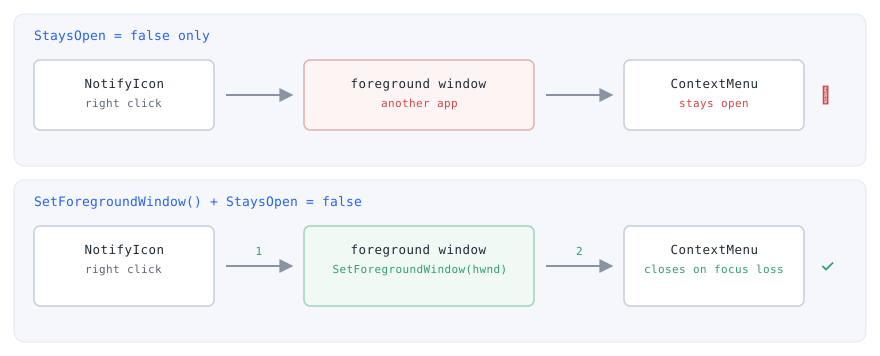
StaysOpen: the menu opens while another application is still in the foreground, so the focus-loss check never fires. The bottom lane calls SetForegroundWindow before showing the menu. Windows restricts which processes may set the foreground window, so the call is not guaranteed to succeed (with the P/Invoke declaration shown above it returns false on failure); A click on the tray icon satisfies one of the conditions under which the foreground may change, but Windows can still refuse and return false. TreePaste confirmed the switch takes effect in this configuration; even so, do not assume success — check the return value and handle the failing path.Implementation
First, call SetForegroundWindow in the tray right-click handler before opening the menu.
The following snippet is based on the implementation used in TreePaste MainWindow.xaml.cs.
_notifyIcon.MouseClick += (_, e) =>
{
    if (e.Button == System.Windows.Forms.MouseButtons.Right)
    {
        Dispatcher.Invoke(() =>
        {
            var helper = new WindowInteropHelper(this);
            Win32Api.SetForegroundWindow(helper.Handle);
            _trayContextMenu.Placement = System.Windows.Controls.Primitives.PlacementMode.MousePoint;
            _trayContextMenu.IsOpen = true;
        });
    }
};
This execution order normalizes foreground state first, then opens the menu.
Opening with only IsOpen = true tends to be less stable for tray-origin focus transitions.
Next, configure the tray menu to close on outside interaction.
The following snippet is from TreePaste CreateTrayContextMenu().
return new System.Windows.Controls.ContextMenu
{
    Items = { showItem, githubItem, separator, exitItem },
    StaysOpen = false
};
The default value of ContextMenu.StaysOpen is true (verified by measurement), so it does not close on an outside click unless set to false explicitly.
StaysOpen = false is necessary but may be insufficient on its own in tray scenarios.
Using it together with foreground alignment provides stable behavior in practice.
SetForegroundWindow is defined in TreePaste Win32Api as follows.
[DllImport("user32.dll")]
public static extern bool SetForegroundWindow(IntPtr hWnd);
This P/Invoke bridge allows the WPF app to coordinate tray menu activation with Win32 window state.
Notes
SetForegroundWindowis still subject to Windows foreground restrictions and should not be treated as an unconditional override. In measurement, a process that had not just received user input could not raise another window: the call returnedfalseand the foreground did not change. A click on the tray icon satisfies one of the conditions for changing the foreground, but that does not guarantee success. Calls made from a timer or background work fail more readily. In every case, check the return value and treatfalseas “the menu may not close”.- For mixed
NotifyIcon+ WPFContextMenuimplementations, menu operations should remain on the UI thread viaDispatcher.Invoke. StaysOpen = falsealone may not fully resolve close behavior if the opening window context is not foreground-aligned.- Tray residency decouples window presence from application lifetime, so set
ShutdownModetoOnExplicitShutdownand callShutdown()from the exit menu, since forgetting that call leaves the process running with no window (diagnosis is covered in Diagnosing a WPF Process That Stays Alive After the Window Closes — ShutdownMode and Foreground Threads).
Alternatives / Comparison
| Approach | Benefits | Drawbacks | Best fit |
|---|---|---|---|
StaysOpen = false only |
Minimal implementation | Can still fail in tray-origin scenarios | Standard in-window context menus |
SetForegroundWindow only |
Improves activation context | Does not replace menu close policy | Cases where menu config is fixed |
| Use both (adopted) | Stabilizes both open-state and close-state behavior | Adds Win32 interop dependency | Tray context menus requiring consistent UX |
Summary
For the TreePaste tray menu issue, combining StaysOpen = false and SetForegroundWindow() resolved the persistent menu display problem.
The result is a context menu that opens in a foreground-aligned state and closes when focus moves away, matching standard user expectations.
For WPF tray menus, designing both menu policy and foreground transition together is the most reliable approach.