Overview
Adding FlowExceptionsToTaskScheduler to a command to keep an exception from an import button from terminating the application makes the failure go silent instead.
In the AsyncRelayCommand of CommunityToolkit.Mvvm (the Toolkit below), this single setting swaps where the exception goes.
By default, an exception from an async Task method marked with [RelayCommand] reaches Application.DispatcherUnhandledException.
With FlowExceptionsToTaskScheduler, after the first run it did not reach TaskScheduler.UnobservedTaskException, which the official documentation names as the destination, even after a GC.
Nothing appears on screen, and the button is clickable after the failure.
What decides where the exception goes is a single async void method that AsyncRelayCommand.Execute calls.
That path is followed in the Toolkit source, and the destination for each way of writing the command is compared by measurement.
The comparison also includes passing an async lambda to Prism 8’s DelegateCommand, and the article ends with an implementation that handles the exception inside the command.
Prerequisites / Environment
- Framework: .NET 6 or later / WPF
- Libraries: CommunityToolkit.Mvvm 8.4.0, Prism.Core 8.1.97 (the last Prism version released under the MIT license)
- Verified on: .NET 10 (10.0.13) / Windows 11
- Architecture: MVVM (the view works through bindings only and has no code-behind)
The measurements set e.Handled = true in the DispatcherUnhandledException handler so that the tool’s process keeps running.
That the application terminates when Handled is not set was not measured in this article.
.NET Framework and AsyncDelegateCommand, available in Prism 9 and later, were not measured either.
Symptom
The command that imports a file is written with the Toolkit source generator.
To reproduce a failed import, ReadImportFile always throws.
using CommunityToolkit.Mvvm.ComponentModel;
using CommunityToolkit.Mvvm.Input;

public sealed partial class ImportViewModel : ObservableObject
{
    [ObservableProperty]
    private string _errorMessage = "";

    [RelayCommand]
    private async Task ImportAsync()
    {
        await Task.Run(ReadImportFile);
    }

    private static void ReadImportFile() =>
        throw new InvalidOperationException("The import file was not found.");
}
[RelayCommand] generates an AsyncRelayCommand from a method that returns Task.
The command is named ImportCommand: the method name with Async removed and Command appended (RelayCommand attribute).
The view consists of a button and a TextBlock that shows the error message.
<StackPanel Margin="8" Width="360">
  <Button Content="Import" Command="{Binding ImportCommand}"
          HorizontalAlignment="Left" Padding="14,2" />
  <TextBlock Margin="0,6,0,0" Foreground="#D13438" Text="{Binding ErrorMessage}" />
</StackPanel>
Clicking the button delivers the exception from ReadImportFile to DispatcherUnhandledException.
According to the DispatcherUnhandledException reference, WPF by default notifies the user of an unhandled exception in a dialog box and shuts the application down, and processing continues when a handler sets Handled to true.
An example of the application terminating without Handled is measured in the “Click handler (Handled not set)” row of the table in Exceptions WPF’s DispatcherUnhandledException Never Sees — Where Thread, Task and async void Exceptions Go.
The RelayCommand attribute documentation introduces FlowExceptionsToTaskScheduler to change this default.
According to it, exceptions no longer crash the application, and they become available through ExecutionTask as well as bubbling up to TaskScheduler.UnobservedTaskException.
[RelayCommand(FlowExceptionsToTaskScheduler = true)]
private async Task ImportAsync()
{
    await Task.Run(ReadImportFile);
}
With this setting, clicking the button no longer raises DispatcherUnhandledException.
However, UnobservedTaskException is not raised either, nothing appears on screen, and the button is clickable after the failure.
What Happens Internally
Execute awaits the resulting Task in an async void method
The button calls the command’s ICommand.Execute.
In the AsyncRelayCommand source of Toolkit 8.4.0, Execute calls ExecuteAsync to get a Task and, unless FlowExceptionsToTaskScheduler is set, passes it to AwaitAndThrowIfFailed.
public void Execute(object? parameter)
{
    Task executionTask = ExecuteAsync(parameter);

    if ((this.options & AsyncRelayCommandOptions.FlowExceptionsToTaskScheduler) == 0)
    {
        AwaitAndThrowIfFailed(executionTask);
    }
}

internal static async void AwaitAndThrowIfFailed(Task executionTask)
{
    await executionTask;
}
The code above is an excerpt of the source with comments removed.
AwaitAndThrowIfFailed is async void, and the comment in the source says it is purposefully async void so that exceptions are rethrown in the original synchronization context, as with synchronous commands.
Exceptions thrown in an async void method propagate to the SynchronizationContext that was active when the method started.
Execute called from a button runs on the UI thread, so the exception is rethrown on the Dispatcher and reaches DispatcherUnhandledException (the “Exceptions from async void” section of the article above).
With FlowExceptionsToTaskScheduler, AwaitAndThrowIfFailed is not called.
An internal routine (MonitorTask) still waits for the Task in order to notify that ExecutionTask completed, but it waits in a way that does not check the result (GetAwaitableWithoutEndValidation), so the exception is not received.
The exception stays inside the failed Task, and that Task remains stored in the ExecutionTask property.
Prism 8 has no dedicated asynchronous command type such as AsyncDelegateCommand, and DelegateCommand takes an Action.
An async lambda passed there becomes async void, and the exception is rethrown on the Dispatcher along the same path as the Toolkit default.
ImportCommand = new DelegateCommand(async () => await Task.Run(ReadImportFile));
An async void lambda returns no Task, so nothing about the failure is left on the DelegateCommand side either.
Destination for each way of writing the command
For each way of writing the command, the destinations after one click and UnobservedTaskException after a second click followed by a GC were measured.
| how the command is written | DispatcherUnhandledException (calls) | UnobservedTaskException, 1 s without an explicit GC | UnobservedTaskException after GC | UnobservedTaskException after a 2nd click and GC | ImportCommand.ExecutionTask.Status | message on screen | button IsEnabled after the failure |
|---|---|---|---|---|---|---|---|
| Toolkit [RelayCommand] on async Task (default) | 1 | 0 | 0 | 0 | Faulted | (none) | True |
| Toolkit [RelayCommand(FlowExceptionsToTaskScheduler = true)] | 0 | 0 | 0 | 1 | Faulted | (none) | True |
| Prism DelegateCommand with an async lambda | 1 | 0 | 0 | 0 | - (no such property) | (none) | True |
| Toolkit default, try / catch around the await in ImportAsync | 0 | 0 | 0 | 0 | RanToCompletion | The import file was not found. | True |
| Toolkit default, another command awaits ImportCommand.ExecuteAsync in try / catch | 0 | 0 | 0 | 0 | Faulted | The import file was not found. | True |
On .NET 10.0.13 / Windows 11 with CommunityToolkit.Mvvm 8.4.0 / Prism.Core 8.1.97, the view from the “Symptom” section was shown (only in row 5 is the button bound to the calling command), and the button was clicked through UI Automation Invoke (Invoke calls ButtonBase.OnClick, which executes the command after raising the Click event). In every row the import throws InvalidOperationException inside Task.Run. After the click, all columns except “after GC” and “after a 2nd click and GC” were read after waiting 1 second without calling the GC explicitly. Then GC.Collect(), GC.WaitForPendingFinalizers() and GC.Collect() were called and “after GC” was read; finally the button was clicked again, 1 second elapsed, the same GC calls were made, and “after a 2nd click and GC” was read. UnobservedTaskException counts are cumulative from the first click; the other columns are the values after the first click. The GC calls were made while the view model was still shown in the window. The DispatcherUnhandledException handler sets e.Handled = true, and the UnobservedTaskException handler calls e.SetObserved(). Before each row, GC was repeated until UnobservedTaskException stopped firing so that tasks from the previous row were not counted. Each row is a single recording, with no warm-up run and no aggregation over multiple runs.
In the default row 1 and the Prism row 3, DispatcherUnhandledException was raised once.
Because AwaitAndThrowIfFailed or the lambda’s await receives the exception, UnobservedTaskException is not raised even after a GC.
In row 2 with FlowExceptionsToTaskScheduler, UnobservedTaskException was not raised after the first click, even after a GC.
The runtime raises UnobservedTaskException when a faulted Task gets finalized before code observes its exception.
The first Task is referenced by the command’s ExecutionTask, so it is not reclaimed.
A second click replaces ExecutionTask with the second Task, and the event was raised once only after the GC that followed.
The measurement held the first ExecutionTask through a weak reference and confirmed, for all four Toolkit rows, that it survived the first GC and was reclaimed by the GC after the second click.
The second Task stays in ExecutionTask, so by the reference shown in the source it is not reclaimed by the GC after the second click either (this was not checked with a weak reference).
Consequences of These Routes
The failure remains only in ExecutionTask
With FlowExceptionsToTaskScheduler, the only clue to the last failure is ExecutionTask.
ExecutionTask raises a change notification again when the operation completes (AsyncRelayCommand).
Binding the view to ExecutionTask.Status therefore shows that the operation failed.
Add the following line below the button in the view from the “Symptom” section.
<TextBlock Margin="0,6,0,0"
           Text="{Binding ImportCommand.ExecutionTask.Status,
                  StringFormat='ExecutionTask: {0}',
                  FallbackValue='ExecutionTask: (not run)'}" />
Before the first run ExecutionTask is null and the path cannot be resolved, so the FallbackValue string is shown as is.
The measurement confirmed that the line reads ExecutionTask: (not run) before the click and changes to Faulted or RanToCompletion afterward.
This line is used in the figure in the “Implementation Example” section.
Awaiting ExecuteAsync delivers the exception to the caller
The rethrow onto the Dispatcher is done by AwaitAndThrowIfFailed inside ICommand.Execute.
IAsyncRelayCommand.ExecuteAsync returns the execution Task as is.
When another command awaits ExecuteAsync, the exception can be caught by the caller’s try / catch.
[RelayCommand]
private async Task ImportAndReportAsync()
{
    ErrorMessage = "";
    try
    {
        await ImportCommand.ExecuteAsync(null);
    }
    catch (InvalidOperationException ex)
    {
        ErrorMessage = ex.Message;
    }
}
Row 5 of the table is this pattern: DispatcherUnhandledException was not raised, and the message appeared on screen.
However, ImportCommand.ExecutionTask.Status stays Faulted.
Whether the caller caught the exception is not reflected in ExecutionTask, so a view that shows ExecutionTask.Status keeps showing the failure.
The button is clickable after a failure
As the last column of the table shows, the button was clickable after the exception in every case.
If the FlowExceptionsToTaskScheduler version shows nothing on screen, a click looks to users as though nothing happened.
Implementation Example
Exceptions that are known to happen, such as a failed import, are caught inside the command method and turned into view model state.
FlowExceptionsToTaskScheduler is not set; the default is kept.
using CommunityToolkit.Mvvm.ComponentModel;
using CommunityToolkit.Mvvm.Input;

public sealed partial class ImportViewModel : ObservableObject
{
    [ObservableProperty]
    private string _errorMessage = "";

    [RelayCommand]
    private async Task ImportAsync()
    {
        ErrorMessage = "";
        try
        {
            await Task.Run(ReadImportFile);
        }
        catch (InvalidOperationException ex)
        {
            ErrorMessage = ex.Message;
        }
    }

    private static void ReadImportFile() =>
        throw new InvalidOperationException("The import file was not found.");
}
The view is the XAML from the “Symptom” section unchanged.
As row 4 of the table shows, neither DispatcherUnhandledException nor UnobservedTaskException was raised, and the message appeared on screen.
The method completes normally, so ExecutionTask.Status becomes RanToCompletion.
The three ways of writing the command, shown side by side in the view with the ExecutionTask.Status line from the “Consequences of These Routes” section, look like this.
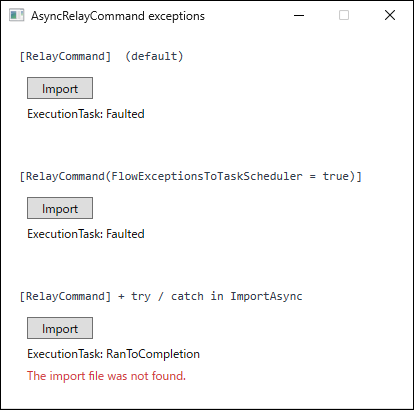
ExecutionTask.Status line, each given a different view model, captured once, 1 second after clicking each Import button once (no warm-up run and no aggregation over multiple runs). The top uses the default from the "Symptom" section (DispatcherUnhandledException was marked Handled by the measurement handler), the middle adds FlowExceptionsToTaskScheduler, and the bottom is the code in this section. The heading of each set was added for the capture and is not part of the view's XAML.The top two sets look the same.
In the default case the exception has reached DispatcherUnhandledException, but unless that handler logs or displays it, the screen cannot tell the two apart.
Catch only the exception types expected as import failures.
An exception that is not caught escapes the method and, following the source path, reaches DispatcherUnhandledException through AwaitAndThrowIfFailed as in row 1 of the table, where the application-wide handler can log it (throwing an exception of a different type was not measured).
Catching everything with catch (Exception) mixes defects unrelated to the import into the on-screen message.
Notes
- When
FlowExceptionsToTaskScheduleris set, something must look atExecutionTask.
The RelayCommand attribute documentation warns that this setting also stops unrelated exceptions from being rethrown automatically, so each scenario needs a deliberate decision.
In the measurement,UnobservedTaskExceptionwas not raised until the next run replacedExecutionTaskand a GC ran.
For a command that runs only once, theTaskis presumably not reclaimed until the view model holding the command is reclaimed, but this article did not measure that.
While the view model holding the command is alive, the last failure does not reachUnobservedTaskExceptionuntil the next run and a GC, so the event cannot be relied on to log the exceptions of a command with this setting. - When
UnobservedTaskExceptionis raised depends on the GC.
The measurement called the GC explicitly.
In a real application, when the GC runs depends on memory conditions (the “Exceptions that stop inside a Task or a Timer” section of the article above). - An
asynclambda passed to Prism 8’sDelegateCommandbecomesasync void.
The exception reachesDispatcherUnhandledException, as with the Toolkit default (row 3 of the table).
DelegateCommandhas nothing equivalent toExecutionTask, so there is no way to read the failure afterward either.
Catching the exception requires wrapping theawaitinside the lambda intry/catch, as in the Toolkit implementation example.
That pattern in Prism, andAsyncDelegateCommandin Prism 9 and later, were not measured. - The measurement covers only an import exception thrown inside
Task.Run.
Exceptions thrown synchronously before the firstawait, and cancellation in methods that take aCancellationToken, were not measured.
Summary
AsyncRelayCommand.Execute awaits the execution Task in an async void method and, on failure, rethrows the exception on the synchronization context that was current when Execute was called.
When the command runs from a button, that is the UI thread’s Dispatcher, so by default a command exception reaches DispatcherUnhandledException.
An async lambda passed to Prism 8’s DelegateCommand followed the same path because the lambda becomes async void.
FlowExceptionsToTaskScheduler removes the rethrow, and the failed Task remains in ExecutionTask.
While ExecutionTask references it, the Task is not reclaimed, so in the measurement, made with the view model still shown, UnobservedTaskException was not raised until the GC after the next run.
Once the view model holding the command becomes collectable, the event may be raised after a GC without another run, but this article did not measure that.
If neither the view nor the code looks at ExecutionTask, then while the command stays in use, the exception reaches nothing until the command runs again and a GC follows.
For exceptions that are known to happen, keep the default, wrap the work in try / catch inside the command method, and show the failure on screen through view model state.
Use FlowExceptionsToTaskScheduler only when something reads the failure from ExecutionTask, such as a view bound to it that displays the result.