Overview
After a hand-written RelayCommand is replaced with a CommunityToolkit.Mvvm (the Toolkit) or Prism command, a Save button that used to become enabled as the user typed can stay disabled.
Calling CommandManager.InvalidateRequerySuggested(), a common fix for a stale CanExecute, does not change the button either.
This article shows, by measuring the button’s IsEnabled and the assemblies the libraries reference, that the Toolkit RelayCommand and the Prism DelegateCommand are not part of the CommandManager requery mechanism.
It then lists the ways each library raises CanExecuteChanged, with the results of the same measurement.
Prerequisites / Environment
- Framework: .NET 6 or later / WPF
- Libraries: CommunityToolkit.Mvvm 8.4.0 / Prism.Core 8.1.97 (the package is Prism.Core and the assembly is Prism; 8.1.97 is the last version released under the MIT license, and the license changed from version 9)
- Verified on: .NET 10 / Windows 11
- Also tested: built for .NET Framework 4.8 and run on 4.8.1 (4.8.9363) / Windows 11 (outside the supported range, but tested because applications maintained on .NET Framework 4.8 are also in scope)
- Architecture: MVVM (the view works only through bindings and has no code-behind)
The additional test used an MVVM sample that reproduces the same CanExecute condition with a different view.
It confirmed the two “setter calls SetProperty only” rows for the Toolkit and Prism (before typing, after setting the name, and after InvalidateRequerySuggested) and the [NotifyCanExecuteChangedFor] and ObservesProperty rows (before typing and after setting the name), all with the same results as on .NET 10.
The two rows that call a notification in the setter, the two hand-written command rows, the “after moving focus” column, the assembly reference table, and the figure were not measured on .NET Framework.
Problem
The following screen, written with the Toolkit, enables saving once a name is entered.
CanExecute is “the name is not empty”.
using CommunityToolkit.Mvvm.ComponentModel;
using CommunityToolkit.Mvvm.Input;

public sealed class CustomerViewModel : ObservableObject
{
    private string _name = "";

    public CustomerViewModel()
    {
        SaveCommand = new RelayCommand(Save, () => !string.IsNullOrEmpty(Name));
    }

    public RelayCommand SaveCommand { get; }

    public string Name
    {
        get => _name;
        set => SetProperty(ref _name, value);
    }

    private void Save()
    {
        // Save the data.
    }
}
SetProperty raises PropertyChanged when the value changes.
The view is shown below; the name TextBox updates the source on every keystroke.
The second TextBox on the right is used later as the target of a keyboard focus move.
<StackPanel Orientation="Horizontal">
  <TextBox Text="{Binding Name, UpdateSourceTrigger=PropertyChanged}" Width="150" />
  <Button Content="Save" Command="{Binding SaveCommand}" Padding="14,4" Margin="12,0" />
  <TextBox Width="80" />
</StackPanel>
Typing a name leaves the Save button disabled.
The result is the same with a Prism DelegateCommand written the same way (a BindableBase base class whose setter only calls SetProperty).
The Common Advice
A common fix for a button that does not reflect CanExecute is to call CommandManager.InvalidateRequerySuggested().
This site also names the method, in Why WPF Validation Errors Are Not Displayed, and Choosing Between IDataErrorInfo and INotifyDataErrorInfo, as the trigger for re-evaluating a CanExecute that depends on validation results.
The API reference describes the method as forcing the CommandManager to raise the RequerySuggested event.
// Call after the condition (Name) has changed.
CommandManager.InvalidateRequerySuggested();
This advice does not work for the Toolkit RelayCommand or the Prism DelegateCommand.
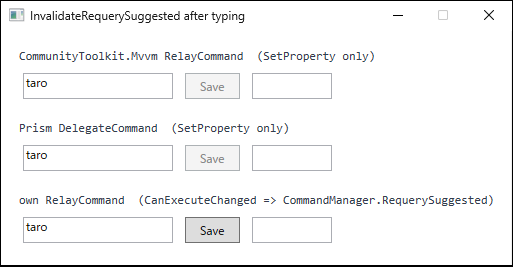
InputManager), and CommandManager.InvalidateRequerySuggested() was called. Keyboard focus was then cleared so the caret would not appear in the capture. The top two view models only call SetProperty in the setter; the bottom one is a hand-written command that forwards CanExecuteChanged to CommandManager.RequerySuggested.Why It Does Not Work
A button subscribes to the command’s CanExecuteChanged and calls CanExecute again when that event is raised.
InvalidateRequerySuggested only notifies handlers subscribed to CommandManager.RequerySuggested.
When a command forwards CanExecuteChanged subscriptions to RequerySuggested, as the hand-written command below does, the button’s handler ends up on RequerySuggested and receives the notification.
public event EventHandler? CanExecuteChanged
{
    add => CommandManager.RequerySuggested += value;
    remove => CommandManager.RequerySuggested -= value;
}
The Toolkit and Prism.Core commands keep CanExecuteChanged as their own event and do not forward it to RequerySuggested.
Neither library’s assembly statically references PresentationCore, which contains CommandManager, so neither has code that uses CommandManager directly.
The table below shows the references read from the assemblies loaded at run time.
The table shows only whether a static reference exists; that the commands do not subscribe was confirmed by the IsEnabled measurements that follow.
| type | assembly | TargetFramework of the loaded assembly | references PresentationCore / PresentationFramework / WindowsBase |
|---|---|---|---|
| CommunityToolkit.Mvvm.Input.RelayCommand | CommunityToolkit.Mvvm 8.4.0.0 | .NETCoreApp,Version=v8.0 | False |
| Prism.Commands.DelegateCommand | Prism 8.1.97.5141 | .NETCoreApp,Version=v5.0 | False |
Results of reading GetReferencedAssemblies() and TargetFrameworkAttribute from the assembly that contains each type, on .NET 10 / Windows 11. Neither references a WPF assembly (PresentationCore, PresentationFramework, or WindowsBase).
The button’s IsEnabled follows this structure.
For each way of writing the view model, the value was measured after setting the name, after calling InvalidateRequerySuggested, and after moving keyboard focus to the second TextBox.
| command and view model | before typing | after setting the name | after InvalidateRequerySuggested | after moving focus |
|---|---|---|---|---|
| own RelayCommand, CanExecuteChanged => CommandManager.RequerySuggested (name typed) | False | True | True | True |
| same command, name assigned to the view model in code | False | False | True | True |
| Toolkit RelayCommand, setter calls SetProperty only | False | False | False | False |
| Toolkit RelayCommand, setter calls NotifyCanExecuteChanged | False | True | True | True |
| Toolkit [ObservableProperty] + [NotifyCanExecuteChangedFor] | False | True | True | True |
| Prism DelegateCommand, setter calls SetProperty only | False | False | False | False |
| Prism DelegateCommand, setter calls RaiseCanExecuteChanged | False | True | True | True |
| Prism DelegateCommand + ObservesProperty(() => Name) | False | True | True | True |
On .NET 10 / Windows 11 with CommunityToolkit.Mvvm 8.4.0 / Prism.Core 8.1.97, the name (taro) was typed through WPF input processing (InputManager) (only in the second row was it assigned to the view model’s Name in code), then CommandManager.InvalidateRequerySuggested() was called, and finally keyboard focus was moved to the second TextBox; the Save button’s IsEnabled was read after each step. CanExecute is “the name is not empty” in every row.
When the setter only calls SetProperty, the button stays False at every step, with both the Toolkit and Prism.
Neither InvalidateRequerySuggested nor moving focus changes it.
The hand-written command used as a control does receive the InvalidateRequerySuggested notification.
In the second row, where the name was assigned in code, the button stays False after the assignment and becomes True after InvalidateRequerySuggested.
In the first row, where the name was typed, it becomes True as soon as the name is typed, without any call.
On this screen, WPF raised RequerySuggested after the name was typed, and the forwarded button handler called CanExecute again.
Fixing a RelayCommand Whose CanExecute Does Not Update the Button State in WPF measured the same result with key input into a TextBox.
Screens whose buttons stop working after moving from a hand-written command to the Toolkit or Prism are the ones that reflected CanExecute only through this input-driven requery.
When the Button Does Update
InvalidateRequerySuggested works for commands that subscribe to RequerySuggested and raise their own CanExecuteChanged in response.
The hand-written command that forwards subscriptions to RequerySuggested (the second row of the previous table) is one of them, and so is the WPF RoutedCommand, which the API reference describes as raising CanExecuteChanged when it receives RequerySuggested.
The Toolkit and Prism commands are not among them, so the command’s own CanExecuteChanged has to be raised.
As the previous table shows, each of the following four approaches made the button True as soon as the name was set.
| Library | Approach | Notification path |
|---|---|---|
| CommunityToolkit.Mvvm | Call SaveCommand.NotifyCanExecuteChanged() in the setter |
Hand-written setter code |
| CommunityToolkit.Mvvm | Add [NotifyCanExecuteChangedFor(nameof(SaveCommand))] to an [ObservableProperty] field |
The source-generated setter |
| Prism | Call SaveCommand.RaiseCanExecuteChanged() in the setter |
Hand-written setter code |
| Prism | new DelegateCommand(...).ObservesProperty(() => Name) |
The command subscribes to the view model’s PropertyChanged |
What they have in common is a path that tells the command when a property its CanExecute depends on has changed.
InvalidateRequerySuggested is not a substitute for that path.
Implementation
With the Toolkit, the source generator attributes keep the relationship between the property and the command in the declarations.
using CommunityToolkit.Mvvm.ComponentModel;
using CommunityToolkit.Mvvm.Input;

public sealed partial class CustomerViewModel : ObservableObject
{
    [ObservableProperty]
    [NotifyCanExecuteChangedFor(nameof(SaveCommand))]
    private string _name = "";

    [RelayCommand(CanExecute = nameof(CanSave))]
    private void Save()
    {
        // Save the data.
    }

    private bool CanSave() => !string.IsNullOrEmpty(Name);
}
[RelayCommand] generates a SaveCommand property from Save, and [NotifyCanExecuteChangedFor] adds a call to SaveCommand.NotifyCanExecuteChanged() to the generated Name setter.
The class must be partial.
The view XAML from the Problem section is used unchanged.
With Prism, the dependent property is registered with ObservesProperty when the command is created.
using Prism.Commands;
using Prism.Mvvm;

public sealed class CustomerViewModel : BindableBase
{
    private string _name = "";

    public CustomerViewModel()
    {
        SaveCommand = new DelegateCommand(Save, () => !string.IsNullOrEmpty(Name))
            .ObservesProperty(() => Name);
    }

    public DelegateCommand SaveCommand { get; }

    public string Name
    {
        get => _name;
        set => SetProperty(ref _name, value);
    }

    private void Save()
    {
        // Save the data.
    }
}
ObservesProperty listens for PropertyChanged on the view model for Name and raises CanExecuteChanged.
No notification call is needed in the setter, so a setter that only calls SetProperty can stay as it is.
Notes
- Every dependent property needs it.
[NotifyCanExecuteChangedFor]notifies the command from the setter of the property it is attached to, andObservesPropertyfrom the change notification of the property it registers.
IfCanExecutereads several properties, it has to be applied to each of those properties.
The measurements in this article cover only a single dependent property. - State that changes through other paths needs an explicit notification.
WhenCanExecutedepends on values that change through paths these two mechanisms do not watch, such as a completed network call or a service’s state,NotifyCanExecuteChanged()orRaiseCanExecuteChanged()has to be called where the change is received.
This article measured only calls made on the UI thread. - The migration guide does not make this obvious.
Microsoft’s guide to migrating from MvvmLight presents the ToolkitRelayCommandas providing like-for-like functionality, and lists swapping theusingdirectives, includingGalaSoft.MvvmLight.CommandWpf, and replacingRaiseCanExecuteChanged()withNotifyCanExecuteChanged().
It does not mentionCommandManager.
If the original code relied on input-driven requery and never calledRaiseCanExecuteChanged(), there is no call to replace, and after the migration nothing raises the event.
The MvvmLight commands themselves were not measured in this article. InvalidateRequerySuggestedhas no effect on Toolkit and Prism commands.
Calling it makes the other command sources subscribed toRequerySuggestedqueryCanExecuteagain.
On a screen that uses only Toolkit or Prism commands, it can be removed.
Summary
The Toolkit RelayCommand and the Prism DelegateCommand keep CanExecuteChanged as their own event and were not notified by CommandManager.RequerySuggested.
Neither library’s assembly statically references any of the three WPF assemblies checked (PresentationCore, PresentationFramework, and WindowsBase).
As a result, when the setter only calls SetProperty, neither calling CommandManager.InvalidateRequerySuggested() nor key input nor a focus change alters the button’s enabled state.
To update the button, the command’s own CanExecuteChanged has to be raised.
[NotifyCanExecuteChangedFor] in the Toolkit and ObservesProperty in Prism record the relationship between the property and the command as a declaration, so the call in the setter cannot be forgotten.
NotifyCanExecuteChanged() or RaiseCanExecuteChanged() is called directly only when the condition depends on state those mechanisms do not watch, at the point where the change is received.