Overview
After a report window is opened and closed, the view model of the closed window can remain uncollected by the GC.
If the remaining object holds large data, repeated opening and closing can look like a memory leak.
In this measurement on .NET 10, one cause was a OneWay or TwoWay binding to a property of an object that does not implement INotifyPropertyChanged (INPC below).
Since something survives the window, it is natural to assume that the whole window survives.
Counting over 100 open/close cycles on .NET 10, however, shows that the objects left uncollected are neither the windows nor the BindingExpression objects, but the binding sources.
In this measurement, the number left behind did not grow in proportion to the number of windows opened.
This article traces the reference path that still leads to the source after the window closes, by reading WPF’s internal table.
It then compares, by measurement, which bindings leave the source behind and which do not, and shows view model implementations that avoid it.
Prerequisites / Environment
- Framework: WPF (.NET). The code examples use collection expressions and therefore assume C# 12 or later (available by default when targeting .NET 8 or later)
- Verified on: .NET 10 (10.0.13) / Windows 11
- Architecture: MVVM (the view shows values through bindings only and has no code-behind)
The behavior was checked only on .NET 10; .NET 8, .NET 9, and .NET Framework 4.8 were not measured.
The internal table is observed through non-public fields, which may not be readable under the same names in other versions.
Symptom
The view model does not implement INPC.
It holds a 1 MB array in place of the report data.
public sealed class ReportViewModel
{
    public string Title { get; set; } = "Monthly report";

    public byte[] Data { get; } = new byte[1_000_000];
}
Title is an ordinary auto-implemented property with no way to announce changes.
For screens that only display values, view models or DTOs written like this are sometimes assigned to DataContext as is.
The view is a window that only shows Title in a TextBlock.
<Window xmlns="http://schemas.microsoft.com/winfx/2006/xaml/presentation"
        Width="240" Height="100">
  <TextBlock Text="{Binding Title}" />
</Window>
Each time the window opens, a new ReportViewModel is created and assigned to DataContext, and the window is shown and closed.
This is repeated 100 times, and after running the GC, the objects that are still alive are counted through weak references.
Sources are counted at 10, 50, and 100 cycles; BindingExpression objects and windows are counted at 100 cycles.
The following table shows the results for nine variations of the binding.
| Source and target element | Binding | Rounds in which it was a key in _valueChangedHandlers while open | Windows opened before the previous BindingExpression was collected | Sources alive after 10 | after 50 | after 100 | BindingExpressions alive after 100 | Windows alive after 100 |
|---|---|---|---|---|---|---|---|---|
| No INPC, settable property, TextBlock | {Binding Title} | 100 / 100 | 97 / 99 | 8 | 3 | 20 | 0 | 0 |
| No INPC, settable property, TextBox (TwoWay by default) | {Binding Title} | 100 / 100 | 97 / 99 | 10 | 1 | 5 | 0 | 0 |
| No INPC, get-only property | {Binding Title} | 100 / 100 | 97 / 99 | 10 | 1 | 5 | 0 | 0 |
| No INPC, Mode=OneTime | {Binding Title, Mode=OneTime} | 0 / 100 | 97 / 99 | 0 | 0 | 0 | 0 | 0 |
| INPC view model (PropertyChanged never raised) | {Binding Title} | 0 / 100 | 97 / 99 | 0 | 0 | 0 | 0 | 0 |
| INPC view model, List<T>.Count (tracking the List<T>) | {Binding Rows.Count} | 100 / 100 | 97 / 99 | 7 | 11 | 7 | 0 | 0 |
| INPC view model, RowCount property over a List<T> (tracking the List<T>) | {Binding RowCount} | 0 / 100 | 97 / 99 | 0 | 0 | 0 | 0 | 0 |
| INPC view model, ObservableCollection<T>.Count (tracking the collection) | {Binding Rows.Count} | 0 / 100 | 97 / 99 | 0 | 0 | 0 | 0 | 0 |
| No INPC, one long-lived source shared by all windows | {Binding Title} | 100 / 100 | 97 / 99 | - (shared) | - (shared) | - (shared) | 0 | 0 |
Table 1: A window was opened and closed 100 times.
At each checkpoint, the run drained the dispatcher, waited 100 ms, and ran the GC, five times in a row, before counting (.NET 10.0.13 / Windows 11, values from one run).
Every source holds a 1 MB array.
The rows marked “tracking the List<T>” and “tracking the collection” count the Rows object instead of the view model.
“Rounds in which it was a key in _valueChangedHandlers while open” counts the rounds in which, while that round’s window was open, the owner of the bound property was a key in the registration table of that property’s PropertyDescriptor (a non-public field read through reflection).
“Windows opened before the previous BindingExpression was collected” counts, out of the 99 rounds from the second onward, the rounds in which the window was opened while the previous round’s BindingExpression had not yet been collected.
In the first three “No INPC” rows (the settable property with a TextBlock and with a TextBox, and the get-only property) and in the “List<T>.Count” row, sources were left uncollected at one or more checkpoints.
At 100 cycles, every one of these rows left fewer than the number opened (100).
On the other hand, no row left any BindingExpression or window alive after 100 cycles.
The INPC view model, Mode=OneTime, the RowCount property, and ObservableCollection<T>.Count left no source at any checkpoint.
Every row that left objects behind is a row whose object was a key in the registration table in all 100 rounds.
At every checkpoint, all of the objects left behind were still keys in the registration table (counted in the scene).
What Happens Internally
How WPF Watches a Source That Does Not Notify
Microsoft Learn’s “Optimizing Performance: Data Binding” names two ways to provide property change notifications: INPC and the change notifications associated with TypeDescriptor.
In the measurement, when the object owning the bound property did not implement INPC and the binding was not Mode=OneTime, that object was in the registration table of the property’s PropertyDescriptor (objects in the middle of the path are covered later).
That is the “Key in _valueChangedHandlers while open” column in Table 1.
When the object owning the property implemented INPC (the view model or ObservableCollection<T>), or when the binding was Mode=OneTime, that object was not in that registration table.
For the measured type, a PropertyDescriptor was not created per object.
Calling TypeDescriptor.GetProperties twice with the type, or once with an instance, returned the same instance for the same property.
This does not hold for types that return different property information per instance, such as types that implement ICustomTypeDescriptor.
Subscribers are registered in a table inside the instance returned for that property, keyed by the object being watched.
The following table shows what the non-public field _valueChangedHandlers held, starting while the window was open.
| Step | Entries in _valueChangedHandlers | Key is the first window's source | Record's _source is that source | Handler target type | Source alive | BindingExpression alive |
|---|---|---|---|---|---|---|
| While the window is open | 1 | True | True | MS.Internal.Data.ValueChangedEventManager+ValueChangedRecord | True | True |
| Closed the window, then GC | 1 | True | True | MS.Internal.Data.ValueChangedEventManager+ValueChangedRecord | True | False |
| Waited 5 s, GC every 250 ms | 1 | True | True | MS.Internal.Data.ValueChangedEventManager+ValueChangedRecord | True | False |
| Opened another window bound to a different non-INPC type, then GC before closing it | 0 | - | - | - | False | False |
Table 2: How _valueChangedHandlers changed for one window, from while it was open until the registration was removed.
TimelineViewModel has the same shape as ReportViewModel in Table 1 and is used only for this measurement.
_valueChangedHandlers and the _source field of the record stored as its value were only read through reflection and never modified.
In “Closed the window, then GC” and “GC before closing it,” the GC means the same procedure as in Table 1: draining the dispatcher, waiting 100 ms, and running the GC, five times in a row.
The third row runs the same procedure 20 times at 250 ms intervals (.NET 10.0.13 / Windows 11).
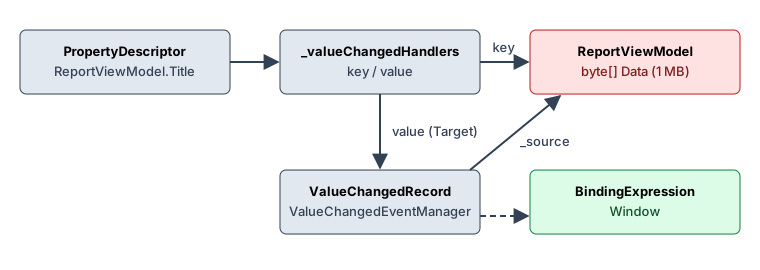
The Target of the handler stored as the value is MS.Internal.Data.ValueChangedEventManager+ValueChangedRecord, not the binding itself.
This record also points to the source through its _source field.
After the window was closed and the GC was run, the BindingExpression was collected, but the registration and the source remained.
Why the Window Is Collected While the Source Is Not
Microsoft Learn’s “Weak event patterns” explains that many aspects of WPF data binding already apply the weak event pattern.
On this path too, what is registered directly in the PropertyDescriptor is not the binding but a ValueChangedEventManager record (Table 2).
Even while the registration and the record remained, after the window closed, the BindingExpression was collected (Tables 1 and 2), and so was the window (Table 1).
The source, on the other hand, is pointed to from inside the registration: as a key in the registration table and as the record’s _source.
The following table shows the types of these two references.
| Item | Value |
|---|---|
| Declared type of PropertyDescriptor._valueChangedHandlers | System.Collections.Concurrent.ConcurrentDictionary<System.Object, System.EventHandler> |
| Actual type of _valueChangedHandlers while registered | System.Collections.Concurrent.ConcurrentDictionary<System.Object, System.EventHandler> |
| Declared type of ValueChangedRecord._source | System.Object |
| Concrete type of the PropertyDescriptor for TimelineViewModel.Title | System.ComponentModel.ReflectPropertyDescriptor |
| Same PropertyDescriptor returned after keeping only a weak reference and running the GC (registration still present) | True |
| Same as above for UnboundViewModel.Title, which was never bound | True |
| Instance fields of ValueChangedRecord | <HasIgnorableListeners>k__BackingField: System.Boolean, _eventArgs: MS.Internal.Data.ValueChangedEventArgs, _listeners: System.Windows.WeakEventManager+ListenerList<MS.Internal.Data.ValueChangedEventArgs>, _manager: MS.Internal.Data.ValueChangedEventManager, _pd: System.ComponentModel.PropertyDescriptor, _source: System.Object |
| OtherViewModel.Name and TimelineViewModel.Title share one PropertyDescriptor | False |
| TextBox.Text BindsTwoWayByDefault | True |
Table 3: Types of the non-public fields and the default direction of TextBox.Text.
The fields were only read through reflection and never modified.
The actual type of the registration table was read while a window bound to TimelineViewModel was open.
Whether the same descriptor keeps being returned was compared in two states: after the window was closed and the GC was run (registration still present), and for Title of UnboundViewModel, which was never bound (no registration). In each case, the scene kept only a weak reference to the descriptor, ran the GC, and compared it with the one returned again by TypeDescriptor (.NET 10.0.13 / Windows 11).
The registration table is a ConcurrentDictionary<object, EventHandler>, which holds its keys with ordinary (strong) references.
The record’s _source is also a field of type object, not a WeakReference.
As Table 3 shows, even for a type that was never bound, TypeDescriptor returned the same PropertyDescriptor after the scene kept only a weak reference to it and ran the GC.
The descriptor is reachable from TypeDescriptor regardless of whether a registration exists.
As long as the registration remains, the source is therefore reachable from the descriptor through the registration key and is not collected.
Besides _source, the record also points to the descriptor (_pd) and to the ValueChangedEventManager (_manager) (Table 3).
In Tables 2 and 4 as well, the source was alive at the sampling points where the registration remained and had been collected at the points after the registration was removed.
What Removes the Registration
As Table 2 shows, the registration was not removed after waiting 5 seconds with the GC run every 250 ms.
The following table compares what removes it by changing the kind of window opened next.
| Window opened next | Registered before opening | First BindingExpression alive before opening | Registered right after opening (before GC) | Registered after GC while open | First BindingExpression alive after that GC | Registered after closing and GC | Registered right after opening one more OneWay window | First source alive at the end |
|---|---|---|---|---|---|---|---|---|
| Window without bindings | True | False | True | True | False | True | False | False |
| Window bound to an INPC view model | True | False | False | False | False | False | False | False |
| Window bound with Mode=OneTime to a non-INPC type | True | False | True | True | False | True | False | False |
| Window bound to a non-INPC property of another type | True | False | False | False | False | False | False | False |
| Window bound to another instance of the same non-INPC type | True | False | False | False | False | False | False | False |
| Same as above, but opened before the first BindingExpression is collected | True | True | True | True | False | True | False | False |
Table 4: In each row, a first window bound to TimelineViewModel was opened and closed, the GC was run to collect the first BindingExpression, and then the next window was opened.
Only in the last row was the next window opened while the first BindingExpression was held by a strong reference (before it could be collected); the reference was released after reading the registration right after opening.
In every row, after the next window was closed and the GC was run, one more window bound with OneWay to a different type was opened, and the registration was read right after it opened.
“Right after opening” is the point at which the window was shown and the dispatcher was drained, before any GC.
The GC uses the same procedure as Table 1, and each row was measured with windows separate from Table 2 (.NET 10.0.13 / Windows 11).
The registration was removed when a window with a binding that watches for changes (OneWay) was opened, already at the point the window was shown and before any GC.
The type of the bound source did not matter: it was removed with an INPC view model, with a different property of a different type, and with another instance of the same type.
An INPC view model does not enter a PropertyDescriptor registration table (Table 1), so what removed the registration was not a registration in a per-PropertyDescriptor table but WPF internal processing that works across types.
The PropertyDescriptor for Name of the other type was a different instance from the one for Title (Table 3).
A window without bindings and a window with only a OneTime binding did not remove it, neither after running the GC while open nor after closing and running the GC.
In Table 4, the registration was removed only when the first window’s BindingExpression had already been collected.
When the next window was opened before the first BindingExpression was collected, as in the last row, the registration was not removed at the point of opening.
The GC then collected the BindingExpression, but the registration was still not removed after closing the window and running the GC.
It was removed when one more OneWay window was opened after that.
The rows for the window without bindings and for OneTime were also removed when one more window was opened.
Because the Table 1 scene explicitly runs the GC only at checkpoints, many rounds opened the next window before the previous round’s BindingExpression was collected (“Windows opened before the previous BindingExpression was collected” in Table 1).
In those rounds, the registration is not removed at the point of opening.
In the rows that were keys, the sources that did not remain were collected after their registrations were removed (they are not collected while registered).
The way of removal confirmed in Table 4 is opening a OneWay window after the BindingExpression has been collected, and the number left in Table 1 can be explained by the order of the open/close cycles and the GCs that run automatically at run time.
Consequences of This Route
Long-Lived Sources Rarely Cause Harm
What stays alive is the source, not the window.
If the source lives for the whole application anyway, such as a single settings object, a remaining registration does not make that source live any longer than it would.
In the “one long-lived source shared by all windows” row of Table 1, that source was a key in the registration table, yet all 100 windows and BindingExpression objects were collected.
The problem arises when a source is created for each window, has no reason to outlive it, and holds large data.
Report data, images, and lists of search results stay together with the source.
The Object That Owns the Bound Property Is What Stays
The key is not necessarily the DataContext; it is the object that owns the bound property.
If Rows in {Binding Rows.Count} is a List<T>, the List<T> that owns Count does not implement INPC, even when the view model does, so the List<T> becomes the key when Count is watched.
The “List<T>.Count” row in Table 1 binds with {Binding Rows.Count} to a view model that implements INPC, has a List<byte[]> Rows holding one 1 MB array, and has no RowCount (the ReadOnlyRowsViewModel shown later without RowCount).
In Table 1, the List<T> was a key in the registration table while the window was open in every round, and the List<T> and its contents stayed after the window closed.
ObservableCollection<T> implements INPC, and in Table 1 it did not become a key with the same path and did not stay.
In Table 1, keeping the List<T> but reading the count from a RowCount property on the INPC view model kept the view model out of the registration table, and no List<T> was left behind either.
Properties Without a Setter Are Watched Too
Having no way to change the value does not exclude a property from watching.
In Table 1, binding to a get-only property also made the source a key in the registration table and left sources behind.
OneTime Stays Out of the Registration Table
In Table 1, a Mode=OneTime binding did not make even a source without notifications a key in the registration table, and the source did not stay.
That OneTime does not watch the source for changes was also confirmed through what the screen shows.
| Target and mode | Operation | Before | After step 1 | After step 2 |
|---|---|---|---|---|
| TextBlock, OneWay | Displayed text: set Title (raises PropertyChanged), then replace DataContext | Monthly report | Changed | Replaced |
| TextBlock, OneTime | Displayed text: set Title (raises PropertyChanged), then replace DataContext | Monthly report | Monthly report | Replaced |
| TextBox, TwoWay (default) | Source Title: type "Edited", then call UpdateSource | Monthly report | Edited | - |
| TextBox, OneTime | Source Title: type "Edited", then call UpdateSource | Monthly report | Monthly report | - |
Table 5: Values read after each operation on an element bound to an INPC view model (Title starts as Monthly report).
The TextBlock rows show the displayed text: Title was set to Changed with PropertyChanged raised, and then the DataContext was replaced with another view model whose Title is Replaced.
The TextBox rows show the source’s Title: the text in the TextBox was selected and SelectedText was set to Edited (the scene confirmed that the binding was still attached afterwards), and then UpdateSource was called (.NET 10.0.13 / Windows 11).
The OneTime display did not change when PropertyChanged was raised, and it changed when the DataContext was replaced.
This matches the description of BindingMode.OneTime, which updates the target when the application starts or when the data context changes.
Implementation Example
Implement INPC on the View Model
The basic fix is to implement INPC on the class that owns the bound properties.
A minimal base class is prepared, and view models derive from it.
using System.Collections.Generic;
using System.ComponentModel;
using System.Runtime.CompilerServices;

public abstract class ViewModelBase : INotifyPropertyChanged
{
    public event PropertyChangedEventHandler? PropertyChanged;

    protected bool SetProperty<T>(ref T field, T value, [CallerMemberName] string? propertyName = null)
    {
        if (EqualityComparer<T>.Default.Equals(field, value))
        {
            return false;
        }

        field = value;
        PropertyChanged?.Invoke(this, new PropertyChangedEventArgs(propertyName));
        return true;
    }
}

public sealed class ReportViewModel : ViewModelBase
{
    private string _title = "Monthly report";

    public string Title
    {
        get => _title;
        set => SetProperty(ref _title, value);
    }

    public byte[] Data { get; } = new byte[1_000_000];
}
In Table 1, a source that implements INPC did not become a key in the PropertyDescriptor registration table.
The source did not stay even when PropertyChanged was never raised.
In Table 5, raising PropertyChanged changed what the OneWay binding displayed.
The setter therefore notifies through SetProperty.
The XAML of the view does not need to change.
{Binding Title} stays as it is, and the type of the source alone changes the path.
Show Counts Through ObservableCollection or a View Model Property
To show the number of rows in a list, make Rows an ObservableCollection<T>.
using System.Collections.ObjectModel;

public sealed class RowsViewModel : ViewModelBase
{
    public ObservableCollection<byte[]> Rows { get; } = [];
}
The XAML can stay {Binding Rows.Count}.
To keep a List<T> for read-only data whose rows do not change, give the view model a property that returns the count.
using System.Collections.Generic;

public sealed class ReadOnlyRowsViewModel : ViewModelBase
{
    public List<byte[]> Rows { get; } = [];

    public int RowCount => Rows.Count;
}
The XAML becomes {Binding RowCount}.
The binding reads RowCount from the view model, which implements INPC, and in Table 1 neither the view model nor the List<T> stayed.
RowCount does not announce changes to Rows, so lists whose items are added or removed after the window opens should use ObservableCollection<T>.
Use OneTime for Values That Do Not Change
When a value does not change while the window is open and the source class cannot be changed (a DTO from an external library, for example), specify Mode=OneTime.
<TextBlock Text="{Binding Title, Mode=OneTime}" />
In Table 1, a OneTime binding stayed out of the registration table, and the source did not stay even though it did not implement INPC.
In exchange, as Table 5 shows, the screen is not updated when a source property changes after it is displayed (it is updated when the DataContext is replaced).
TextBox.Text, which accepts input, is TwoWay by default (BindsTwoWayByDefault in Table 3; “How User Input Silently Removes a WPF Binding Written Without Mode” covers how to check a property’s default direction).
In Table 5, changing the text of a TextBox and calling UpdateSource put the value into the source with the default TwoWay, while the source value did not change with OneTime.
This approach is limited to display-only elements.
Notes
- Use the internal type names for observation only.
_valueChangedHandlers,ValueChangedRecord, and_sourceare non-public implementation details whose names and structure may change in other versions. Do not touch them from application code. - Check the retention path in a memory profiler. When the view model of a closed window stays alive and it is held by the
_valueChangedHandlers(ConcurrentDictionary) of aSystem.ComponentModel.ReflectPropertyDescriptor(Table 3) or by the_sourceof aValueChangedEventManagerrecord, it is the path described here. - Do not judge by the number left behind. Even in Table 1, only part of the opened sources stayed at 100 cycles. “Opening and closing a few times did not increase it” does not prove that this path is absent. Check the binding itself: whether the object owning the bound property (at each step of the path) implements INPC, or whether the binding is
OneTime. - The object without INPC is not always the view model. Objects in the middle of the path (
List<T>, DTOs, settings classes, and so on) are affected as well. For a path like{Binding A.B.C}, check the type of the object at each step. - A shared source does not need an urgent fix. For a binding to a source that lives to the end, the windows and
BindingExpressionobjects are collected (Table 1).
Summary
In the measurement, when the object owning a property bound with OneWay or TwoWay did not implement INPC, that object became a key in the registration table of a PropertyDescriptor that was reused for that property.
That object is not necessarily the DataContext; it can be an object in the middle of the path, such as the List<T> in {Binding Rows.Count}.
Both the registration key and the record’s _source are strong references, so on .NET 10, even after the BindingExpression and the window are collected, that object is not collected while the registration remains.
Waiting and running the GC did not remove the registration; it was removed when another window with a OneWay binding was opened after the closed window’s BindingExpression had been collected.
A window without bindings, or with only a OneTime binding, did not remove it.
When binding to view models created per window or to objects that hold large data, implement INPC on that class.
Show list counts through ObservableCollection<T> or through a count property on the view model.
For values that do not change and whose class cannot be modified, use Mode=OneTime.
For a single long-lived source shared across the application, the windows are not retained, so the priority is low.