Overview
When a value is typed into a DataGrid cell and Save in the toolbar is clicked without leaving the cell, the value that gets saved is the one from before the edit.
The cell on screen still shows the new value, so to the user it looks as if the value reverted after saving.
No exception is thrown.
The cause is that the DataGrid has not committed the edit yet when the save command runs.
Calling a commit in the save handler looks like an easy fix, but a single call to the parameterless CommitEdit() during a cell edit does not push the value to the source.
On top of that, the commit itself fails for a row that contains input that cannot be converted to the property type.
This article measures the source value and the editing state when Save is triggered with real mouse and keyboard input while a cell is still being edited.
It then works through these three obstacles in order and shows a save handler that commits the row before saving.
Prerequisites and Environment
- Framework: WPF (.NET Framework 4.0 or later / .NET Core 3.0 or later, where
DataGridis part of WPF) - Scope:
DataGridTextColumnin aDataGrid, a save command placed in aToolBar, aMenu, aButtonoutside the toolbar, and aKeyBindingon theWindow, andDataGrid.CommitEdit - Architecture: MVVM (the view model implements
INotifyPropertyChangedand exposes saving as anICommand) - Verified on: .NET 10 / Windows 11 (default theme; the Fluent theme was not measured)
- Method: the cell edit was started with
BeginEdit(), and text was typed through WPF’sInputManager.
Each save input was performed once per row (twice only in the row that corrects the input and saves again) with OS mouse and keyboard input (SendInput).
When the save command ran, the scene read the keyboard focus, the return value ofCommitEdit, the source value, the number ofIEditableObject.EndEditcalls, the result ofICollectionView.Refreshon the default view, andIsEditingof the cell and row.
The measurement is implemented as a scene intools/screenshot-capture.
Problem
The same save command is placed in three places: a menu, a toolbar, and a button outside the toolbar.
The column bindings of the DataGrid have no special settings.
<DockPanel Width="400">
  <Menu DockPanel.Dock="Top">
    <MenuItem x:Name="menuSave" Header="Save" Command="{Binding SaveCommand}" />
  </Menu>
  <ToolBar DockPanel.Dock="Top">
    <Button x:Name="toolBarSave" Content="Save" Command="{Binding SaveCommand}" />
  </ToolBar>
  <StackPanel DockPanel.Dock="Bottom" Orientation="Horizontal" Margin="4">
    <Button x:Name="plainSave" Content="Save" Command="{Binding SaveCommand}" Padding="12,2" />
    <TextBlock Text="{Binding LastSaved}" Margin="8,0" VerticalAlignment="Center" />
  </StackPanel>
  <DataGrid x:Name="grid" ItemsSource="{Binding Items}"
            AutoGenerateColumns="False" CanUserAddRows="False" Height="100">
    <DataGrid.Columns>
      <DataGridTextColumn Header="Name" Binding="{Binding Name}" Width="*" />
      <DataGridTextColumn Header="Quantity" Binding="{Binding Quantity}" Width="90" />
    </DataGrid.Columns>
  </DataGrid>
</DockPanel>
A KeyBinding on the Window makes Ctrl+S save as well.
<Window.InputBindings>
  <KeyBinding Key="S" Modifiers="Control" Command="{Binding SaveCommand}" />
</Window.InputBindings>
SaveCommand writes the Name of the first row to LastSaved.
The next screenshot shows the result of changing Name in the first row from alpha to edited and clicking Save in the toolbar while the cell is still being edited.
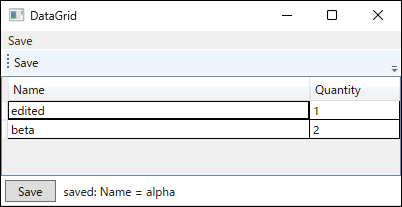
edited, but the command read alpha.The next table shows the results for different combinations of save input and save handler.
In rows without a note, the item implements IEditableObject.
| save input | called in the save handler | where focus went when it left the DataGrid | keyboard focus when saving | return value | source value | EndEdit | Refresh | after saving: cell / row editing |
|---|---|---|---|---|---|---|---|---|
| click the Button in the ToolBar | nothing | Button in the ToolBar | TextBox in the cell | - | "alpha" | 0 | InvalidOperationException | True / True |
| click the MenuItem in the Menu | nothing | MenuItem in the Menu | TextBox in the cell | - | "alpha" | 0 | InvalidOperationException | True / True |
| Ctrl+S (KeyBinding on the Window) | nothing | did not leave | TextBox in the cell | - | "alpha" | 0 | InvalidOperationException | True / True |
| click a Button outside the ToolBar | nothing | Button outside the ToolBar | Button outside the ToolBar | - | "edited" | 2 | succeeds | False / False |
| click the Button in a ToolBar with FocusManager.IsFocusScope="False" | nothing | Button in the ToolBar | Button in the ToolBar | - | "edited" | 2 | succeeds | False / False |
| click the MenuItem in a Menu with FocusManager.IsFocusScope="False" | nothing | MenuItem in the Menu | MenuItem in the Menu | - | "edited" | 2 | succeeds | False / False |
| click the Button in the ToolBar | CommitEdit() | Button in the ToolBar | TextBox in the cell | True | "alpha" | 0 | InvalidOperationException | False / True |
| click the Button in the ToolBar | CommitEdit() twice | Button in the ToolBar | TextBox in the cell | True, True | "edited" | 2 | succeeds | False / False |
| click the Button in the ToolBar | CommitEdit(DataGridEditingUnit.Row, true) | Button in the ToolBar | TextBox in the cell | True | "edited" | 2 | succeeds | False / False |
| click the MenuItem in the Menu | CommitEdit(DataGridEditingUnit.Row, true) | MenuItem in the Menu | TextBox in the cell | True | "edited" | 2 | succeeds | False / False |
| Ctrl+S (KeyBinding on the Window) | CommitEdit(DataGridEditingUnit.Row, true) | did not leave | TextBox in the cell | True | "edited" | 2 | succeeds | False / False |
| click a Button outside the ToolBar | CommitEdit(DataGridEditingUnit.Row, true) | Button outside the ToolBar | Button outside the ToolBar | True | "edited" | 2 | succeeds | False / False |
| click the Button in the ToolBar (item without IEditableObject) | CommitEdit() | Button in the ToolBar | TextBox in the cell | True | "alpha" | - | InvalidOperationException | False / True |
| click the Button in the ToolBar (item without IEditableObject) | CommitEdit(DataGridEditingUnit.Row, true) | Button in the ToolBar | TextBox in the cell | True | "edited" | - | succeeds | False / False |
| click the Button in the ToolBar (Name column with UpdateSourceTrigger=PropertyChanged) | nothing | Button in the ToolBar | TextBox in the cell | - | "edited" | 0 | InvalidOperationException | True / True |
| click the Button in the ToolBar ("abc" typed into the int Quantity column) | CommitEdit(DataGridEditingUnit.Row, true) | Button in the ToolBar | TextBox in the cell | False | 1 | 0 | InvalidOperationException | True / True |
| click the Button in the ToolBar ("abc" in Quantity, then corrected to 5 and clicked again) | CommitEdit(DataGridEditingUnit.Row, true) | Button in the ToolBar | TextBox in the cell | False → True | 5 | 2 | succeeds | False / False |
| click the Button in the ToolBar (no cell has been edited) | CommitEdit(DataGridEditingUnit.Row, true) | Button in the ToolBar | DataGrid | True | "alpha" | 0 | succeeds | False / False |
Measured on .NET 10 / Windows 11. Each row used a new window. “source value” and “EndEdit” are read after the commit called in the save handler, and “Refresh” is the result of calling ICollectionView.Refresh on the default view after that. A - in “return value” means no commit was called, and a - in “EndEdit” means the item does not implement IEditableObject. In “return value”, , separates return values of calls made in one save, and → separates return values of separate saves. In the row that saves again, “where focus went when it left the DataGrid” is from the first save, and the other columns are from the second save.
Without a commit, “click a Button outside the ToolBar” delivers the typed value, while the toolbar, the menu, and Ctrl+S do not.
The following sections fix the failing cases one obstacle at a time.
First Obstacle: Toolbar and Menu Clicks Do Not End the Cell Edit
A DataGrid has its own triggers for committing an edit.
According to the official documentation, a cell edit is committed when focus moves to another cell in the same row or when Enter is pressed while the cell is in edit mode, and a row edit is committed when focus moves to another row or when Enter is pressed while the row is in edit mode (DataGrid).
The documentation does not describe what happens when focus leaves the DataGrid.
In the measurement, “click a Button outside the ToolBar” moved focus to that button, and by the time the command ran, both the cell edit and the row edit had ended and edited had reached the source.
With the toolbar and the menu, focus also moves to the clicked control for a moment (the “where focus went when it left the DataGrid” column).
Even so, by the time the command ran, focus was back in the cell’s TextBox, and both the cell and the row were still being edited.
Reading the settings of the three controls shows that Focusable is True for all of them, and the difference is the focus scope each one belongs to.
| control | Focusable | focus scope it belongs to | IsFocusScope |
|---|---|---|---|
| Button in the ToolBar | True | ToolBar | False |
| MenuItem in the Menu | True | Menu | False |
| Button outside the ToolBar | True | Window | False |
Read on .NET 10 / Windows 11 by showing the XAML above, reading Focusable, and calling FocusManager.GetFocusScope. “IsFocusScope” tells whether the control itself is a focus scope, which is a different value from ToolBar and Menu being scopes.
ToolBar and Menu are focus scopes by default (FocusManager).
When keyboard focus leaves a focus scope, the focused element in that scope keeps logical focus, and it regains keyboard focus when focus returns to the scope (Focus Overview).
The rows with FocusManager.IsFocusScope="False" on the ToolBar and on the Menu confirm that the scope is the cause.
In both cases, focus stayed on the clicked control, both the cell and row edits ended, and edited reached the source.
When Ctrl+S is handled by a KeyBinding on the Window, focus never leaves the DataGrid at all.
As long as committing is left to focus movement, the result depends on how the user triggers Save.
The save handler therefore has to call the commit explicitly.
Second Obstacle: CommitEdit() Called During a Cell Edit Does Not Commit the Row
Calling DataGrid.CommitEdit() at the start of the save handler returns True and ends the cell edit.
However, in the rows where the save handler calls “CommitEdit()”, the source value stayed alpha, EndEdit was not called, and the row remained in edit mode.
The result is the same for an item that does not implement IEditableObject.
This matches the official documentation.
When a cell is being edited, the parameterless CommitEdit() only propagates the cell’s change to the pending row and does not commit the row.
When no cell is being edited, it commits all pending row edits (DataGrid.CommitEdit).
In the “CommitEdit() twice” row, the second call committed the row and delivered edited to the source.
A row left in edit mode causes more than a missing value.
Calling ICollectionView.Refresh on the default view after saving, for example to re-sort or re-filter the list, threw InvalidOperationException.
Calling CommitEdit() twice makes it hard to read what happens when the first, cell-level commit fails.
To state explicitly that the commit goes up to the row, specify DataGridEditingUnit.Row as the unit.
bool committed = grid.CommitEdit(DataGridEditingUnit.Row, true);
The second argument true means “exit edit mode after committing”.
In the rows where the save handler calls “CommitEdit(DataGridEditingUnit.Row, true)”, saving from the toolbar, the menu, Ctrl+S, or the button outside the toolbar all delivered edited to the source, ended both the cell and row edits, and made Refresh succeed.
Third Obstacle: A Row With Unconvertible Input Cannot Be Committed
With abc typed into the int column Quantity, CommitEdit(DataGridEditingUnit.Row, true) returned False.
The source Quantity stayed at its original 1, and the cell and row remained in edit mode.
If the save continues without checking the return value, the save logic runs with the old value while the cell still shows abc.
When the return value is False, the save should therefore stop and the user should be told about the invalid input.
In the row ‘“abc” in Quantity, then corrected to 5 and clicked again’, the first save returned False, and the second save after correcting the input to 5 returned True and set the source to 5.
After a stopped save, correcting the input lets the same operation save normally.
This measurement covers only a type conversion failure.
How the return value behaves for validation errors from IDataErrorInfo, INotifyDataErrorInfo, or RowValidationRules was not measured.
Complete Implementation
The view model does not know about the DataGrid, so the view hands the commit logic to it.
The view model exposes a property that receives the logic to run before saving.
public sealed class ItemsViewModel : INotifyPropertyChanged
{
    public ItemsViewModel()
    {
        Items = new ObservableCollection<Item>();
        SaveCommand = new RelayCommand(Save);
    }

    public ObservableCollection<Item> Items { get; }

    public ICommand SaveCommand { get; }

    /// <summary>Commits pending edits in the view before saving. Returns false if they cannot be committed.</summary>
    public Func<bool> CommitPendingEdits { get; set; }

    private void Save()
    {
        if (CommitPendingEdits != null && !CommitPendingEdits())
        {
            StatusMessage = "Rows with invalid input cannot be saved.";
            return;
        }

        // Save Items here.
    }

    // StatusMessage and the INotifyPropertyChanged implementation are omitted.
}
RelayCommand stands for a typical ICommand implementation that runs an Action.
When CommitPendingEdits is null (the view has not set it), the save proceeds without committing.
This is meant for views that have no editable DataGrid.
A view that edits data in a DataGrid must always set it.
If it is forgotten, no commit is called, so saving through a path that does not commit by moving focus, such as the toolbar, the menu, or Ctrl+S, saves the value from before the edit, just as in the first obstacle.
The view’s code-behind passes the logic that commits the row.
public partial class ItemsWindow : Window
{
    public ItemsWindow(ItemsViewModel viewModel)
    {
        InitializeComponent();
        DataContext = viewModel;
        viewModel.CommitPendingEdits = () => grid.CommitEdit(DataGridEditingUnit.Row, true);
    }
}
In a project with nullable reference types enabled, CommitPendingEdits should be declared as Func<bool>? so that the unset state is allowed.
Calling this logic when no cell had been edited also returned True (the “no cell has been edited” row, measured with CanUserAddRows="False").
The official documentation does not state that this overload returns True when nothing is being edited.
Because the commit happens inside the command, the result does not depend on the save input, as the table shows.
Caveats
UpdateSourceTrigger=PropertyChangedis not a substitute for the commit.
Adding it to the column binding updates the source without a commit (the “Name column with UpdateSourceTrigger=PropertyChanged” row).
However, the row stays in edit mode,EndEditis not called, andRefreshthrowsInvalidOperationException.
In addition, whether pressing Esc restores the original value depends on how the item is implemented (the table below).- Setting
FocusManager.IsFocusScope="False"on theToolBarorMenustill relies on focus movement.
The toolbar button or menu item then triggers the commit, butCtrl+Sdoes not, because focus does not move.
Placing the button outside the toolbar has the same limitation.
In addition, with this setting focus stays on the button or menu item after the click.
A routed command without aCommandTargettargets the element with keyboard focus (Commanding Overview).
Commands such asApplicationCommands.Copyplaced in the same toolbar or menu would therefore no longer target the text being edited (not measured). IEditableObject.EndEditis not always called once.
In this measurement, committing a row once calledEndEdittwice.
IfEndEditsaves data or raises notifications, it should be safe to call more than once.- Commit each
DataGridseparately.
CommitEditis an instance method ofDataGrid, and it targets the cell and row being edited in that instance.
Combining the calls with&&skips the remainingCommitEditcalls once the firstDataGridreturnsFalse.
To commit all of them, combine the results with&(() => ordersGrid.CommitEdit(DataGridEditingUnit.Row, true) & linesGrid.CommitEdit(DataGridEditingUnit.Row, true)).
MultipleDataGridcontrols were not measured.
| binding of the column | item | source while typing | source after Esc twice | CancelEdit |
|---|---|---|---|---|
| {Binding Name} | implements IEditableObject | "alpha" | "alpha" | 2 |
| {Binding Name} | INotifyPropertyChanged only | "alpha" | "alpha" | - |
| {Binding Name, UpdateSourceTrigger=PropertyChanged} | implements IEditableObject | "edited" | "alpha" | 2 |
| {Binding Name, UpdateSourceTrigger=PropertyChanged} | INotifyPropertyChanged only | "edited" | "edited" | - |
Measured on .NET 10 / Windows 11 by typing edited into Name in the first row and then pressing the real Esc key twice. The original value is alpha.
Summary
When a DataGrid cell is saved while still being edited, the toolbar, the menu, and Ctrl+S do not commit the edit, and the value from before the edit is saved.
The toolbar and the menu are focus scopes, and the DataGrid did not commit when focus moved into them.
The recommended approach is to call CommitEdit(DataGridEditingUnit.Row, true) at the start of the save handler and stop saving when it returns False.
A single call to the parameterless CommitEdit() during a cell edit does not commit the row or deliver the value to the source, so it is not suitable for this purpose.
UpdateSourceTrigger=PropertyChanged only delivers the source value early and does not end the row edit, so it should not replace the commit.
Related Articles
- Calling TextBox UpdateSource from the View in WPF: Implementation and Pitfalls
- Controlling When TextBox Input Reaches the Source with UpdateSourceTrigger in WPF
- Causes of a Stale ICollectionView Filter in WPF and Choosing Between Refresh and Live Filtering
- Switching Controls Between Display and Edit Modes in WPF DataGrid Cells
- Why WPF Validation Errors Are Not Displayed, and Choosing Between IDataErrorInfo and INotifyDataErrorInfo
- DataGrid (WPF Standard Control Demo App): a page that measures editing with F2, Esc, and Enter