Overview
In WPF MVVM, a button is bound to an ICommand on the view model, and its enabled state follows the result of CanExecute.
A common defect is that changing the condition CanExecute depends on, such as whether an input field is filled, does not update the button.
This article explains that the cause is a missing ICommand.CanExecuteChanged notification, and it organizes two approaches with their trade-offs: delegating to CommandManager.RequerySuggested, and raising CanExecuteChanged manually.
Prerequisites / Environment
- Framework: .NET 6 or later / WPF
- Language: C# / XAML (samples assume nullable reference types are enabled; on C# 7 or earlier, drop the nullable annotations)
- Target feature: a custom
RelayCommandimplementingSystem.Windows.Input.ICommand, bound throughButton.Command - Architecture: MVVM (command logic lives in the view model)
- Namespaces:
System,System.Windows.Input - Verification environment: .NET 10 / Windows 11
- Also tested on: .NET Framework 4.8.1 (4.8.9363) / Windows 11 (built for .NET Framework 4.8)
A separate MVVM sample that reproduces the article’s conditions confirmed the three rows of the table for an implementation with its ownCanExecuteChangedevent (InvalidateRequerySuggested,RaiseCanExecuteChanged, and a key typed into aTextBox), with the same results as on .NET 10.
The article changes the condition in code and then types one key into a neighboringTextBox; the sample types the condition (the name) itself.
The rows for the implementation that delegates toRequerySuggested, the own-event row that calls nothing, and theCommand = nullrow were not measured on .NET Framework.
The table in this article comes from displaying buttons in the environment above while toggling what CanExecute returns, and reading Button.IsEnabled.
The following points were confirmed in that environment:
- Changing what
CanExecutereturns does not, by itself, changeButton.IsEnabled. InvalidateRequerySuggestedonly updates implementations that delegate toRequerySuggested.- Raising
CanExecuteChangedyourself only updates that implementation. - A button with no
Commandset stays enabled.
Problem
Consider binding a view model command to Button.Command and driving the enabled state from CanExecute.
The following code intends to enable a save button only when a name has been entered.
public class RelayCommand : ICommand
{
    private readonly Action _execute;
    private readonly Func<bool> _canExecute;

    public RelayCommand(Action execute, Func<bool> canExecute)
    {
        _execute = execute;
        _canExecute = canExecute;
    }

    public bool CanExecute(object? parameter) => _canExecute();

    public void Execute(object? parameter) => _execute();

    // Never raised, so the button stays at its first evaluation
    public event EventHandler? CanExecuteChanged;
}
CanExecute is evaluated when the command is first bound. It would normally be re-evaluated afterward in response to CanExecuteChanged, but because this implementation never raises it, entering a value into Name leaves the save button disabled.
The button has no trigger to re-evaluate CanExecute.
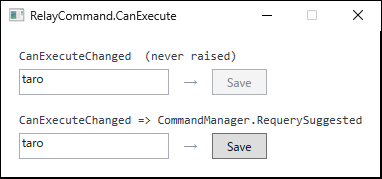
Name is not empty) and contain the same text, typed through WPF's input processing (InputManager) without calling InvalidateRequerySuggested or anything else. The upper implementation never raises CanExecuteChanged, so the button stays disabled after typing. The lower one delegates to CommandManager.RequerySuggested, so WPF requeries in response to the input and the button becomes enabled.Cause / Background
A command source, such as a Button, subscribes to ICommand.CanExecuteChanged and re-queries CanExecute only when that event is raised, updating its own enabled state accordingly.
The official documentation states that a command source typically subscribes to CanExecuteChanged, calls CanExecute when it is raised, and disables itself if the command cannot execute.
Therefore, no matter how the return value of CanExecute changes, the button never reflects it unless CanExecuteChanged is raised.
This evaluation only applies when an ICommand is actually assigned to Command.
If the binding fails to resolve and Command stays null, there is nothing to evaluate, and the button remains enabled while doing nothing (see Binding to the Parent DataContext from Inside a WPF DataTemplate).
The reason the built-in RoutedCommand rarely exposes this problem is that its CanExecuteChanged is delegated to CommandManager.RequerySuggested.
When the CommandManager detects conditions that might change a command’s ability to execute, such as a change in keyboard focus, it raises RequerySuggested and prompts every bound command to re-evaluate.
A custom RelayCommand does not ride on this mechanism, so it is responsible for raising CanExecuteChanged itself.
Note also that the CommandManager only detects UI interactions such as focus changes; it does not detect UI-independent condition changes, such as a view model property being updated.
Which way of raising the event reaches which implementation can be confirmed by displaying the button and reading IsEnabled.
The table below shows the button displayed while CanExecute returns false, the condition then changed so it returns true, and the result of calling nothing, CommandManager.InvalidateRequerySuggested(), the command’s own RaiseCanExecuteChanged(), or calling nothing and typing one key into the neighboring TextBox.
The delegating implementation has no event of its own, so RaiseCanExecuteChanged() has nothing to raise there and that combination is not measured.
| implementation / what was called | before | after |
|---|---|---|
| RequerySuggested / (nothing) | False | False |
| RequerySuggested / InvalidateRequerySuggested | False | True |
| RequerySuggested / key typed in a TextBox | False | True |
| own event / (nothing) | False | False |
| own event / InvalidateRequerySuggested | False | False |
| own event / RaiseCanExecuteChanged | False | True |
| own event / key typed in a TextBox | False | False |
| Command = null | True | True |
Measured on .NET 10 / Windows 11, reading Button.IsEnabled before and after CanExecute switches from false to true. before is taken just prior to changing the condition; after is taken once the condition changed and the listed call was made. The key input is sent through WPF’s input processing (InputManager).
With nothing called, IsEnabled stays False on both implementations. A changed return value from CanExecute alone does not reach the button.
Beyond that, the way the event is raised must match the implementation.
InvalidateRequerySuggested() reaches only an implementation that forwards CanExecuteChanged to CommandManager.RequerySuggested; it never reaches one that holds its own event.
RaiseCanExecuteChanged() is the reverse, reaching only the implementation with its own event.
The choice of approach therefore determines what has to be called when a condition changes.
As the key-input rows show, when the user types, WPF raises RequerySuggested and requeries. That, too, reaches only the delegating implementation; the one with its own event stayed False despite the input.
The last row is a control: a button whose Command is unset has nothing to evaluate, so it stays enabled throughout.
Two Ways to Raise the Notification
There are two ways to raise CanExecuteChanged.
- Delegate to
CommandManager.RequerySuggested— forward theCanExecuteChangedsubscription toCommandManager.RequerySuggested. This rides on the re-evaluation triggered by UI interactions with minimal code. For UI-independent conditions, callCommandManager.InvalidateRequerySuggested()to force a re-evaluation. - Raise
CanExecuteChangedmanually — keep a dedicated event and raise it explicitly when the condition changes. Re-evaluation is limited to the command in question, and the trigger is fully under control.
The former rides on WPF’s re-evaluation cycle; the latter re-evaluates only when explicitly told to.
Delegate to CommandManager.RequerySuggested
The add / remove of CanExecuteChanged is forwarded to CommandManager.RequerySuggested.
The CommandManager then prompts a re-evaluation on each UI interaction, such as a focus change, and the button follows.
public event EventHandler? CanExecuteChanged
{
    add    => CommandManager.RequerySuggested += value;
    remove => CommandManager.RequerySuggested -= value;
}
For condition changes without a UI interaction, such as a timer or the completion of an asynchronous operation, force a re-evaluation explicitly.
InvalidateRequerySuggested raises RequerySuggested, prompting the connected command sources (buttons subscribing through the built-in RoutedCommand or a delegating RelayCommand) to re-query CanExecute.
// Called when a condition changes without a UI interaction
CommandManager.InvalidateRequerySuggested();
This call does not evaluate immediately; it raises RequerySuggested to prompt the connected command sources to re-query CanExecute.
It therefore carries the cost of re-evaluating the command sources connected to RequerySuggested, as noted below.
Raise CanExecuteChanged manually
The CanExecuteChanged of the opening RelayCommand is changed to a dedicated event, and a method that raises it when re-evaluation is needed is added.
public class RelayCommand : ICommand
{
    private readonly Action _execute;
    private readonly Func<bool> _canExecute;

    public RelayCommand(Action execute, Func<bool> canExecute)
    {
        _execute = execute;
        _canExecute = canExecute;
    }

    public bool CanExecute(object? parameter) => _canExecute();
    public void Execute(object? parameter) => _execute();

    public event EventHandler? CanExecuteChanged;

    public void RaiseCanExecuteChanged()
        => CanExecuteChanged?.Invoke(this, EventArgs.Empty);
}
The view model initializes SaveCommand and calls RaiseCanExecuteChanged right after updating a property (Name) that CanExecute depends on.
The following is a compilable, minimal setup that re-evaluates whenever the save button’s condition, whether Name is entered, changes.
public class SaveViewModel
{
    public RelayCommand SaveCommand { get; }

    public SaveViewModel()
    {
        // Executable when Name is not empty
        SaveCommand = new RelayCommand(Save, () => !string.IsNullOrEmpty(Name));
    }

    private string _name = string.Empty;
    public string Name
    {
        get => _name;
        set
        {
            if (_name == value) return;
            _name = value;
            // The input state changed, so re-evaluate the save command
            SaveCommand.RaiseCanExecuteChanged();
        }
    }

    private void Save() { /* Implement the save logic */ }
}
With this approach, only SaveCommand is re-evaluated, and the timing is explicit.
The RelayCommand in CommunityToolkit.Mvvm uses this approach, exposing an equivalent trigger through the NotifyCanExecuteChanged() method and the [NotifyCanExecuteChangedFor] attribute.
The Prism DelegateCommand likewise keeps its own event, so CommandManager.InvalidateRequerySuggested() has no effect on commands from either library (Why InvalidateRequerySuggested Does Not Update CommunityToolkit.Mvvm and Prism Commands in WPF).
How to Choose
Which one applies is settled by where the condition that decides executability lives.
When executability is tied to UI interaction (focus movement, selection changes), delegate.
CommandManager prompts re-evaluation on those interactions, so the command follows along without raising anything. This needs the least code.
When executability is determined by a view model property, raise manually.
Only the target command is re-evaluated, at the moment the property changes, and the trigger is visible to the reader. Frameworks such as CommunityToolkit.Mvvm take this approach.
To reflect a UI-independent change while still delegating, call CommandManager.InvalidateRequerySuggested() at that point.
The completion of asynchronous work is one such trigger. It re-queries every command source connected to RequerySuggested, though, so a high frequency costs responsiveness.
Comparing the Approaches
| Approach | Pros | Cons | Best suited for |
|---|---|---|---|
Delegate to RequerySuggested |
Minimal code; follows UI interactions automatically | Re-queries the sources connected to RequerySuggested; opaque trigger; weak-reference caveat |
Executability tied mainly to UI interaction (focus, selection) |
Raise CanExecuteChanged manually |
Re-evaluates only the target command; explicit trigger | Requires an explicit raise per condition change | Executability determined by view model properties |
Call InvalidateRequerySuggested on demand |
Re-evaluates at any moment while delegating | Cost of re-querying the sources connected to RequerySuggested; easy to forget |
Reflecting UI-independent changes under the delegating approach |
Notes
RequerySuggestedholds handlers by weak reference:CommandManager.RequerySuggestedkeeps registered handlers as weak references. In the delegating approach, WPF provides the machinery that keeps the handler alive for as long as the command source (such as aButton) is, so this is usually fine. Registering a handler withRequerySuggestedyourself, on the other hand, means managing its lifetime so that it stays reachable; registered as a local variable or a bare lambda, re-evaluation stops the moment it is collected.- Call
InvalidateRequerySuggestedon the UI thread: the re-evaluation this API prompts is processed on the UI thread by theCommandManager, and the target command sources (UI elements) live on the UI thread as well. The call therefore assumes the UI thread; when state changes on a background thread, marshal to the UI thread with theDispatcherbefore calling it. - Raise manual events on the UI thread as well:
RaiseCanExecuteChangedsynchronously invokes the button-side handler, which updates a UI element. Raising it from another thread touches UI elements off the UI thread, so marshal to the UI thread with theDispatcher. - Keep
CanExecutelightweight:InvalidateRequerySuggestedmakes the command sources connected toRequerySuggestedre-queryCanExecute. Heavy work inside it makes frequent re-evaluation harm responsiveness. - Do not leave
CanExecuteChangeddeclared but unraised: the opening example, which declaresCanExecuteChangedwithout ever raising it, compiles cleanly yet is a classic reason the state stays frozen.
Summary
The button fails to update because of a missing CanExecuteChanged notification, not because of the CanExecute result itself.
The deciding question is whether the condition lives in UI interaction or in the view model.
Delegate to CommandManager.RequerySuggested for the former; raise manually for the latter.
Raising every notification on the UI thread and keeping CanExecute lightweight are the prerequisites for not harming responsiveness.
- Fixing the Cross-Thread Exception When Updating an ObservableCollection in WPF
- Button (WPF Standard Control Demo App): measures what enables a button with a
Commandand whenCanExecuteis asked again