Overview
When Windows Explorer lists file names, it displays them in a natural (logical) order such as item1, item2, item10, treating digit runs as numeric values.
The default string sort in .NET, however, produces item1, item10, item2, which does not match Explorer.
This article covers how to call the Win32 API StrCmpLogicalW through P/Invoke inside a class that implements IComparer<string> (and the non-generic IComparer) to reproduce Explorer’s ordering.
It also summarizes the pros and cons of this approach and compares it with the alternatives.
Prerequisites / Environment
- Language: C# 9.0 or later (the runnable examples in this article use top-level statements; the comparer class itself needs C# 7.0 or later for
is null, and P/Invoke works on any version) - Framework: .NET Framework 4.x / .NET 5 or later
- Runtime: Windows only (depends on
shlwapi.dll) - Use case: APIs that accept an
IComparer<string>, such asList<T>.Sortand LINQOrderBy - Verification environment: .NET 10 / Windows 11
The figure and tables in this article were measured in the environment above.
The figure and the order table come from sorting the same input with each comparer.
The pair table comes from passing two strings at a time to each comparer and reading the sign of the result.
The following points were confirmed in that environment:
- Under the default culture of the verification environment, both ordinal and culture-sensitive comparison place
item10beforeitem2. StrCmpLogicalWtreats a run of digits as a single number when comparing.StrCmpLogicalWis case-insensitive.
Problem
The goal is simply to sort file names or key strings in ascending order, yet the default sort produces an order different from Explorer.
var files = new List<string> { "item10", "item2", "item1", "item20", "item3" };
files.Sort();
// Actual result:   item1, item10, item2, item20, item3
// Expected result: item1, item2, item3, item10, item20
List<T>.Sort() uses Comparer<string>.Default, which compares digits as a sequence of characters.
As a result, comparing item10 and item2 decides the order by the fifth characters 1 and 2, placing item10 first.
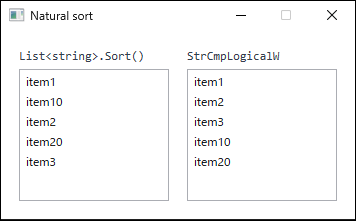
StrCmpLogicalW (right). The right-hand order matches Windows Explorer.Cause / Background
For ASCII strings such as this example, an ordinary string comparison—whether ordinal or culture-based—walks both strings character by character to decide the order.
item10 and item2 are equal up to item, and the next characters are 1 (U+0031) and 2 (U+0032).
Because 1 is less than 2, item10 is judged to come before item2 regardless of how many digits follow.
Explorer, by contrast, compares consecutive digits as a single numeric value.
The Win32 API that provides this “digits as numbers” comparison is StrCmpLogicalW in shlwapi.dll.
StrCmpLogicalW compares two Unicode strings and returns 0 if they are identical, 1 if the first argument is greater, and -1 if it is smaller.
The comparison is not case-sensitive.
Sorting the same input with each comparer shows the difference directly.
| comparer | resulting order |
|---|---|
| Ordinal | Item1, item10, item2, item20, item3 |
| CurrentCulture | Item1, item10, item2, item20, item3 |
| OrdinalIgnoreCase | Item1, item10, item2, item20, item3 |
| StrCmpLogicalW | Item1, item2, item3, item10, item20 |
Measured on .NET 10 / Windows 11, sorting item10, item2, Item1, item20, item3 with each comparer.
Ordinal, culture-aware, and case-insensitive ordinal comparison all give the same result. Case handling is not what is at stake here.
Only StrCmpLogicalW compares runs of digits as numbers and produces the expected order.
What each comparer returns for an individual pair can be checked as well.
| pair | StrCmpLogicalW | CompareOrdinal |
|---|---|---|
| "item2" vs "item10" | -1 (left first) | +1 (right first) |
| "item10" vs "item2" | +1 (right first) | -1 (left first) |
| "item2" vs "item2" | 0 (equal) | 0 (equal) |
| "Item2" vs "item2" | 0 (equal) | -1 (left first) |
| "item02" vs "item2" | -1 (left first) | -1 (left first) |
| "a" vs "B" | -1 (left first) | +1 (right first) |
Measured on .NET 10 / Windows 11 by passing each pair to StrCmpLogicalW and string.CompareOrdinal. Only the sign is shown.
The row for "Item2" against "item2" reads 0. StrCmpLogicalW ignores case, so it treats the two as equivalent.
"item02" and "item2" are not equivalent, and the zero-padded one sorts first: equal as numbers, they are ordered by their digit count.
Solution
Declare StrCmpLogicalW for P/Invoke with DllImport, and call it from the Compare method of a class that implements IComparer<string>.
Implementing IComparer<string> lets the same instance pass to both List<T>.Sort and LINQ OrderBy.
Implementing the non-generic IComparer as well allows older APIs such as ListCollectionView to use it.
Implementation
The following comparer wraps StrCmpLogicalW.
To bind the Unicode version of the shlwapi.dll function exactly, specify CharSet.Unicode and ExactSpelling = true.
null is handled explicitly before the call, because StrCmpLogicalW does not handle it as a comparer must (see Notes).
using System;
using System.Collections;
using System.Collections.Generic;
using System.Runtime.InteropServices;

public sealed class NaturalStringComparer : IComparer<string>, IComparer
{
    // Bind StrCmpLogicalW from shlwapi.dll via P/Invoke.
    // It treats digit runs as numeric values, close to Explorer's logical order.
    [DllImport("shlwapi.dll", CharSet = CharSet.Unicode, ExactSpelling = true)]
    private static extern int StrCmpLogicalW(string psz1, string psz2);

    // The comparer is stateless, so a single shared instance is enough.
    public static NaturalStringComparer Instance { get; } = new NaturalStringComparer();

    public int Compare(string x, string y)
    {
        // Establish the order for null in advance to avoid passing it to the API.
        if (ReferenceEquals(x, y)) return 0;
        if (x is null) return -1;
        if (y is null) return 1;
        return StrCmpLogicalW(x, y);
    }

    // Non-generic version for older APIs such as ListCollectionView.
    // Do not collapse type mismatches to null with 'as'; throw ArgumentException per the contract.
    int IComparer.Compare(object x, object y)
    {
        if (x != null && !(x is string)) throw new ArgumentException("A string is required.", nameof(x));
        if (y != null && !(y is string)) throw new ArgumentException("A string is required.", nameof(y));
        return Compare((string)x, (string)y);
    }
}
Because the class is stateless, Instance can be reused.
The same instance passes to both List<T>.Sort and LINQ OrderBy.
var files = new List<string> { "item10", "item2", "item1", "item20", "item3" };

// Pass IComparer<string> to List<T>.Sort to sort in place.
files.Sort(NaturalStringComparer.Instance);
// Result: item1, item2, item3, item10, item20

// Sort into a new sequence with LINQ.
var ordered = files.OrderBy(f => f, NaturalStringComparer.Instance).ToList();
// Result: item1, item2, item3, item10, item20
The second argument of OrderBy accepts an IComparer<TKey>, so returning the target string from the key selector reuses the same comparer.
Note that OrderBy and ToList require using System.Linq;.
Notes
- Windows only.
shlwapi.dllis a Windows library; on Linux or macOS the call throwsDllNotFoundException. The approach cannot be used where cross-platform execution is required. - Not based on linguistic collation.
StrCmpLogicalWis not a locale-aware linguistic sort. The official documentation states it “should not be used for canonical sorting applications” and that its return values “can change from release to release.” It is unsuitable for persisted key ordering or collations that require strict reproducibility. - Not case-sensitive.
Item2anditem2are treated as equal. A separate tiebreaker is needed to distinguish case. - Handle
nullcarefully. The documentation ofStrCmpLogicalWsays nothing aboutnull. On the test machine (Windows 10.0.26200), all three calls measured with anullargument,(null, "a"),("a", null), and even(null, null), returned-2, a value the documentation does not list. Swapping the arguments did not flip the sign and twonulls did not compare equal, which breaks the contract a comparer must keep. Handlenullbefore the call, as shown above. - Strings with embedded NUL characters are not compared correctly. Marshaling passes the string as null-terminated, so a string containing
"\0"is only compared up to the first\0. This comparer targets ordinary strings such as file names and does not account for embedded NUL characters. - P/Invoke has a cost. Every comparison incurs a native call. Sorting n elements invokes the comparison O(n log n) times, so the overhead can become noticeable compared with a pure managed implementation for extremely large collections.
Alternatives / Comparison
| Approach | Pros | Cons | Best suited for |
|---|---|---|---|
StrCmpLogicalW (this article) |
Closely follows Explorer’s order; a few lines of code | Windows only; not locale-aware linguistic collation; case-insensitive; behavior can change between releases | Windows desktop apps that must match the shell’s order |
| Custom natural comparer (split digit tokens and compare numerically) | Cross-platform; full control over behavior | More code; must handle overflow, leading zeros, etc. | Cross-platform apps on .NET 5+ |
StringComparer.Ordinal |
Standard, fast, culture-agnostic stable order | Does not treat digits as numbers, so not natural order | Internal collation that needs a stable order |
StringComparer.CurrentCulture |
Linguistically natural collation | Culture-dependent; order varies by environment; does not treat digits as numbers | User-facing display text |
Summary
For a Windows desktop app that must display file lists and similar data in an order close to Explorer’s, wrapping StrCmpLogicalW in an IComparer<string> implementation is the simplest approach.
A few lines of code yield an order close to the shell’s, and the comparer passes directly to both List<T>.Sort and OrderBy.
Note, however, that the official documentation discourages this function for canonical sorting, and its behavior can change between releases.
When cross-platform execution, case sensitivity, or a stable order for persisted keys is required, the constraints of this API (Windows only, not locale-aware linguistic collation, behavior that can change between releases) become problematic.
In that case, choose an implementation that splits digit tokens and compares them numerically.
Prefer StrCmpLogicalW when matching Explorer’s appearance is the top priority, and a custom implementation when portability and control matter more.