Overview
This article covers the C# operators and initialization syntax sugar introduced across versions from C# 1.0 through C# 12.
It explains which features are available in .NET Framework, which ones depend only on LangVersion, and which ones require additional BCL types or attributes.
The goal is to help with implementation decisions when newer syntax cannot be used in a legacy build environment.
Prerequisites / Environment
- Language: C# 1.0 to C# 12
- Frameworks: .NET Framework 2.0 to 4.8 / .NET Core / .NET 5 and later
- Target features: null-safe operators, index and range operators, type operators, and initialization syntax sugar
- Verification environment: .NET SDK 10.0.302 / .NET Framework 4.8.9337.0 / Windows 11
The tables in this article record what actually compiled.
Each construct was compiled against net10.0 with LangVersion lowered step by step to find the minimum the compiler accepts, and against net48 to determine whether the BCL supplies the types it needs.
For ^ and .., the compiled output was also executed on .NET Framework to confirm the returned values.
That process surfaced points that documentation alone does not reveal: init is not a pure language feature, whether with needs a BCL type depends on the target type, and required needs different attributes with init and with set. They are explained in footnotes †3 to †5 of the table.
Problem
In C# development targeting .NET Framework, a project may be compiled with a language version earlier than C# 8.0.
In that case, syntax such as ??= cannot be used even if the target framework itself is otherwise capable of running the code.
private List<int> _numbers;

public void AddNumber(int val)
{
    _numbers ??= new List<int>(); // Compilation error in environments that compile below C# 8.0
    _numbers.Add(val);
}
This becomes an issue when newer syntax is used in source code but the compiler is configured with an older LangVersion.
Cause / Background
C# language version support is independent of the target framework.
Feature availability depends mainly on two factors:
- The compiler and
LangVersion. - Runtime-side requirements such as BCL types or attributes.
As a result, even when targeting .NET Framework, language features such as ??= and ! can be used once LangVersion is set to 8.0 or later; a newer compiler alone keeps the .NET Framework default of C# 7.3 (see †1).
The following table summarizes the operators and syntax covered in this article and the C# version in which they were introduced.
Plotted over time, they line up as follows.
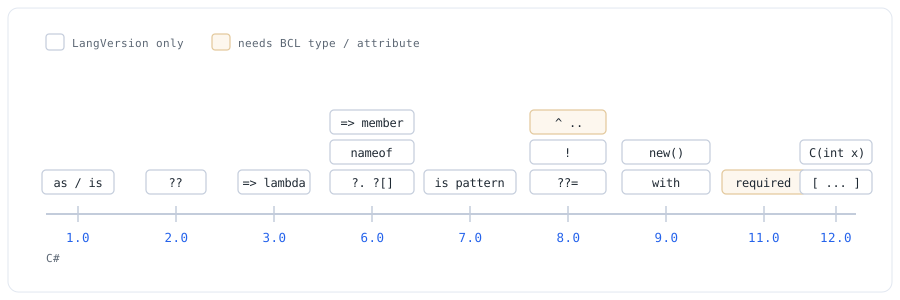
LangVersion: they depend on a BCL type or attribute. ??= sits at C# 8.0. The shading matches the compilation results in the next section.| Operator / Syntax | C# Version | .NET Version | .NET Framework Support |
|---|---|---|---|
?? (null-coalescing) |
C# 2.0 | .NET Framework 2.0 | ✅ Supported from 2.0 onward |
as (type cast) |
C# 1.0 | .NET Framework 1.0 | ✅ All versions |
is (type check) |
C# 1.0 | .NET Framework 1.0 | ✅ All versions |
=> (lambda) |
C# 3.0 | .NET Framework 3.5 | ✅ Language feature only (†1) |
=> (expression-bodied members) |
C# 6.0 | .NET Framework 4.6 | ✅ Language feature only (†1) |
?. ?[] (null-conditional) |
C# 6.0 | .NET Framework 4.6 | ✅ Language feature only (†1) |
nameof |
C# 6.0 | .NET Framework 4.6 | ✅ Language feature only (†1) |
is pattern matching |
C# 7.0 | .NET Framework 4.7 | ✅ Language feature only (†1) |
??= (null-coalescing assignment) |
C# 8.0 | .NET Core 3.0 / .NET 5 | ✅ Language feature only (†1) |
! (null-forgiving) |
C# 8.0 | .NET Core 3.0 / .NET 5 | ✅ Language feature only (†1) |
^ (index from end) |
C# 8.0 | .NET Core 3.0 / .NET 5 | ⚠️ Requires BCL type (†2) |
.. (range) |
C# 8.0 | .NET Core 3.0 / .NET 5 | ⚠️ Requires BCL type (†2) |
init accessor |
C# 9.0 | .NET 5 | ⚠️ Requires BCL type (†3) |
with (record class) |
C# 9.0 | .NET 5 | ⚠️ Requires a BCL type (†3) |
with (mutable struct / positional record struct) |
C# 10.0 | .NET 6 | ✅ Language feature only (†1, †5) |
Target-typed new |
C# 9.0 | .NET 5 | ✅ Language feature only (†1) |
required property |
C# 11.0 | .NET 7 | ⚠️ Requires BCL attributes (†4) |
| Collection expressions | C# 12.0 | .NET 8 | ✅ Language feature only for arrays and List<T> (†1); span targets need System.Memory |
| Primary constructors | C# 12.0 | .NET 8 | ✅ Language feature only (†1) |
- †1: Pure language features. These can be used on .NET Framework once
LangVersionis set to the corresponding C# version. Updating the SDK or Visual Studio is not enough on its own: a project targeting .NET Framework defaults to C# 7.3 and does not move off it when the tooling is updated, soLangVersionhas to be set explicitly in the.csproj. - †2: Requires
System.Index/System.Range, added in .NET Core 3.0+. Array slicing witha[1..3]additionally requiresSystem.Runtime.CompilerServices.RuntimeHelpers.GetSubArray. - †3: Requires
System.Runtime.CompilerServices.IsExternalInit, added in .NET 5+. Whether awithexpression needs it depends on whether the target type hasinitaccessors. Arecordclass and areadonly record structgenerate them and therefore need it; a mutablestructand a positionalrecord structdo not. - †4: Paired with
init, it needsCompilerFeatureRequiredAttributeandIsExternalIniton top ofRequiredMemberAttribute(all inSystem.Runtime.CompilerServices). Paired withset,IsExternalInitis not involved and the first two suffice. Holding it on arecord, or setting it from a constructor marked[SetsRequiredMembers], additionally needsSystem.Diagnostics.CodeAnalysis.SetsRequiredMembersAttribute. - †5: A mutable
structand a positionalrecord structdo not generateinit, soIsExternalInitis not required. Thewithexpression itself is C# 10.0 or later, however: leavingLangVersionat 9.0 fails withCS8773.
Classifying init as †1 (language feature only) is incorrect.
A with expression whose target has init accessors carries the same constraint: it does not compile on .NET Framework, where IsExternalInit does not exist, no matter how high LangVersion is set.
The next section shows this classification as actual compiler output.
Compilation Results Against .NET Framework 4.8
The table below records the result of compiling each construct against net48 with LangVersion=latest.
Whether defining the missing type makes it compile was checked the same way.
| net48 | missing type | + polyfill | |
|---|---|---|---|
| ??= | OK | - | - |
| ! | OK | - | - |
| new() | OK | - | - |
| [1, 2, 3] | OK | - | - |
| C(string p) | OK | - | - |
| a[^1] | NG | Index | OK |
| a[1..3] | NG | Range +1 | OK |
| { get; init; } | NG | IsExternalInit | OK |
| struct s with { } | OK | - | - |
| record struct s with { } | OK | - | - |
| readonly record struct s with { } | NG | IsExternalInit | OK |
| record r with { } | NG | IsExternalInit | OK |
| required + init | NG | IsExternalInit +2 | OK |
| required + set | NG | RequiredMemberAttribute +1 | OK |
| record with required | NG | IsExternalInit +3 | NG |
| + SetsRequiredMembersAttribute | NG | IsExternalInit +3 | OK |
| [SetsRequiredMembers] ctor | NG | IsExternalInit +3 | NG |
| + SetsRequiredMembersAttribute | NG | IsExternalInit +3 | OK |
Compiled with .NET SDK 10.0.302 against net48 at LangVersion=latest. missing type is the type the compiler reported as absent; when several are missing, the first is named along with the count of the rest. + polyfill is the result of recompiling after defining those types locally.
Four things follow from the table.
1. ??= and ! work on .NET Framework by raising LangVersion alone.
The same holds for target-typed new, primary constructors, and collection expressions that create arrays or List<T>.
For the problem this article opens with — ??= being unavailable — raising LangVersion is sufficient.
2. init, and with on a type that has init, do not compile even at the highest LangVersion.
System.Runtime.CompilerServices.IsExternalInit does not exist on .NET Framework.
What decides this is not the with syntax but whether the target type has init accessors.
As the table shows, with on a mutable struct and on a positional record struct compiles on net48 as-is, because those generate ordinary setters.
A record class and a readonly record struct generate init and therefore need IsExternalInit.
3. What required needs depends on whether it is paired with init.
required can be declared alongside either init or set.
Paired with init it needs all three of RequiredMemberAttribute, CompilerFeatureRequiredAttribute, and IsExternalInit.
Paired with set it needs only the first two — IsExternalInit is not involved, as the differing count of missing types on the two rows shows.
Either way, defining RequiredMemberAttribute alone does not resolve it.
A record holding a required member needs System.Diagnostics.CodeAnalysis.SetsRequiredMembersAttribute on top of those.
The compiler marks the generated copy constructor with it, so the three alone produce CS0656.
The same applies to setting required members from a constructor explicitly marked [SetsRequiredMembers]. The four corresponding rows of the table measure exactly that.
4. The C# version that allows with depends on the shape of the target type.
A record class works from C# 9.0, but a struct and a record struct require C# 10.0.
Writing with against a struct at LangVersion 9.0 fails with CS8773.
The table below records the lowest LangVersion that compiles for each construct.
| default (no LangVersion) | minimum LangVersion | |
|---|---|---|
| ??= | NG | 8.0 |
| new() | NG | 9.0 |
| record class + with | NG | 9.0 |
| struct + with | NG | 10.0 |
| record struct + with | NG | 10.0 |
| [1, 2, 3] | NG | 12.0 |
Measured with .NET SDK 10.0.302 against net48, raising LangVersion from 7.3 upward and recording the first value that compiles. Constructs needing BCL types were measured with their polyfill applied.
Note that every row fails in the column with no LangVersion set. A project targeting .NET Framework stays on C# 7.3 by default and does not move off it when the SDK or Visual Studio is updated.
LangVersion has to be stated explicitly in the .csproj.
In every case, defining the missing types locally makes the code compile. The definitions appear under “Option 3: Supply the missing types yourself” below.
Three Ways to Deal with It
When a compile error occurs because of new C# syntax, there are three main approaches.
Option 1: Raise LangVersion or update the build environment
The C# version used by a project can be controlled by specifying <LangVersion> in the project file (.csproj).
<Project Sdk="Microsoft.NET.Sdk">
  <PropertyGroup>
    <TargetFramework>net481</TargetFramework>
    <LangVersion>8.0</LangVersion>  <!-- Enables ??= and ! -->
  </PropertyGroup>
</Project>
Updating Visual Studio or the .NET SDK can also make a newer compiler available.
Option 2: Rewrite to older syntax
When the build environment cannot be changed, or when required BCL types are missing, equivalent older syntax can be used instead.
// When ??= cannot be used
_numbers = _numbers ?? new List<int>();

// When ^ cannot be used because System.Index is unavailable
int last = array[array.Length - 1];

// When .. cannot be used because System.Range is unavailable
int[] sliced = array.Skip(1).Take(3).ToArray();
These examples preserve the same meaning while using older syntax. The LINQ example requires using System.Linq;.
Option 3: Supply the Missing Types Yourself
When only a BCL type is missing, defining that type in your own project makes the code compile.
The compiler looks for a type with a matching namespace and shape; which assembly provides it is irrelevant.
The definitions below were compiled against net48 and confirmed to work.
For init and with, define IsExternalInit.
namespace System.Runtime.CompilerServices
{
    // Marker type required by init accessors and records. No members are needed.
    internal static class IsExternalInit { }
}
For required, two more attributes are needed.
using System;

namespace System.Runtime.CompilerServices
{
    internal static class IsExternalInit { }

    [AttributeUsage(AttributeTargets.Class | AttributeTargets.Struct
        | AttributeTargets.Field | AttributeTargets.Property, Inherited = false)]
    internal sealed class RequiredMemberAttribute : Attribute { }

    [AttributeUsage(AttributeTargets.All, AllowMultiple = true, Inherited = false)]
    internal sealed class CompilerFeatureRequiredAttribute : Attribute
    {
        public CompilerFeatureRequiredAttribute(string featureName) => FeatureName = featureName;

        public string FeatureName { get; }
    }
}

namespace System.Diagnostics.CodeAnalysis
{
    [AttributeUsage(AttributeTargets.Constructor, AllowMultiple = false, Inherited = false)]
    internal sealed class SetsRequiredMembersAttribute : Attribute { }
}
That last SetsRequiredMembersAttribute is needed for a record holding a required member, and for setting one from a constructor marked [SetsRequiredMembers].
Note that its namespace differs from the other three. Writing required on a plain class compiles without it, but including it costs nothing.
For ^ and .., define System.Index and System.Range, plus the RuntimeHelpers.GetSubArray method that array slicing compiles down to.
using System;

namespace System
{
    internal readonly struct Index
    {
        private readonly int _value;

        public Index(int value, bool fromEnd = false) => _value = fromEnd ? ~value : value;

        public int Value => _value < 0 ? ~_value : _value;

        public bool IsFromEnd => _value < 0;

        public int GetOffset(int length) => IsFromEnd ? length - Value : Value;

        public static implicit operator Index(int value) => new Index(value);
    }

    internal readonly struct Range
    {
        public Range(Index start, Index end) { Start = start; End = end; }

        public Index Start { get; }

        public Index End { get; }

        public (int Offset, int Length) GetOffsetAndLength(int length)
        {
            int start = Start.GetOffset(length);
            int end = End.GetOffset(length);

            // Without these checks a[3..1] yields a negative length. The real System.Range
            // throws ArgumentOutOfRangeException, so match that.
            if ((uint)end > (uint)length || (uint)start > (uint)end)
            {
                throw new ArgumentOutOfRangeException(nameof(length));
            }

            return (start, end - start);
        }
    }
}

namespace System.Runtime.CompilerServices
{
    // The compiler rewrites a[1..3] on an array into a call to this method.
    internal static class RuntimeHelpers
    {
        public static T[] GetSubArray<T>(T[] array, Range range)
        {
            (int offset, int length) = range.GetOffsetAndLength(array.Length);
            var result = new T[length];
            Array.Copy(array, offset, result, 0, length);
            return result;
        }
    }
}
Running a net48 console application that includes these definitions returns the same values as .NET 5 and later.
For int[] a = { 10, 20, 30, 40, 50 }, a[^1] returned 50 and a[1..3] returned [20, 30] on actual .NET Framework.
A Caveat About NuGet Packages
IndexRange is a package that supplies Index and Range.
There is no NuGet package named System.Index — nuget.org returns 404 for it.
IndexRange is deprecated for projects targeting netstandard2.0 or .NET Framework 4.6.2 and later, though; its package description directs those to Microsoft.Bcl.Memory instead.
The net48 target this article uses falls under that, so Microsoft.Bcl.Memory is the choice for a new project. What follows is measured for projects that already reference IndexRange.
Referencing IndexRange 1.1.1 from net48 makes a[^1] and the Index / Range types available, but array slicing with a[1..3] still fails to compile.
error CS0656: Missing compiler required member
'System.Runtime.CompilerServices.RuntimeHelpers.GetSubArray'
The package does not include GetSubArray.
Array slicing therefore still requires defining RuntimeHelpers as shown above.
Notes on Defining These Yourself
RuntimeHelpersalso exists inmscorlib. Defining it locally makes the local type win inside that project. The otherRuntimeHelpersmembers are lost not only where they are called explicitly but also where compiler-generated code calls them: with this local type,fixed (char* p = "abc")failed onnet48withCS0656, because the compiler callsRuntimeHelpers.OffsetToStringDatafor a string infixed. Implement every member that the project needs on the local type. Writing the fully qualified name does not reach the BCL type —System.Runtime.CompilerServices.RuntimeHelpers.InitializeArraystill resolves to the local type and fails withCS0117(verified onnet48). If adding those members is undesirable, avoid the array-slicing polyfill and useSkip/Takeinstead.- Declare all of these as
internal. Making thempubliccan collide with the types of assemblies that reference yours. - Remove the definitions after retargeting to .NET 5 or later. Duplicating a BCL type means the local definition wins, which can produce unintended behavior.
Syntax by Version
1. Null-safe operators
?. and ?[] (null-conditional operators) — C# 6.0 and later
These operators access members or elements only when the object or collection is not null.
If the target is null, evaluation stops and null is returned, which removes the need for a separate null check.
string title = GetTitle();
int? length = title?.Length; // length becomes null if title is null

List<string> items = GetItems();
string firstItem = items?[0]; // firstItem becomes null if items is null
?. and ?[] can be combined in a chain.
If any step evaluates to null, the entire chain returns null.
?? (null-coalescing operator) — C# 2.0 and later
This operator returns the left-hand value when it is not null.
If the left-hand value is null, the right-hand value is returned instead.
It is used to provide a default value for nullable expressions.
string typedName = GetName();
string displayName = typedName ?? "Anonymous"; // "Anonymous" when typedName is null
?? has been supported since .NET Framework 2.0 and can be used regardless of version within that runtime range.
??= (null-coalescing assignment operator) — C# 8.0 and later
This operator assigns the right-hand value only when the left-hand variable is null.
It is often used for lazy initialization.
private List<int> _numbers;

public void AddNumber(int val)
{
    _numbers ??= new List<int>(); // Create the instance only when _numbers is null
    _numbers.Add(val);
}
When the build environment compiles below C# 8.0, this syntax cannot be used.
An equivalent rewrite is shown below.
_numbers = _numbers ?? new List<int>();
This form expresses the same intent, although ??= is more concise in environments that support it.
! (null-forgiving operator) — C# 8.0 and later
This operator tells the C# static analyzer that a value is definitely not null at that point in the code.
It suppresses nullable warnings at compile time only and does not change runtime behavior.
string? rawInput = GetValidatedInput();
// Assume validation guarantees that the value is not null here.
string solidInput = rawInput!;
Using ! removes a null check from the compiler’s analysis.
If null is actually passed, a runtime exception can still occur.
For that reason, usage should be kept to a minimum.
2. Index and range
^ (index from end operator) — C# 8.0 and later
This operator creates a System.Index value that represents a position counted from the end of a collection.
^1 refers to the last element (Length - 1), and ^0 refers to the position just past the last element (Length).
int[] digits = new[] { 10, 20, 30, 40 };
int last = digits[^1];          // 40, equivalent to digits[digits.Length - 1]
int secondFromLast = digits[^2]; // 30
On .NET Framework, System.Index is not provided by default.
Without an additional reference or polyfill, the ^ operator cannot be used.
An explicit index calculation such as array[array.Length - 1] is the alternative.
.. (range operator) — C# 8.0 and later
This operator creates a System.Range value from a start index and an end index, and it enables intuitive slicing of arrays and strings.
The start index is included, and the end index is excluded.
int[] dataset = new[] { 0, 1, 2, 3, 4, 5 };
int[] sliced = dataset[1..4]; // [1, 2, 3]

// Omitting start or end
int[] continuous = dataset[2..];  // [2, 3, 4, 5]
int[] allButLast = dataset[..^1]; // [0, 1, 2, 3, 4]
The .. operator requires System.Range.
On .NET Framework, it cannot be used without an additional reference or polyfill.
A common alternative is array.Skip(start).Take(count).ToArray() with LINQ.
3. Type operators
is and as (type check and type cast operators)
is checks whether an object is compatible with a specific type.
From C# 7.0 onward, it can be combined with pattern matching to declare and assign a variable when the type matches.
as attempts a type conversion and returns the cast object on success.
If the conversion fails, it returns null instead of throwing an exception.
object element = "Hello WPF";

// is pattern matching (C# 7.0 and later)
if (element is string message)
{
    Console.WriteLine(message.Length); // Treated as string within this block
}

// as operator
var stream = element as System.IO.Stream; // stream becomes null because conversion fails
A direct cast such as (Type)obj throws InvalidCastException when the conversion fails.
By contrast, as returns null, which makes it suitable when type compatibility is uncertain.
4. Data manipulation and other operators
=> (lambda operator / expression-bodied members) — C# 3.0 / C# 6.0 and later
C# 3.0 introduced => as the syntax for lambda expressions.
C# 6.0 later extended it to expression-bodied members, which allow properties and methods to be written in a single expression.
public class Rectangle
{
    private readonly double _width;
    private readonly double _height;

    public Rectangle(double width, double height)
    {
        _width = width;
        _height = height;
    }

    // Expression-bodied property (C# 6.0)
    public double Area => _width * _height;

    // Expression-bodied method (C# 6.0)
    public void PrintArea() => Console.WriteLine($"Area: {Area}");
}
Expression-bodied members are effective when the logic can be expressed as a single expression.
They reduce boilerplate and improve readability in small members.
nameof — C# 6.0 and later
This operator returns the identifier name of a variable, type, property, or method as a string at compile time.
It avoids hard-coded string literals, which improves refactor safety and reduces typos.
public void UpdateText(string? newText)
{
    if (newText == null)
    {
        throw new ArgumentNullException(nameof(newText));
    }
}
The result of nameof is a compile-time constant.
For that reason, it can also be used in case labels and attribute arguments.
with expression — C# 9.0 for a record class, C# 10.0 for structs
This expression creates a copy of an existing record or struct, changing only selected properties.
The original instance itself remains unchanged.
What it produces, however, is a shallow copy: every instance field is duplicated, private ones included (a private field of a record kept its value through with on net48), and reference-type members keep pointing at the same objects.
Mutating a nested mutable object through the copy is therefore visible from the original as well.
public record WindowSettings(string Title, double Width, double Height);

var defaultSettings = new WindowSettings("Main", 800, 600);
var tallSettings = defaultSettings with { Height = 1000 };
The C# version that allows with depends on the shape of the target type.
A record class works from C# 9.0; a struct and a record struct require C# 10.0 (writing with against a struct at LangVersion 9.0 fails with CS8773).
IsExternalInit is required only when the target type has init accessors.
A record class and a readonly record struct generate them and therefore need it.
A mutable struct and a positional record struct do not, so raising LangVersion to 10.0 is enough for them on .NET Framework.
5. Initialization syntax sugar
Target-typed new — C# 9.0 and later
When the instantiation type can be inferred from the target type on the left-hand side or from a method parameter, the type name after new can be omitted.
public class Example
{
    public void Run()
    {
        // Traditional form
        Dictionary<string, List<string>> map1 = new Dictionary<string, List<string>>();

        // Target-typed new
        Dictionary<string, List<string>> map2 = new();

        // Applied to method arguments
        RegisterNumbers(new() { 1, 2, 3 });
    }

    private void RegisterNumbers(List<int> numbers) { }
}
The type can be omitted only when it is unambiguous from the left-hand side or from the parameter type.
var cannot be combined with this syntax, because the right-hand side type would no longer be inferable.
For that reason, var map = new(); is a compile error.
Collection expressions — C# 12.0 and later
This syntax provides a unified [...] notation for initializing arrays, List<T>, Span<T>, and other custom collections.
int[] row = [1, 2, 3];                     // Array
List<string> tags = ["C#", "WPF", ".NET"]; // List<T>
ReadOnlySpan<byte> data = [0x00, 0x01];    // Span<T> (on .NET Framework, needs the System.Memory package)
Inside a collection expression, the .. spread operator can be used to flatten and combine another collection’s elements.
int[] left = [1, 2];
int[] right = [5, 6];

int[] result = [.. left, 3, 4, .. right]; // Produces [1, 2, 3, 4, 5, 6]
Collection expressions were introduced in C# 12.0 and require a compiler and SDK that support C# 12.0 or later.
required property — C# 11.0 and later
A property marked with required must be initialized when the object is created through an object initializer.
This prevents missed initialization without adding extra constructor parameters.
public class AppTheme
{
    public required string ThemeName { get; init; } // Required at initialization time
    public string Author { get; init; } = "Unknown"; // Optional, because a default value exists
}

// Compiles successfully
var lightTheme = new AppTheme { ThemeName = "Light Mode" };

// Compile error because ThemeName is not specified
// var invalidTheme = new AppTheme { Author = "s-iguchi" };
required was introduced in C# 11.0. Starting with .NET 7, the attributes it needs are provided by the platform.
On .NET Framework, three types are missing. Compiling the example above against net48 reports all three at once.
System.Runtime.CompilerServices.RequiredMemberAttributeSystem.Runtime.CompilerServices.CompilerFeatureRequiredAttributeSystem.Runtime.CompilerServices.IsExternalInit(because the example uses aninitaccessor)
Defining RequiredMemberAttribute alone does not resolve it.
All three definitions appear under “Option 3: Supply the Missing Types Yourself”.
Primary constructor — C# 12.0 and later
Starting with C# 12, class and struct types can define constructor parameters directly after the type name.
This removes the need for a constructor body or boilerplate field assignments.
public enum LogLevel { Debug, Info, Warning, Error }

public class LogWriter(string logFilePath, LogLevel minimumLevel)
{
    // Parameters can be referenced directly from within the class.
    public void WriteLog(string message, LogLevel level)
    {
        if (level >= minimumLevel)
        {
            System.IO.File.AppendAllText(logFilePath, $"[{level}] {message}\n");
        }
    }
}
The values passed as parameters, such as logFilePath and minimumLevel, can be referenced directly from any member of the class.
Primary constructors were introduced in C# 12.0 and require a compiler and SDK that support C# 12.0 or later.
Notes
- Even when targeting .NET Framework, language features such as
??=and!can be used if the compiler andLangVersionsupport them. !suppresses compile-time warnings only and does not perform a runtime null check.
Ifnullis actually passed to the marked location, aNullReferenceExceptioncan still occur.- Target-typed
new, primary constructors, and collection expressions that create arrays orList<T>are pure language features and work on .NET Framework onceLangVersionis raised (confirmed againstnet48). A collection expression forReadOnlySpan<T>failed onnet48withCS0246, because the type itself is missing without theSystem.Memorypackage.
initis not a pure language feature, and neither iswithwhen its target hasinitaccessors. Both requireIsExternalInit, so raisingLangVersionalone does not make them compile on .NET Framework. Awithexpression on a mutablestructor a positionalrecord structdoes compile, because those generate ordinary setters rather thaninit.
requiredadditionally requiresRequiredMemberAttributeandCompilerFeatureRequiredAttribute. - The
..spread operator in collection expressions uses the same symbol as the C# 8.0 range operator, but the purpose is different.
In collection expressions, it expands elements within the collection literal.
Comparing the Approaches
The following table compares the approaches for handling compile errors caused by new C# syntax. The three approaches above are split into five rows, one per decision point.
| Approach | Pros | Cons | Best suited for |
|---|---|---|---|
Raise LangVersion |
New syntax can be used directly. Code remains concise. | Requires updates to the build environment such as Visual Studio or the SDK. | Projects where compiler settings can be changed. |
| Update the build environment | Provides the latest language features (together with a raised LangVersion) and tooling support. |
May have a wider impact on existing projects. | New development or environments that can be updated. |
| Rewrite to older syntax | Works without changing the environment. | Code becomes more verbose and newer features cannot be used. | Legacy environments where updates are not allowed. |
| Define the missing types yourself | Enables ^, .., init, with, and required on .NET Framework. No extra package needed. |
The definitions need maintaining and must be removed when retargeting to .NET 5+. RuntimeHelpers shadows the BCL type of the same name. |
Projects that need BCL-dependent syntax but must stay on .NET Framework. |
Reference Microsoft.Bcl.Memory |
Supplies Index / Range. This is the package recommended from .NET Framework 4.6.2 onward. |
How it handles the GetSubArray that array slicing a[1..3] needs has to be checked separately. |
Filling the gap from NuGet in a new project. |
Reference the IndexRange package |
Supplies Index / Range and makes a[^1] work. |
Does not cover array slicing a[1..3], since it omits GetSubArray; that still needs a local definition. Deprecated from 4.6.2 onward. |
Projects that already reference it. |
Summary
C# operators and initialization syntax have been added gradually across language versions.
Whether a feature can be used depends mainly on the compiler configuration (LangVersion) and on any runtime-side types or attributes the feature requires.
The following selection criteria are practical guidelines.
- .NET Framework without compiler updates:
??(C# 2.0),?.(C# 6.0),nameof(C# 6.0), andispattern matching (C# 7.0) are the upper baseline. - .NET Framework with
LangVersionraised:??=,!, target-typednew, collection expressions for arrays andList<T>, primary constructors, andwithon a mutablestructor a positionalrecord structbecome available (confirmed againstnet48).^,..,init,withon a type withinitaccessors (arecordclass or areadonly record struct), andrequiredremain unusable until the missing BCL types are defined. - .NET 5 to 6 (C# 9 to 10): the C# 9 to 10 features covered in this article are available, including the supporting BCL types they need.
- .NET 7 (C# 11) and later:
requiredproperties are available. - .NET 8 (C# 12) and later: collection expressions and primary constructors are available.
Compiling against net48 showed that whether a construct is a pure language feature cannot be inferred from how it looks.
with reads like an operator yet requires IsExternalInit on a type with init accessors, while larger additions such as primary constructors and collection expressions require no BCL type at all.
The reliable way to tell whether raising LangVersion is enough, or whether types must be supplied, is to compile against the target framework and see.
The compiler names the missing types in CS0518 / CS0656, which can then be defined directly.