Overview
When a string containing _ (underscore) is set as the Content of a WPF Label control, the underscore is not rendered and disappears from the display.
This behavior is by design in WPF. This article explains the cause and the representative workarounds.
The issue is commonly treated as specific to Label, but the same result occurs on several other controls including Button and CheckBox.
This article establishes the affected range of controls through measurement, then presents four workarounds and the criteria for choosing among them.
Prerequisites / Environment
- Framework / Language: .NET 10 / C# / WPF / XAML
- Target controls: standard controls whose default template sets
ContentPresenter.RecognizesAccessKeytoTrue—Label,Button,CheckBox,RadioButton,ToggleButton, and theHeaderofGroupBox,Expander,TabItem, andMenuItem - Architecture: Applies to both MVVM and code-behind approaches
- Verification environment: Windows 11, default theme (Aero2), display scaling 100%
- Prior knowledge: WPF basics, XAML fundamentals
The figures and measured values in this article were captured by actually running an application in the environment above.
Other versions and themes were not verified. Because the behavior depends on RecognizesAccessKey in the default templates, results can differ where the theme or ControlTemplate has been replaced.
Problem
When a string containing an underscore (for example, my_variable) is set on a Label’s Content, the screen displays myvariable with the underscore missing.
When the string contains _F, the letter F is rendered with an underline instead of showing _F as-is.
The same issue occurs with dynamically bound data: if the bound string contains an underscore, it is silently dropped from the display.
File paths, identifiers, database column names, and snake_case keys are all common cases where underscores reach the screen.
Feeding such values directly into a Label often goes unnoticed during development and surfaces only once real data is displayed.
Cause / Background
Label internally uses a control called AccessText to render its text.
AccessText interprets underscores as markers for access keys — the shortcut feature that moves focus to a control when the corresponding Alt key combination is pressed.
The specific rendering behavior is as follows:
| Input string | Rendered output | Interpretation |
|---|---|---|
_File |
File | F is registered as the access key |
my_var |
myvar | v is registered as the access key |
name_ |
name_ | No character follows, so the underscore remains visible |
The image below shows those three cases rendered by an actual application.
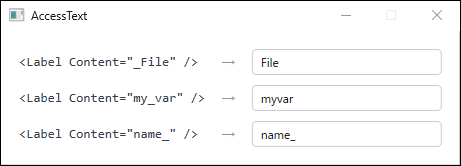
Label on .NET 10 / Windows 11. The left column is the XAML markup and the right column is the actual rendering. _File and my_var lose their underscore, while name_ is not treated as an access key because no character follows it.As a result, display corruption occurs simply because the data contains an underscore.
Because the underscore is only consumed when a character follows it, the outcome depends on where the underscore sits in the string.
When a string contains multiple underscores, only the first one is registered as an access key.
Given a_b_c, the access key becomes b and the second underscore is rendered as-is.
What Decides Whether AccessText Is Used
Whether AccessText is used is determined not by the Label type itself, but by the RecognizesAccessKey property of the ContentPresenter placed in the default ControlTemplate.
The ContentPresenter produces an AccessText only when RecognizesAccessKey is True and the string contains an underscore.
For a string without one, a plain TextBlock is used even though RecognizesAccessKey is True.
Walking the visual tree makes the difference explicit.
Content |
Visual tree that gets built |
|---|---|
Status Running |
Label → Border → ContentPresenter → TextBlock |
Status _Running |
Label → Border → ContentPresenter → AccessText → TextBlock |
An AccessText layer is inserted only when the content contains an underscore.
The accurate statement is therefore not that Label swallows underscores, but that a ContentPresenter with RecognizesAccessKey="True" does.
Which Controls Are Affected
Label is not the only control whose default template sets RecognizesAccessKey to True.
The table below records whether an AccessText appears in the visual tree when the same string my_var is assigned to each control.
| Control | Underscore handling | Affected property |
|---|---|---|
Label |
Removed | Content |
Button |
Removed | Content |
CheckBox |
Removed | Content |
RadioButton |
Removed | Content |
ToggleButton |
Removed | Content |
GroupBox |
Removed | Header only |
Expander |
Removed | Header only |
TabItem |
Removed | Header only |
MenuItem |
Removed | Header only (both top level and submenu) |
TreeViewItem |
Preserved | — |
ListBoxItem |
Preserved | — |
ComboBoxItem |
Preserved | — |
StatusBarItem |
Preserved | — |
TextBlock |
Preserved | — |
The table above was not compiled by eye: each control was given the same string and displayed, and its visual tree was walked to see whether an AccessText appeared.
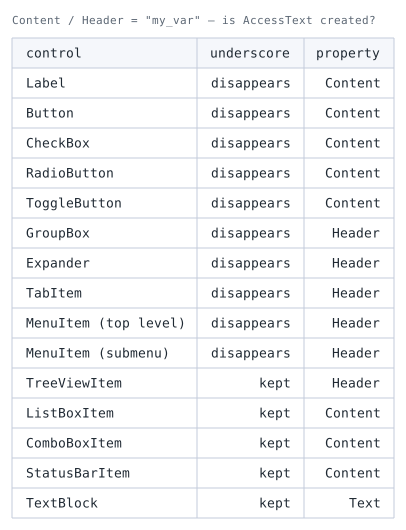
disappears means an AccessText was generated in the visual tree; kept means none was. ComboBoxItem and the submenu MenuItem were inspected after opening their popups so that the containers are realized.On these header-bearing controls, the only ContentPresenter with RecognizesAccessKey="True" is the one that renders the Header.
How the main Content is rendered differs by control.
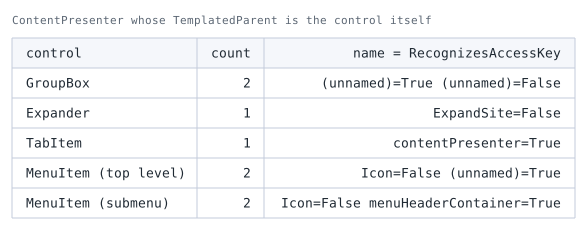
ContentPresenter instances. Only presenters whose TemplatedParent is the control itself are counted. name is the name within the template; (unnamed) means none was assigned.Three things follow from the figure.
The Header presenter of Expander does not live in the Expander’s own template.
Its own template holds only ExpandSite, the presenter for Content, whose RecognizesAccessKey is False.
The one that renders the Header lives in the template of the header ToggleButton.
TabItem is the reverse: its own template holds only the presenter for Header.
The selected Content is rendered by PART_SelectedContentHost on the parent TabControl.
MenuItem changes template with menu level, but neither the count nor RecognizesAccessKey changes.
At both the top level and in a submenu it has two — Icon (False) and the header presenter (True).
Only the header presenter’s name differs, (unnamed) versus menuHeaderContainer.
On Expander and TabItem, then, the presenters for Header and Content are split across different controls’ templates.
Which template a ContentPresenter belongs to can be determined from its TemplatedParent.
Walking the visual tree alone also counts template parts belonging to child controls.
The figure counts only presenters whose TemplatedParent is the control itself, and that condition is written into the scene’s code.
Counting by eye leads to attributing the Expander header presenter to the Expander itself.
In every case, RecognizesAccessKey="True" applies only to the presenter that renders the Header.
Consequently, within the same control, only strings placed in the header lose their underscores.
The rendering result for the principal controls, all given the same string, is shown below.
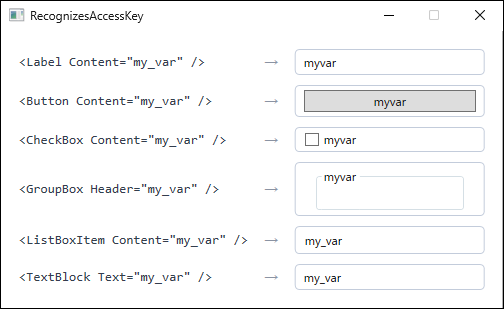
my_var to each control on .NET 10 / Windows 11. Label, Button, CheckBox, and the GroupBox header lose the underscore, while ListBoxItem and TextBlock preserve it. The difference comes from ContentPresenter.RecognizesAccessKey in the default templates.ListBoxItem and ComboBoxItem are unaffected because assigning access keys to entries in a list serves no purpose.
Conversely, placing a Label or Button inside an ItemTemplate reintroduces the problem at that point.
Four Workarounds
There are four workarounds. The appropriate one depends on the use case.
- To simply escape the underscore, write it twice as
__(Workaround 1). - When access keys are unnecessary and the text is display-only, switch to
TextBlock(Workaround 2). - To keep
Labelwhile rendering dynamically bound data correctly, use aTextBlockinContentTemplate(Workaround 3). - To disable access-key interpretation in the default string display itself, set
RecognizesAccessKey="False"in aControlTemplate(Workaround 4). This replaces the default template, so theBorderand padding must be rebuilt by hand.
Workaround 1 is the only approach that fixes the display while retaining access-key functionality. Workarounds 2 through 4 all give up access keys in exchange for handling strings verbatim.
Workaround 1: Escape the Underscore by Doubling It
Writing __ renders a single underscore on screen.
This suits cases where the string is set statically in XAML.
<Label Content="my__variable" />
- Advantage: Requires a single edit in XAML. Access-key functionality remains available.
- Disadvantage: When the data is dynamically bound, replacement logic is required on the ViewModel side.
For dynamic data handled by replacement, write it as follows.
// Escape underscores for display purposes. The original value is left untouched.
public string DisplayName => Name.Replace("_", "__");
This replacement must be applied exactly once.
Applying it again to an already-escaped string turns a_b into a____b, which renders incorrectly as a__b.
Computing the value in a property getter each time makes double application easy to avoid.
Workaround 2: Switch to the TextBlock Control
When access-key functionality and focus control via the Target property are unnecessary, switching Label to TextBlock is the simplest fix.
TextBlock does not use AccessText, so underscores render as-is.
<TextBlock Text="my_variable" />
Binding works the same way.
<TextBlock Text="{Binding VariableName}" />
- Advantage: Underscores no longer require attention.
TextBlockis lighter thanLabeland is the appropriate choice for display-only text. - Disadvantage: Focus control through
Label’sTargetproperty is lost. The defaultPaddingalso disappears, so line spacing and alignment need rechecking.
Workaround 3: Use a TextBlock in ContentTemplate
To keep Label while correctly rendering dynamically bound data that contains underscores, specify a TextBlock in ContentTemplate.
This makes Label render its Content through a TextBlock rather than an AccessText.
<Label Content="{Binding VariableName}">
    <Label.ContentTemplate>
        <DataTemplate>
            <TextBlock Text="{Binding}" />
        </DataTemplate>
    </Label.ContentTemplate>
</Label>
To apply this consistently across an application, define the template as a style.
<Style x:Key="PlainLabel" TargetType="Label">
    <Setter Property="ContentTemplate">
        <Setter.Value>
            <DataTemplate>
                <TextBlock Text="{Binding}" />
            </DataTemplate>
        </Setter.Value>
    </Setter>
</Style>
- Advantage: Dynamically bound data containing underscores renders correctly. Sharing the template as a style makes it easy to apply in many places.
- Disadvantage: The XAML grows.
ContentTemplatealso applies whenContentis an object rather than a string, so its scope must be constrained.
Workaround 4: Set RecognizesAccessKey to False in a ControlTemplate
This addresses the cause directly.
Replace the ControlTemplate and set RecognizesAccessKey to False on the ContentPresenter.
<Label Content="{Binding VariableName}">
    <Label.Template>
        <ControlTemplate TargetType="Label">
            <ContentPresenter RecognizesAccessKey="False" />
        </ControlTemplate>
    </Label.Template>
</Label>
The ContentPresenter no longer selects an AccessText for the default string display, so underscores render as-is.
This setting only affects the default path where the ContentPresenter picks a display element from a string.
An explicit ContentTemplate takes precedence, and an AccessText placed directly in Content is rendered as that element.
In neither case does the value of RecognizesAccessKey change the result.
- Advantage: Strips access-key interpretation from the default string display without requiring a
ContentTemplate. As long as the bound data is a string, it applies uniformly regardless of the value. - Disadvantage: Replacing the
ControlTemplatemeans reimplementing what the default template provides, such as theBorderand the disabled-state appearance (the foreground color whenIsEnabled="False"). Placing only aContentPresenter, as in the example above, discards them.
When the default appearance must be preserved, Workaround 3 has a smaller blast radius than replacing the entire ControlTemplate.
Applying each of the four workarounds produces the same rendered result.
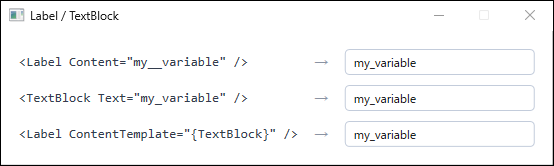
__, switching to TextBlock, replacing ContentTemplate, and setting RecognizesAccessKey="False" all display my_variable without loss.How to Choose
Which of the four applies is settled in this order.
1. Do you need access-key functionality (focus movement through Target)?
If so, Workaround 1 is the only option. Workarounds 2, 3 and 4 all stop access-key interpretation, so Target no longer works.
2. Is the string static, or bound data?
A static string is covered by Workaround 1. Producing __ for bound data requires substitution on the ViewModel side, which pulls a view-level display rule into the ViewModel. Workaround 3 suits dynamic data.
3. Are you placing many of these Labels?
As shown below, a Label given a string containing an underscore takes roughly three times the layout time. Workaround 3 avoids that increase as well, which makes it the better fit for lists and grids.
4. Do you already have a custom ControlTemplate?
If so, adding RecognizesAccessKey="False" to its ContentPresenter is all it takes (Workaround 4). Without one, reimplementing the default template just for this is not worth the cost.
Comparing the Workarounds
| Workaround | Advantage | Drawback | Fits when |
|---|---|---|---|
1: escape with __ |
One edit in XAML. Access keys are retained | Dynamic data needs ViewModel-side handling, with a risk of double application | The string is static and access keys are wanted |
2: switch to TextBlock |
Simplest and lightest | Loses Label’s Target and default padding |
Display-only text with no access keys |
3: replace ContentTemplate |
Handles dynamic binding and keeps the default appearance | More XAML. Applies regardless of Content type |
Label must stay while the display is dynamic |
4: RecognizesAccessKey="False" |
Disables the cause directly. No ContentTemplate needed |
Requires reimplementing the ControlTemplate. Only affects the default string display |
A custom template already exists |
Side Effect on Rendering Cost
Because AccessText adds one visual level, it affects rendering cost as well.
Placing 1,000 Labels in a non-virtualizing StackPanel and comparing, the layout time for strings containing an underscore is roughly three times that of strings without one.
A Label with the ContentTemplate of Workaround 3 applied, on the other hand, stays close to the cost of a Label with no underscore.
For a screen displaying large amounts of text where the data contains underscores, Workaround 3 addresses both display correctness and rendering cost.
The relationship between control choice and rendering cost is covered in detail in Why WPF Slows Down with Many Labels and When to Switch to TextBlock.
Notes and Limitations
- A
ContentTemplatein Workaround 3 also applies whenContentis something other than a string, so confirm that the bound data type isstringbefore applying it. - When substituting
_with__on the ViewModel side, leave the original property that value objects and business logic read untouched and add a separate display-only property. Applying the substitution twice to the same value yields____. - The same problem occurs with
ButtonandMenuItem. Fixing onlyLabelleaves the text truncated wherever the same string is used as a button caption. Check every place that displays data-derived strings. - An unintended access key affects keyboard operation, not just the display. When several controls in the same scope carry the same access key, Alt cycles focus among them, making the interaction unpredictable.
- For strings containing underscores inside a list,
ListBoxitself is unaffected, but aLabelinside theItemTemplatestill drops the character. Check the template contents as well.
Summary
An underscore disappears from a WPF Label because the ContentPresenter in the default template has RecognizesAccessKey="True" and renders the string as AccessText.
This is not specific to Label: Button, CheckBox and RadioButton, as well as the Header of GroupBox, Expander, TabItem and MenuItem, all behave the same way.
The deciding question is whether access keys are used. If they are, Workaround 1 is the answer; if not, pick among Workarounds 2 through 4 by how much of Label’s appearance you want to keep.
On screens handling dynamic data, Workaround 3 is the default choice, addressing both display correctness and rendering cost.