Overview
To defer committing input until a moment such as a “Submit” button in WPF, set UpdateSourceTrigger=Explicit and call BindingExpression.UpdateSource() from the View to write the value back to the source.
The call itself is a single line, but in practice there are pitfalls specific to the calling side: GetBindingExpression returns null and throws a NullReferenceException, or several input fields fail to commit together and some keep a stale value.
Centered on calling UpdateSource() from the View, this article covers the conditions under which it returns null, updating multiple bindings at once, the directional difference from UpdateTarget(), and a design that preserves MVVM, based on documented behavior.
It does not cover choosing among the three UpdateSourceTrigger values that decide the timing of the update.
Prerequisites / Environment
- Framework / Language: .NET 8 / C# 12 (
UpdateSourceis available in WPF since .NET Framework 3.0) - Target control / feature: two-way binding on
TextBox.Text(Mode=TwoWay/OneWayToSource) - Architecture: MVVM (a ViewModel property bound to a
TextBoxin the View) - Assumed knowledge: change notification via
INotifyPropertyChangedand the basics ofUpdateSourceTrigger - Verification environment: .NET 10 / Windows 11 (the measured results in this article were obtained here)
UpdateSource() writes the current value of the target (TextBox.Text) back to the source (the ViewModel).
For a binding with UpdateSourceTrigger=Explicit, the source is never updated unless this method is called.
Problem
When writing back an Explicit binding from the View, the following code may not work as intended.
// Called on the submit button click, but may throw or do nothing
BindingExpression be = amountBox.GetBindingExpression(TextBox.TextProperty);
be.UpdateSource();
Three failures are typical.
GetBindingExpression returns null and the second line throws a NullReferenceException; UpdateSource() is called but the source is not updated; or, among several TextBox controls in a form, only the one explicitly called reflects while the rest stay stale.
Cause / Background
The first cause is that GetBindingExpression returns a BindingExpression only when the dependency property has an active single Binding, and returns null otherwise.
The official reference states that checking the return value for null is the technique for determining whether a property has an active binding.
It returns null when a literal is assigned such as Text="fixed string", when Text holds a MultiBinding (use GetMultiBindingExpression in that case), or when Text uses a TemplateBinding ({TemplateBinding ...}), which is not a BindingExpression.
In addition, when the target TextBox sits inside another control’s template and the element itself cannot be referenced from outside, there is no starting point from which to call GetBindingExpression at all.
Second, UpdateSource() does nothing unless the binding’s Mode is TwoWay or OneWayToSource.
Calling it on a OneWay or OneTime binding is silently ignored without an exception.
Calling it while the binding is detached from its target throws an InvalidOperationException.
Measured: Behavior by Configuration
The conditions above were verified by running them.
| how Text is set | GetBindingExpression state | UpdateSource() as-is | after editing Text / after typing |
|---|---|---|---|
| Text="literal" | null | cannot call | cannot call |
| MultiBinding | null | cannot call | cannot call |
| TemplateBinding | null | cannot call | cannot call |
| Binding Mode=OneTime | obtained | no change | InvalidOperationException |
| Binding Mode=OneWay | obtained | no change | InvalidOperationException |
| Binding Mode=OneWayToSource | obtained | no change | source updated |
| Binding Mode=TwoWay | obtained | no change | source updated |
| OneWay, typed via TextInput | still bound | not called | unchanged |
| OneTime, typed via TextInput | still bound | not called | unchanged |
| TwoWay, typed via TextInput | still bound | not called | unchanged |
| TwoWay, then ClearBinding | obtained | - | InvalidOperationException |
Measured on .NET 10 / Windows 11 by varying how Text is set and then calling GetBindingExpression and UpdateSource(). The GetBindingExpression state column is read at a different moment per row: before Text is modified on the first seven rows, after the keystroke on the next three (typed via TextInput), and before ClearBinding on the last row (TwoWay, then ClearBinding). UpdateSource() as-is is the call made immediately after establishing the binding; after editing Text / after typing doubles as the result of calling UpdateSource() after an assignment and as the source value after typing. The three typed via TextInput rows type one character through the TextInput event instead of assigning. no change means the source value was left unchanged.
The two columns disagree for OneWay and OneTime, and that difference matters.
Calling UpdateSource() on an intact binding raises no exception and does nothing, as described above.
Assigning a value to TextBox.Text first and then calling it, however, raises InvalidOperationException.
The reason is that assigning a local value to the target of a OneWay or OneTime binding replaces the binding with that local value and detaches it.
The “silently ignored because the mode does not qualify” state and the “throws because it is detached” state are therefore not independent: real code ends up in the second one.
Typing does not detach it, however. The TextBox editor writes the value through the TextInput event, and that path leaves the binding in place.
Measured on OneWay, a keystroke leaves the binding alive: the display changes and the source does not. Only an assignment from code, such as box.Text = ..., replaces the binding.
The accurate statement is not that typing loses the binding, but that typing does not update the source.
With OneWayToSource and TwoWay, assigning to Text and then calling updates the source.
The binding survives because those two modes carry a path from target to source.
Third, UpdateSource() writes back only the single BindingExpression it was called on.
Committing an entire form requires calling it on each target TextBox individually, or using a bulk-update mechanism described below.
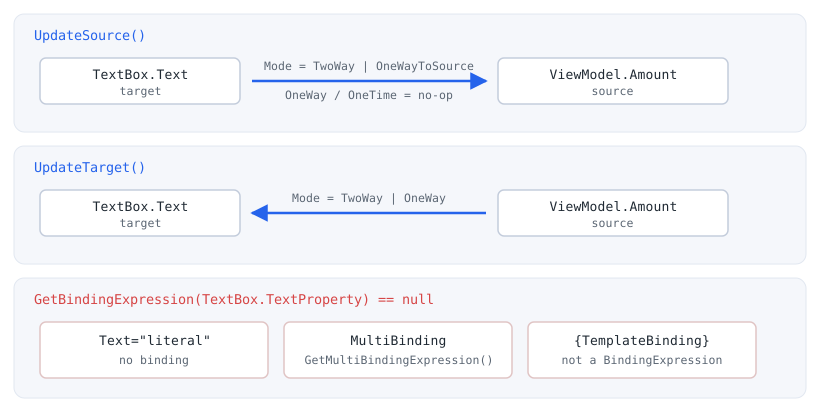
UpdateSource() writes from target to source, so it does nothing on OneWay or OneTime. UpdateTarget(), going the other way, works on OneTime too and re-reads the source value (see the table further below). The bottom row lists the three common conditions under which GetBindingExpression returns null — none of them raise an exception.Solution
The retrieved BindingExpression is always null-checked first, and a null isolates the cause: not bound, a MultiBinding, or connected through TemplateBinding.
A single element is written back safely with the null-conditional operator ?..
A form that commits multiple elements together either walks the visual tree and calls each TextBox, or updates in bulk with a BindingGroup.
To keep the View decoupled, the call lives in an attached property (behavior) rather than directly in code-behind, which also makes it reusable.
Implementation
The code examples below are fragments that show the essential points.
The C# examples assume using directives for System.Windows, System.Windows.Controls, System.Windows.Controls.Primitives, System.Windows.Data, System.Windows.Media, and System.Windows.Input.
The XAML examples omit the default WPF namespaces (xmlns="http://schemas.microsoft.com/winfx/2006/xaml/presentation" and xmlns:x="http://schemas.microsoft.com/winfx/2006/xaml"), and local: refers to the CLR namespace that defines the attached behavior (for example, xmlns:local="clr-namespace:YourApp.Behaviors").
The basic form for writing back a single TextBox is as follows.
The result of GetBindingExpression is received with ?. so that nothing happens when it is null (not bound, and so on).
// amountBox is a TextBox bound with UpdateSourceTrigger=Explicit
BindingExpression be = amountBox.GetBindingExpression(TextBox.TextProperty);
be?.UpdateSource();
The ?. avoids a NullReferenceException even when no binding exists.
To treat null as an error, the code branches explicitly to log it or return early.
To write back several TextBox controls in a form together, walk the visual tree recursively and call UpdateSource() on each TextBox.Text binding.
// Write back every TextBox.Text binding under the given element
static void UpdateAllTextSources(DependencyObject root)
{
    int count = VisualTreeHelper.GetChildrenCount(root);
    for (int i = 0; i < count; i++)
    {
        DependencyObject child = VisualTreeHelper.GetChild(root, i);
        if (child is TextBox textBox)
        {
            textBox.GetBindingExpression(TextBox.TextProperty)?.UpdateSource();
        }
        UpdateAllTextSources(child);
    }
}
This walk runs after the visual tree is built (from Loaded onward).
Not-yet-realized elements inside a virtualized list are excluded from the walk.
To write back multiple bindings at once with validation, use a BindingGroup.
Setting a BindingGroup on a parent makes the descendant bindings join the group, and by default they do not update the source until UpdateSources() is called.
<StackPanel x:Name="formPanel">
    <StackPanel.BindingGroup>
        <BindingGroup />
    </StackPanel.BindingGroup>
    <TextBox Text="{Binding Street}" />
    <TextBox Text="{Binding City}" />
</StackPanel>
A binding joins the group in one of two ways.
With implicit participation (no BindingGroupName), the StackPanel’s DataContext must be the same object as the bindings’ source.
With an explicit BindingGroupName, a binding can join a group of the same name even when its DataContext differs.
From code-behind, a single call to UpdateSources() is enough.
This method runs each binding’s ValidationRule (those whose validation step is RawProposedValue, ConvertedProposedValue, or UpdatedValue) and returns true if all succeed. According to the documentation, the rules set on the group itself (BindingGroup.ValidationRules) run as well; the measurements in this article used rules on the individual bindings.
// Validate all participating bindings and write back only on success
bool committed = formPanel.BindingGroup.UpdateSources();
UpdateSources() returns false if even one validation fails.
A rule at a step that runs before the write-back (such as RawProposedValue) keeps the source untouched when it fails, but a rule at the UpdatedValue step runs after the write-back, so the value has already been written to the source even though false is returned (see the table below).
| case | result |
|---|---|
| TwoWay, TextBox removed from the tree, then UpdateSource() | no exception; Status PathError; source = before |
| OneTime: source changed, then UpdateTarget() | Text before -> before (no call) -> changed (after UpdateTarget) |
| BindingGroup.UpdateSources(), no rule | returns True; source = after |
| BindingGroup.UpdateSources(), rule at RawProposedValue fails | returns False; source = before |
| BindingGroup.UpdateSources(), rule at UpdatedValue fails | returns False; source = after |
Measured on .NET 10 / Windows 11. The BindingGroup rows assign after to Text and then call UpdateSources().
It does not end the IEditableObject edit transaction, so use CommitEdit() to commit fully.
To push the display back from source to target, call UpdateTarget() instead of UpdateSource().
The two run in opposite directions, and confusing them causes bugs such as “saved but the field does not change” or “wrote to the source when the intent was to discard input”.
// Force source-to-target (the inverse of UpdateSource; used to discard input and re-display)
amountBox.GetBindingExpression(TextBox.TextProperty)?.UpdateTarget();
To avoid code-behind under MVVM, confine the UpdateSource() call to an attached property.
The following makes an “update on Enter” behavior reusable as an attached behavior.
public static class TextBoxBehavior
{
    public static readonly DependencyProperty UpdateSourceOnEnterProperty =
        DependencyProperty.RegisterAttached(
            "UpdateSourceOnEnter",
            typeof(bool),
            typeof(TextBoxBehavior),
            new PropertyMetadata(false, OnChanged));

    public static bool GetUpdateSourceOnEnter(DependencyObject obj) =>
        (bool)obj.GetValue(UpdateSourceOnEnterProperty);

    public static void SetUpdateSourceOnEnter(DependencyObject obj, bool value) =>
        obj.SetValue(UpdateSourceOnEnterProperty, value);

    static void OnChanged(DependencyObject d, DependencyPropertyChangedEventArgs e)
    {
        if (d is not TextBox textBox)
        {
            return;
        }

        textBox.KeyDown -= OnKeyDown;
        if ((bool)e.NewValue)
        {
            textBox.KeyDown += OnKeyDown;
        }
    }

    static void OnKeyDown(object sender, KeyEventArgs e)
    {
        if (e.Key == Key.Enter && sender is TextBox textBox)
        {
            textBox.GetBindingExpression(TextBox.TextProperty)?.UpdateSource();
            e.Handled = true; // stop other Enter handlers (e.g. a default button) from also firing
        }
    }
}
In XAML, only the attached property is set, keeping View-specific logic out of code-behind.
<TextBox Text="{Binding Amount, UpdateSourceTrigger=Explicit}"
         local:TextBoxBehavior.UpdateSourceOnEnter="True" />
When wiring events, a named handler with -= before += as above avoids double subscription.
A lambda subscription cannot be unsubscribed, so the subscriptions accumulate.
To commit several TextBox controls at once from a single submit button while preserving MVVM, combine a BindingGroup with an attached behavior.
BindingGroup is an inheritable dependency property, so setting it on a parent makes the descendant elements, including the button, share the same group.
The attached behavior then, on the button’s click, writes back all input with the inherited group’s UpdateSources() and, on success, executes the ViewModel command.
public static class SubmitBehavior
{
    // The ViewModel command to run once the write-back succeeds
    public static readonly DependencyProperty SubmitCommandProperty =
        DependencyProperty.RegisterAttached(
            "SubmitCommand",
            typeof(ICommand),
            typeof(SubmitBehavior),
            new PropertyMetadata(null, OnChanged));

    public static ICommand GetSubmitCommand(DependencyObject obj) =>
        (ICommand)obj.GetValue(SubmitCommandProperty);

    public static void SetSubmitCommand(DependencyObject obj, ICommand value) =>
        obj.SetValue(SubmitCommandProperty, value);

    static void OnChanged(DependencyObject d, DependencyPropertyChangedEventArgs e)
    {
        if (d is not ButtonBase button)
        {
            return;
        }

        button.Click -= OnClick;
        if (e.NewValue is not null)
        {
            button.Click += OnClick;
        }
    }

    static void OnClick(object sender, RoutedEventArgs e)
    {
        var button = (ButtonBase)sender;

        // 1. Write back all input under the inherited BindingGroup at once
        BindingGroup group = button.BindingGroup;
        if (group is null || !group.UpdateSources())
        {
            return; // no group, or validation failed; do not run the command
        }

        // 2. Run the ViewModel command with the committed values
        ICommand command = GetSubmitCommand(button);
        if (command?.CanExecute(null) == true)
        {
            command.Execute(null);
        }
    }
}
In XAML, the BindingGroup sits on the parent, each TextBox binds normally, and the button carries SubmitCommand.
Bindings that join a BindingGroup are not written back until UpdateSources() by default, so UpdateSourceTrigger=Explicit need not be set on each TextBox.
<StackPanel x:Name="formPanel">
    <StackPanel.BindingGroup>
        <BindingGroup />
    </StackPanel.BindingGroup>
    <TextBox Text="{Binding Street}" />
    <TextBox Text="{Binding City}" />
    <Button Content="Save"
            local:SubmitBehavior.SubmitCommand="{Binding SaveCommand}" />
</StackPanel>
Because the behavior controls the order of commit and command execution itself, it does not depend on the firing order of Click and Command.
The button does not also bind the standard Command; consolidating on SubmitCommand avoids double execution.
Because the command is skipped when the BindingGroup is absent (not inherited) or UpdateSources() returns false on validation failure, uncommitted or invalid input never proceeds to the save logic.
The save logic itself stays in SaveCommand (the ViewModel), and only the commit wiring lives on the View.
As noted earlier, implicit participation in a BindingGroup (without BindingGroupName) requires the parent’s DataContext to be set to the bindings’ source.
Notes
nullis not swallowed silently:?.prevents the exception, but anullon an element that should be bound indicates a configuration mistake (wrong retrieval method for aMultiBinding, a connection throughTemplateBinding, or a name-resolution failure). Thenullbranch is worth logging during debugging.Modeconstraint:UpdateSource()is silently ignored outsideTwoWay/OneWayToSource. When nothing reflects,Modeshould be checked first.- Detached bindings: calling a previously retrieved expression after the binding is removed by
ClearBindingor by assigning a local value throws anInvalidOperationException. Removing the element from the tree does not remove the binding, and the call does not throw. In the measurement, theTextBoxinherited itsDataContextfrom the panel it was removed from, so it lost theDataContext,StatusbecamePathError, and the source was not updated (see the table above). A binding whose source does not depend on the tree, such as one with an explicitSourceor aDataContextset on the element itself, was not measured. - Scope of bulk update: the
VisualTreeHelperwalk targets only realized elements, so items not yet generated by virtualization are not written back. Unrealized regions such as inactiveTabControltabs are excluded as well. BindingGroupis tied to validation:UpdateSources()runs theValidationRuleobjects and returnsfalseon failure. A rule at a step before the write-back leaves the source untouched, but a rule at theUpdatedValuestep fails after the value has already been written to the source. Used as a plain bulk write, a validation failure can look like no response.- Direction of
UpdateSourcevsUpdateTarget: the former is target-to-source, the latter source-to-target. Choose by intent (commit or discard).
Alternatives / Comparison
The way to write back from the View is chosen according to scope and design policy.
| Approach | Scope | Pros | Cons | Best suited for |
|---|---|---|---|---|
GetBindingExpression().UpdateSource() |
Single element | Clear and easy to control | Must be called per element | Committing one specific field |
VisualTreeHelper walk (bulk) |
All descendant TextBox |
Writes back many at once | Excludes unrealized elements; walk cost | Committing a realized group of inputs |
BindingGroup.UpdateSources() |
Bindings in the group | Bulk commit tied to validation | Requires validation design; return value handling | Forms validating and saving multiple fields |
| Attached behavior (commit one on Enter) | The element it is set on | Keeps the View decoupled; reusable | More implementation code | MVVM where code-behind is avoided |
BindingGroup + submit behavior |
All TextBox in the group |
Bulk commit, validation, and command in one click while preserving MVVM | More code; requires a BindingGroup |
MVVM committing multiple inputs via a submit button |
Calling UpdateSource() directly is the clearest choice for committing a single field.
A BindingGroup suits committing a whole form with validation, and an attached behavior keeps MVVM separation intact.
Summary
The basic form for writing a TextBox binding back from the View is GetBindingExpression(TextBox.TextProperty)?.UpdateSource().
Because GetBindingExpression returns null when there is no binding, a ?. guard is required, and a null on an element that should be bound points to a MultiBinding, a template, or name resolution.
UpdateSource() works only on TwoWay / OneWayToSource and throws once the binding is removed, for example by ClearBinding.
A direct call suits a single commit, BindingGroup.UpdateSources() suits committing multiple fields with validation, and an attached behavior suits keeping View separation as the priority.
To commit multiple inputs from a submit button while preserving MVVM, a commit behavior on a button that inherits the BindingGroup runs the ViewModel command after a successful commit.
To push the direction back, UpdateTarget() rather than UpdateSource() avoids bugs from confusing the two.
The separate question of when the update fires (choosing among LostFocus / PropertyChanged / Explicit) is covered in Controlling When TextBox Input Reaches the Source with UpdateSourceTrigger in WPF.
- TextBox (WPF Standard Control Demo App): measures when the text reaches the bound source for each
UpdateSourceTrigger