Overview
A local image file displayed through a BitmapImage assigned to an Image control cannot be deleted or overwritten while the application is running.
This article explains that the behavior does not come from an explicit lock taken by BitmapImage.
The actual cause is the default caching policy, which keeps access to the image source open.
It then covers the fix based on BitmapCacheOption.OnLoad, the distinction between UriSource and StreamSource, a comparison of the BitmapCacheOption values, and the pitfalls around Freeze and memory usage.
Prerequisites / Environment
- Framework: .NET 6 or later / WPF (
BitmapImageandBitmapCacheOptionhave shipped since .NET Framework 3.0) - Language: C# / XAML
- Target classes and features:
System.Windows.Controls.Image,BitmapImage,BitmapCacheOption,BitmapCreateOptions - Architecture: applicable to both MVVM and code-behind
- Assumption: the displayed image is a local file that changes at run time (a file chosen by the user, a downloaded temporary file), not a resource embedded at build time
- Namespaces: code samples assume
System,System.IO, andSystem.Windows.Media.Imaging - Verification environment: .NET 10 / Windows 11
The behavior described here was confirmed by loading an image each way in the environment above and attempting File.Delete immediately afterwards.
The results appear under “Measured Results by Loading Method” below.
Problem
After creating a BitmapImage from a file path and assigning it to Image.Source, deleting or overwriting the same file throws an exception.
The following snippet reproduces the issue with the most direct implementation.
// Display the image
PreviewImage.Source = new BitmapImage(new Uri(path, UriKind.Absolute));

// Deleting or overwriting the same file throws an IOException
File.Delete(path);
The image renders correctly, but File.Delete throws an IOException reporting that the file is in use.
Overwriting and renaming fail in the same way.
The failure is not deterministic.
Once the display is cleared and the reference to the BitmapImage is dropped, a garbage collection can release the file and allow the deletion to succeed.
The result is an intermittent defect where the deletion only succeeds some of the time.
Supplying the path from XAML produces the same outcome.
The following markup is the shortest form, assigning the path string directly to Source.
<Image Source="{Binding ImagePath}" Stretch="Uniform" />
Assigning a string directly to Source delegates the work to ImageSourceConverter, which leaves no place to specify CacheOption.
The image is therefore loaded with the default caching behavior, and the file is retained exactly as it is in the code-based version.
Cause / Background
The cause is the caching policy of BitmapImage.
The default value of BitmapImage.CacheOption is BitmapCacheOption.Default.
The documentation for the CacheOption property describes the resulting behavior as follows.
The default
OnDemandcache option retains access to the stream until the image is needed, and cleanup is handled by the garbage collector.
Source: BitmapImage.CacheOption Property
Both Default and OnDemand appear because the BitmapCacheOption enumeration defines them with the same value, 0.
The descriptions attached to those fields, however, do not agree.
Default is documented as “Caches the entire image into memory” while OnDemand is documented as “Creates a memory store for requested data only”, which is a contradiction inside the official reference.
Since the two share one value, only one behavior can apply.
The CacheOption remarks name OnDemand as the default and state that it “retains access to the stream until the image is needed”.
OnDemand creates a memory store only for the data that has been requested.
The first request loads the image directly, and subsequent requests are filled from that cache.
To serve those later reads, access to the image source is retained.
Deferring the initialization of the object itself is a separate concern, controlled by BitmapCreateOptions.DelayCreation rather than by CacheOption.
When UriSource points at a local file, what is retained is understood to be the file stream WPF opened internally.
That stream is what holds the file open, and the application has no supported way to close it.
Release is left to the garbage collector, which is why the behavior cannot be reproduced on demand.
What the documentation states explicitly about OnLoad is that the stream used to create the BitmapImage can be closed afterwards.
No equivalent sentence covers a local file passed through UriSource, but since the retained resource is likewise an internal stream, the same mechanism applies.
The core issue is not that BitmapImage takes an exclusive lock, but that the source stays open to serve later reads.
The fix is therefore not to remove a lock, but to pull the whole image into memory at load time so that retaining the source becomes unnecessary.
Solution
Set CacheOption to BitmapCacheOption.OnLoad.
OnLoad caches the entire image into memory at load time, and every subsequent request for image data is filled from that memory store.
Because the source no longer needs to be read, the file or stream can be released once initialization completes.
The difference between the default behavior and OnLoad is shown in the diagram below.
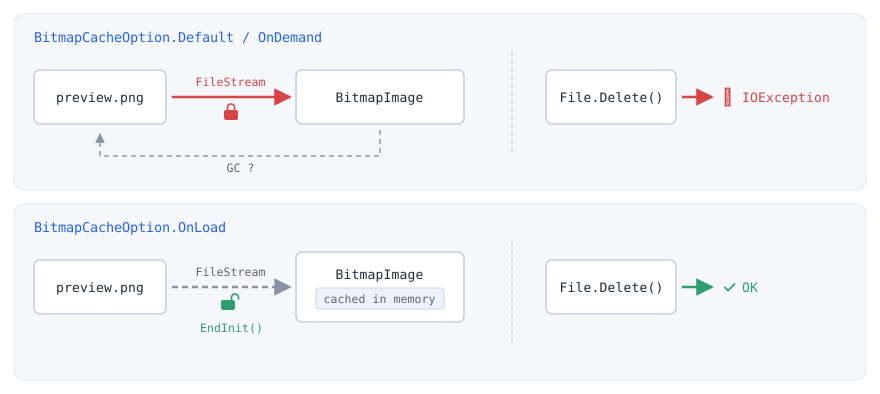
Default / OnDemand) handling of the file stream and the bottom lane shows OnLoad. By default the stream stays open to serve later reads, and the timing of its release is left to the garbage collector. With OnLoad the entire image is cached in memory when EndInit completes, so the stream is closed and the file can be deleted or overwritten.CacheOption can only be set while the BitmapImage is being initialized.
BitmapImage implements ISupportInitialize, so property initialization must be performed between BeginInit and EndInit calls.
Property changes made after initialization are ignored.
Two approaches are available.
UriSourcewithOnLoad— pass the path directly.
The markup and code stay short, and this is sufficient in most cases.StreamSourcewithOnLoad— pass a stream opened by the application and dispose it deterministically after initialization.
This suits cases where the sharing mode or the origin of the data must be controlled.
Implementation
Combining UriSource with OnLoad
Set CacheOption and UriSource inside a BeginInit / EndInit block.
The whole image is pulled into memory at EndInit, so the file can be deleted or overwritten once the method returns.
private static BitmapImage LoadWithoutLocking(string path)
{
    var bitmap = new BitmapImage();
    bitmap.BeginInit();
    bitmap.CacheOption = BitmapCacheOption.OnLoad;
    bitmap.UriSource = new Uri(path, UriKind.Absolute);
    bitmap.EndInit();
    bitmap.Freeze();
    return bitmap;
}
The Freeze call is optional, but BitmapImage derives from Freezable, and freezing removes the cost of change notification while making the object shareable across threads.
For designs that load images asynchronously and hand them to the UI thread, freezing is effectively mandatory.
A local file loaded with OnLoad is freezable at this point; where the conditions are less predictable, test with CanFreeze first, as described in the notes below.
An important distinction concerns the BitmapImage(Uri) constructor.
Objects created with that constructor are automatically initialized, and subsequent property changes are ignored.
The following code therefore leaves the file retained because OnLoad never takes effect.
// Initialization already completed in the constructor, so the CacheOption change is ignored
var bitmap = new BitmapImage(new Uri(path, UriKind.Absolute));
bitmap.CacheOption = BitmapCacheOption.OnLoad;
Applying OnLoad requires the parameterless constructor combined with BeginInit and EndInit.
Supplying an explicit stream through StreamSource
When the way the file is opened matters, open a FileStream explicitly and assign it to StreamSource.
With OnLoad specified, the whole image is already in memory by the time EndInit returns, so the image remains displayable after the using block disposes the stream.
private static BitmapImage LoadFromStream(string path)
{
    var bitmap = new BitmapImage();
    using (var stream = new FileStream(path, FileMode.Open, FileAccess.Read, FileShare.ReadWrite))
    {
        bitmap.BeginInit();
        bitmap.CacheOption = BitmapCacheOption.OnLoad;
        bitmap.StreamSource = stream;
        bitmap.EndInit();
    }

    bitmap.Freeze();
    return bitmap;
}
FileShare specifies the access granted to subsequent opens, by this process or another, while this handle is open.
FileShare.ReadWrite therefore allows other processes to open the same file for reading or writing while this FileStream is open.
That grant covers reading and writing only; deletion and renaming are not included.
Permitting deletion during the load requires Delete as well, written as FileShare.ReadWrite | FileShare.Delete.
When both StreamSource and UriSource are set, the StreamSource value is ignored.
UriSource is left unset in this approach.
Specifying the option in XAML and its limits
When the image path is fixed, the whole solution fits in XAML.
Replace the type-converted string assigned to Source with an explicit BitmapImage object element carrying CacheOption.
Property assignments written on the object element are applied as part of its initialization, so OnLoad takes effect with this markup.
<Image Stretch="Uniform">
    <Image.Source>
        <BitmapImage UriSource="C:\work\preview.png" CacheOption="OnLoad" />
    </Image.Source>
</Image>
This BitmapImage is instantiated once, when the XAML is parsed, and it needs UriSource or StreamSource by the end of its initialization.
Binding UriSource therefore depends on when the binding has a value, and in neither case does it follow the path:
- No value while loading. Loaded without a
DataContext, as happens when theDataContextis set afterInitializeComponent, the XAML threwXamlParseException(innerInvalidOperationException). - A value while loading. Inside a
DataTemplatewhoseDataContextalready held a path, the first image was shown. Changing the path afterward, with change notification, left the same image and the earlierUriSource, because property changes after initialization are ignored.
| where the XAML is loaded | result |
|---|---|
| XamlReader, no DataContext | XamlParseException (inner InvalidOperationException) |
| DataTemplate, DataContext holds a valid path | shown: 64x48, UriSource = current ImagePath |
| then ImagePath changed to a 64x96 image | shown: 64x48, UriSource = earlier path |
Measured on .NET 10 / Windows 11 with <BitmapImage UriSource="{Binding ImagePath}" CacheOption="OnLoad" /> inside an Image.
To swap the image at run time, convert the path with an IValueConverter that builds a BitmapImage, or expose an ImageSource property from the view model and bind it to Image.Source.
The latter hands a new ImageSource to the control on every change, so the BitmapImage produced by LoadWithoutLocking above can be assigned directly.
Measured Results by Loading Method
The table below records the result of deleting the file with File.Delete, overwriting it with File.Copy, and renaming it with File.Move immediately after loading the image each way described in this article. Each of the three operations was tried on its own file, loaded just before the operation. The last row is the exception: it loads the image the default way, releases the BitmapImage reference, and forces a garbage collection before trying.
| how the image is loaded | size | File.Delete | overwrite (File.Copy) | rename (File.Move) |
|---|---|---|---|---|
| new BitmapImage(uri) | 64x48 | IOException | IOException | IOException |
| + CacheOption = OnLoad | 64x48 | IOException | IOException | IOException |
| BeginInit / EndInit | 64x48 | IOException | IOException | IOException |
| + CacheOption = OnLoad | 64x48 | OK | OK | OK |
| + CreateOptions = IgnoreImageCache | 64x48 | IOException | IOException | IOException |
| StreamSource + OnLoad | 64x48 | OK | OK | OK |
| ImageSourceConverter | 64x48 | IOException | IOException | IOException |
| (default) after GC | - | OK | - | - |
Measured on .NET 10 / Windows 11, calling File.Delete, File.Copy with overwrite, or File.Move immediately after loading a 64x48 PNG each way. The size column confirms the image loaded correctly in every case. The last row is the default loading method after releasing the BitmapImage reference and forcing a garbage collection.
Four things follow from the table.
1. Only CacheOption = OnLoad allows deletion immediately after loading.
This holds whether the image arrives through UriSource or StreamSource.
2. Setting CacheOption after the BitmapImage(Uri) constructor has no effect.
Initialization is already complete at construction, so the later assignment is ignored and the file stays held.
3. IgnoreImageCache does not avoid the lock.
Setting BitmapCreateOptions.IgnoreImageCache on CreateOptions still produces an IOException immediately after loading.
That option addresses the separate problem of a stale image being returned for the same path; it is unrelated to how long the stream is held.
4. The default method does release the file once the reference is dropped and a collection runs.
That is the last row. Put the other way round, release timing is left to the garbage collector, which is exactly why deletion appears to succeed only sometimes.
With OnLoad, release is determined at EndInit rather than waiting for a collection.
Notes
- Trade-off against memory:
OnLoadexpands the entire image into memory.
For large images or numerous thumbnails, setDecodePixelWidthorDecodePixelHeightso the image decodes at roughly its rendered size.
Set only one of them, not both, to preserve the aspect ratio. - Decode-size savings depend on the codec: The JPEG and PNG codecs decode natively to the requested size, whereas other codecs decode at full size and then scale to the target.
Peak memory savings are therefore smaller for other formats, such as BMP and TIFF. - A stale image can appear after an overwrite: WPF keys its image cache by URI, so reloading a replaced file at the same path can still display the previous image.
SettingBitmapCreateOptions.IgnoreImageCacheonCreateOptionsreplaces existing cache entries even when they share the sameUri.
This is not a workaround for the lock. As measured above, the file remains held even withIgnoreImageCacheset. Avoiding the lock is the job ofCacheOption; the two settings are independent. - Conditions that prevent freezing: An object cannot be frozen when it has animated or data-bound properties, has properties set by a dynamic resource, or contains sub-objects that cannot be frozen.
Where the conditions are not predictable, test withCanFreezebefore callingFreeze. - Modifying a frozen object throws: Attempting to modify a frozen
Freezableraises anInvalidOperationException.
When post-processing is required, keep the object unfrozen or create a modifiable copy withClone. - Unfrozen objects cannot cross threads: A
FreezablewhoseIsFrozenisfalsecan be accessed only from the thread that created it, and access from another thread throws anInvalidOperationException.
Freeze the image before handing it from a background thread to the UI thread. BitmapCacheOption.Noneis not a fix:Nonecreates no memory store and fills every request directly from the image file.
That behavior requires access to the source to be retained, so it cannot be used to avoid the lock.
Alternatives / Comparison
| Approach | File release | Memory store | Best suited for |
|---|---|---|---|
UriSource with the default (Default / OnDemand) |
Not released (left to the GC) | Created for requested data only | Fixed images that are never replaced while the application runs |
UriSource with OnLoad |
Released when initialization completes | Created for the whole image at load time | Local files that may be deleted or overwritten at run time |
StreamSource with OnLoad |
Released explicitly via using |
Created for the whole image at load time | Cases requiring a specific sharing mode or in-memory data |
BitmapCacheOption.None |
Not released | Not created | Cases where re-reading from the file on every request is acceptable |
The criterion for choosing between UriSource and StreamSource is straightforward.
UriSource is sufficient when the image is simply read from a path.
StreamSource applies when the application must decide how the stream is obtained, such as specifying FileShare, reading across a network, or decrypting data before decoding.
Summary
The file lock caused by BitmapImage originates in the default caching policy, which keeps the source open to serve later reads.
The selection criteria are as follows.
- Displaying a local file that may later be deleted or overwritten: Set
CacheOptiontoOnLoadinside aBeginInit/EndInitblock.
This is the primary choice. - Controlling the sharing mode or decoding from in-memory data: Combine
StreamSourcewithOnLoadand dispose the stream explicitly after initialization. - Reloading a replaced image: Add
BitmapCreateOptions.IgnoreImageCacheto prevent the per-URI cache from returning the previous image. - Loading on a background thread: Call
FreezeafterEndInitbefore passing the image to the UI thread.
One prerequisite applies to every approach above: the BitmapImage(Uri) constructor completes initialization automatically and ignores later property changes.
Any implementation that relies on OnLoad must therefore use the parameterless constructor together with BeginInit and EndInit.
- Fixing the Cross-Thread Exception When Updating an ObservableCollection in WPF
- Image (WPF Standard Control Demo App): measures the file lock of a bound path and
BitmapCacheOption.OnLoad, along with the size for eachStretch