Overview
Initial rendering and scroll responsiveness degrade on screens that place a large number of WPF Label controls.
This article analyzes the cause based on the structural difference between Label and TextBlock, and presents an implementation policy for performance-sensitive screens.
The conclusion first.
The gap between Label and TextBlock is measurable, but it only matters on screens where UI virtualization is not in effect.
With 10,000 items bound to a virtualized ListBox, no practical difference in layout time remains between the two.
Replacing controls is worth considering only after virtualization has been confirmed.
Prerequisites / Environment
- Framework / Language: .NET 10 / C# / WPF
- Target controls:
Label,TextBlock,ContentPresenter - Architecture: MVVM (the same applies to code-behind)
- Target screens: lists, dashboards, and other screens displaying many text elements
- Measurement environment: Windows 11, default theme (Aero2), display scaling 100%
The figures in this article were obtained by running an actual application in the environment above and timing the interval from Measure to UpdateLayout.
Each condition was run 15 times in alternation, and the minimum was taken.
Elapsed time depends on the execution environment, so read the values as ratios between conditions rather than as absolute numbers.
Problem
Screens that place dozens to hundreds of Label controls tend to exhibit the following:
- Slower initial display.
- Heavier redraw during resizing and scrolling.
- Higher memory usage than an equivalent
TextBlocklayout, even for the same string display.
Carrying an implementation that uses Label for form captions into a list display is a common way to degrade rendering performance.
Cause / Background
TextBlock is a lightweight element whose primary purpose is text rendering, and it derives directly from FrameworkElement.
Label, by contrast, derives from ContentControl and is designed as a general-purpose UI part capable of hosting content other than strings.
Label renders through a ContentPresenter and provides access-key handling and Target integration as needed.
For workloads that display large amounts of plain text, this overhead exceeds that of TextBlock.
Visual Tree Composition
The substance of the difference is the number of visuals constructed per element.
With the default template and a string content, the composition is as follows.
| Element | Visual tree that gets built | Visuals |
|---|---|---|
TextBlock |
TextBlock |
1 |
ContentPresenter |
ContentPresenter → TextBlock |
2 |
Label |
Label → Border → ContentPresenter → TextBlock |
4 |
Each Label additionally constructs a Border, a ContentPresenter, and the TextBlock that actually draws the characters.
Quadrupling the number of objects processed during measure, arrange, and render is the direct cause of the performance gap.
Measurements Without Virtualization
Placing the same string in a StackPanel and measuring the time to complete layout, along with the total number of visuals produced, gives the following.
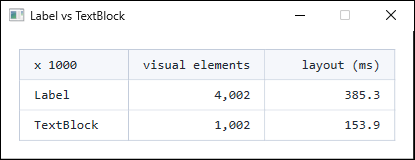
ControlTemplate, giving Content a string that contains no access key. Elements are placed in a non-virtualized StackPanel. Visual counts change when the theme or ControlTemplate is replaced, and elapsed time depends on the execution environment, so read the values as ratios rather than absolute numbers.The visual count scales exactly with the element count, and Label is consistently four times that of TextBlock.
The layout time difference, however, stays around a factor of two.
The processing cost per visual is not uniform: elements that draw no text, such as Border and ContentPresenter, are comparatively cheap.
Memory follows the same trend.
Comparing the managed heap growth immediately after placing 1,000 elements, Label consumes roughly 1.6 times what TextBlock does.
The gap is narrower than the 4x visual ratio, but it likewise grows in proportion to the element count.
Extra Cost from Underscores in the Content
The cost of Label also varies with the content itself.
When the string contains an underscore (_), the ContentPresenter produces an AccessText rather than a TextBlock, adding one visual layer for a total of five.
Fixing the count at 1,000 and varying the composition gives the following.
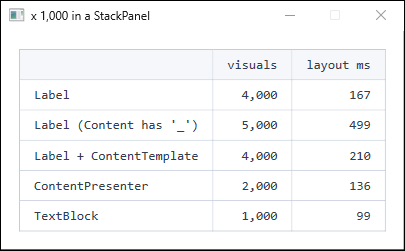
StackPanel. A Label whose Content contains an underscore has an AccessText inserted; a single additional visual raises layout time by roughly a factor of three. A Label with a TextBlock in its ContentTemplate costs about the same as a Label without underscores.The visual count grows only 25%, from four to five, yet layout time rises by roughly a factor of three.
AccessText performs heavier work than a plain TextBlock because it parses the access key and renders the underline.
This matters in practice on screens that display underscore-prone data such as file paths and identifiers.
The separate problem of underscores disappearing from the display is covered in Why WPF Label Hides Underscores and How to Fix It.
With Virtualization Enabled
Everything above compares elements placed directly in a StackPanel, without virtualization.
An ItemsControl with UI virtualization changes the premise.
Only the containers within the visible range are realized, so the number of simultaneously live visuals stays constant no matter how large the collection grows.
Binding 10,000 items to a virtualized ListBox and swapping only the contents of ItemTemplate gives the following.
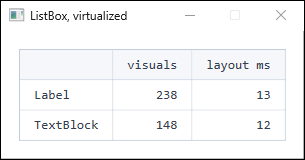
ListBox configured with IsVirtualizing="True" and VirtualizationMode="Recycling". Only the containers in the visible range are realized, so the total visual count does not depend on the item count. The layout time difference falls within measurement noise; the roughly 2x gap seen without virtualization does not survive.Compared with 4,000 elements in a non-virtualized StackPanel, the item count here is 2.5 times larger while layout time is two orders of magnitude smaller.
At this scale, the gap between Label and TextBlock is buried in measurement noise.
The primary cause of “many Labels make WPF slow” is not Label itself but the absence of virtualization.
Switching controls buys roughly a factor of two; enabling virtualization buys far more.
Order of Improvements
Work through the improvements in this order.
- Confirm that virtualization is in effect first. For list displays, use an
ItemsControl-family control and keep UI virtualization enabled. If this is broken, replacing controls yields limited benefit. - Move display-only text to
TextBlock. Effective on screens where virtualization is unavailable, or where a fixed but large number of elements is present. - Use
ContentTemplatefor underscore-bearing data. This keepsLabelwhile avoiding the additional cost ofAccessText.
The separation by purpose is as follows.
- Display-only text: use
TextBlockas the default. - Input form captions: use
Labelonly whereTargetor access keys are required. - Reworking existing screens: avoid a blanket replacement; convert to
TextBlockincrementally within what the requirements allow.
Step 1: keep virtualization in effect
For list displays, choose a control backed by a virtualizing panel rather than using ItemsControl as-is.
The default ItemsPanel of ItemsControl is a StackPanel, which does not virtualize.
<!-- Not virtualized. Containers are created in proportion to the item count -->
<ItemsControl ItemsSource="{Binding Items}" />

<!-- Virtualized. ListBox defaults to VirtualizingStackPanel -->
<ListBox ItemsSource="{Binding Items}"
         ScrollViewer.CanContentScroll="True"
         VirtualizingPanel.IsVirtualizing="True"
         VirtualizingPanel.VirtualizationMode="Recycling" />
To virtualize while staying on ItemsControl, the ItemsPanel must be set to VirtualizingStackPanel and the template must supply a ScrollViewer.
Even when selection is unnecessary, using ListBox and disabling Focusable and the selection visuals through a style is the more reliable route.
Note that setting ScrollViewer.CanContentScroll to False changes the scroll unit from item-based to pixel-based and disables virtualization.
The default is True, and it is sometimes changed in pursuit of smooth scrolling.
Step 2: replace display-only Labels with TextBlock
Replace Label controls used purely for display with TextBlock.
The goal is to reduce rendering cost while preserving appearance.
<!-- Before -->
<Label Content="Status: Running" />

<!-- After -->
<TextBlock Text="Status: Running" />
This removes Label-specific features from display-only locations and unifies them into a lightweight rendering structure.
Because Label’s default Padding is lost, specify Margin or Padding explicitly where needed.
Step 3: use a ContentTemplate for underscore-bearing data
To keep the appearance of Label while avoiding AccessText, specify a TextBlock in ContentTemplate.
<Label Content="{Binding FilePath}">
    <Label.ContentTemplate>
        <DataTemplate>
            <TextBlock Text="{Binding}" />
        </DataTemplate>
    </Label.ContentTemplate>
</Label>
The ContentPresenter no longer produces an AccessText, so underscores render as-is and the rendering cost returns to that of a Label without underscores.
Because ContentTemplate also applies when Content is an object rather than a string, restrict its scope to string display.
Where Label stays
The example below shows an input form caption that requires Label.
This pattern keeps Label to preserve usability and accessibility.
<StackPanel Orientation="Horizontal">
    <Label Content="_Name:"
           Target="{Binding ElementName=NameTextBox}"
           VerticalAlignment="Center" />
    <TextBox x:Name="NameTextBox" Width="180" />
</StackPanel>
Label is appropriate where focus movement via Alt + N and focus movement on label click are required.
Performance work therefore calls for requirement-based separation rather than a blanket ban.
An AccessText is constructed in this example because the access key is intentional, but form captions are few in number and the cost is immaterial.
AccessText cost matters only when displaying large volumes of underscore-bearing data.
Notes and Limitations
- Replacing
LabelwithTextBlockloses access keys (_) and focus integration throughTarget. - For long text,
TextWrapping="Wrap"orTextTrimmingmust be specified on theTextBlockside, or the display may not match expectations. - Existing UI sometimes relies on
Label’s default padding, so line spacing and alignment need verification after replacement. - When rendering many elements inside a
DataGridorItemsControltemplate, evaluate the virtualization settings before the control choice. Replacing withTextBlockwhile virtualization remains disabled yields limited improvement. - The measurements here cover layout time from
MeasuretoUpdateLayout. They exclude actual rendering and the container-recycling cost incurred while scrolling. Evaluating scroll smoothness requires separate measurement under scroll operations. - At a scale of a few dozen elements, the difference between
LabelandTextBlockis imperceptible. Replace only after identifying a screen that is actually slow.
Alternatives / Comparison
| Approach | Advantages | Disadvantages | Best suited for |
|---|---|---|---|
| Enable virtualization | Makes cost independent of item count; the largest single win | Scroll unit becomes item-based; incompatible with CanContentScroll="False" |
Lists and grids with a variable item count |
Keep everything as Label |
Retains access keys and Target exactly as specified |
High rendering cost at large volumes | Form-centric screens with few elements |
Replace display-only spots with TextBlock |
Reduces rendering and memory load | Requires revisiting padding and wrapping settings | Fixed layouts with many elements that cannot virtualize |
Label + ContentTemplate |
Avoids AccessText cost while preserving appearance |
More verbose XAML | Screens displaying underscore-bearing data in a Label |
Convert the whole screen to TextBlock |
Simple and lightweight | Loses Label-specific interaction |
Read-only screens with no input integration |
Summary
The slowdown from placing many WPF Label controls stems from the rendering overhead of its general-purpose ContentControl features.
Each Label constructs four visuals, four times that of TextBlock.
Without virtualization, that translates to roughly 2x in layout time and 1.6x in memory.
The practical priority, however, is as follows.
- Check virtualization first. With virtualization enabled, no practical layout-time difference remains between
LabelandTextBlock. This outweighs any control replacement. - Move to
TextBlockon screens that cannot virtualize. Control choice does matter where a fixed, large number of elements is present. - Use
ContentTemplatewhen displaying underscore-bearing data in aLabel. An insertedAccessTextadds only one visual but raises layout time by roughly a factor of three. - Keep
LabelwhereTargetand access keys are required. At the scale of form captions, the cost is immaterial.
Rather than “avoid Label because it is slow,” first confirm whether virtualization is in effect and whether the screen genuinely renders at volume, then choose according to the requirements.