Overview
WPF provides two resource reference mechanisms: StaticResource and DynamicResource.
When a resource is modified in code at runtime and the UI does not update, the root cause is the difference in when each mechanism resolves its value.
This article explains the internal behavior of both mechanisms and provides criteria for choosing between them.
Prerequisites / Environment
- Framework / Language: .NET 6 or later / WPF / C#
- Architecture: Applicable to both MVVM and code-behind patterns
- Verification environment: .NET 10 / Windows 11
The figures in this article come from displaying a screen in the environment above that references the same resource through both StaticResource and DynamicResource, then swapping the resource at run time.
The following points were confirmed in that environment:
- Before the swap, both sides hold the same value.
- After the swap, the value referenced through
StaticResourcedoes not change. - After the swap, the value referenced through
DynamicResourcefollows it.
Problem
Replacing an entry in a ResourceDictionary at runtime does not always cause the associated control to update its appearance.
For example, the following XAML defines a SolidColorBrush as a StaticResource, and the code-behind replaces it at runtime.
<Window.Resources>
    <SolidColorBrush x:Key="ThemeColor" Color="SkyBlue" />
</Window.Resources>

<Button Background="{StaticResource ThemeColor}" Content="Button" />
// Attempt to change the color at runtime
Resources["ThemeColor"] = new SolidColorBrush(Colors.OrangeRed);
Despite the assignment, the button background remains SkyBlue.
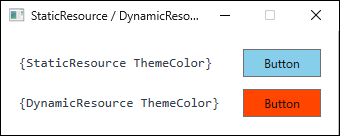
ThemeColor, captured right after the resource was replaced with OrangeRed at runtime. The StaticResource side keeps the SkyBlue value it resolved at load time.Cause / Background
The critical difference between StaticResource and DynamicResource lies in when the resource value is resolved.
How StaticResource Works
StaticResource resolves the resource exactly once, at the moment the XAML is parsed (loaded).
The resolved value is written directly to the property, after which no reference between the property and the resource dictionary is retained.
Consequently, any subsequent change to the dictionary entry is invisible to the property.
Because XAML is parsed top-to-bottom, a resource referenced via StaticResource must be defined before its reference site in the markup.
Violating this order raises a XamlParseException at load time.
How DynamicResource Works
DynamicResource does not resolve the value immediately.
Instead, it records the association between the property and the resource key.
Whenever the corresponding entry in the resource dictionary changes at runtime, WPF detects the change and re-evaluates the property, updating the UI automatically.
| Aspect | StaticResource | DynamicResource |
|---|---|---|
| Resolution timing | XAML load time (once only) | Load time + re-evaluated on every change |
| Runtime changes | Not reflected | Reflected immediately |
| Definition order | Must be defined before the reference | Order is unrestricted |
| Performance | High (no change monitoring) | Lower (change listener overhead) |
The difference can be confirmed by replacing the resource at run time and reading the property back.
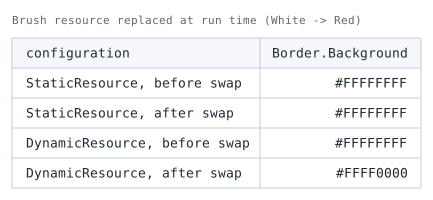
PanelBrush from white to red at run time and reading Border.Background before and after. Nothing differs between the two rows except how the resource is referenced.Both hold the same value before the swap. The two diverge only afterwards, where the StaticResource side stays white.
Solution
To reflect runtime resource changes in the UI, replace StaticResource with DynamicResource at the affected binding site.
Implementation
Dynamic Theme Toggle with DynamicResource
The following example switches the button background color on each button click by replacing the brush in the resource dictionary.
Because DynamicResource is used, the assignment propagates to the Background property immediately.
<Window.Resources>
    <SolidColorBrush x:Key="ThemeColor" Color="SkyBlue" />
</Window.Resources>

<StackPanel>
    <Button Background="{DynamicResource ThemeColor}" Content="Target Button" />
    <Button Content="Toggle Theme" Click="OnThemeToggleClick" />
</StackPanel>
private bool _isDark = false;

private void OnThemeToggleClick(object sender, RoutedEventArgs e)
{
    _isDark = !_isDark;
    Resources["ThemeColor"] = _isDark
        ? new SolidColorBrush(Colors.DarkSlateGray)
        : new SolidColorBrush(Colors.SkyBlue);
}
The assignment to Resources["ThemeColor"] is reflected on the Background property without any additional refresh call.
Full Theme Switch via MergedDictionaries
For application-wide light/dark theme switching, a common pattern is to separate each theme into its own ResourceDictionary file and swap the active dictionary at runtime.
Theme file (Themes/Light.xaml):
<ResourceDictionary xmlns="http://schemas.microsoft.com/winfx/2006/xaml/presentation">
    <SolidColorBrush x:Key="Background" Color="White" />
    <SolidColorBrush x:Key="Foreground" Color="Black" />
</ResourceDictionary>
Theme file (Themes/Dark.xaml):
<ResourceDictionary xmlns="http://schemas.microsoft.com/winfx/2006/xaml/presentation">
    <SolidColorBrush x:Key="Background" Color="#1E1E1E" />
    <SolidColorBrush x:Key="Foreground" Color="White" />
</ResourceDictionary>
Theme switching code:
private void SwitchTheme(string themeName)
{
    var uri = new Uri($"Themes/{themeName}.xaml", UriKind.Relative);
    var dict = new ResourceDictionary { Source = uri };

    Application.Current.Resources.MergedDictionaries.Clear();
    Application.Current.Resources.MergedDictionaries.Add(dict);
}
All controls that reference theme resources via DynamicResource update automatically when MergedDictionaries is replaced.
Controls using StaticResource for the same keys will not update.
Notes
- In the theme switching covered here,
Freezematters when an existingFreezableinstance is mutated: IfFreeze()has been called on aFreezableresource (e.g., aSolidColorBrush), modifying its properties throws anInvalidOperationException.
CheckIsFrozenbefore mutating an existing instance; if you replace the dictionary entry with a new instance, freezing is typically not an issue.
Freezing has other effects as well, such as allowing cross-thread access and causing the object to be cloned when it becomes the target of an animation. - Overusing
DynamicResourcedegrades performance:DynamicResourceacts as a deferred expression that looks the value up at runtime and re-evaluates it whenever the resource changes.
ApplyingDynamicResourceto every resource in a large application can increase memory usage and slow initial rendering.
RetainStaticResourcefor values that never change at runtime. - A resolved resource does not always change the appearance: When the target property carries a local value, the value supplied by a style trigger never becomes the effective value.
The cause there is dependency property value precedence rather than evaluation timing (see Why WPF Style Triggers and DataTriggers Do Not Apply — Dependency Property Value Precedence). - Where
DynamicResourcecan be written depends on the kind of value: Even insideStyleorControlTemplatetriggers, theValueof aSetter— the value handed to a dependency property — acceptsDynamicResource.
What it cannot be used for is a value that is not a dependency property, theValue(the comparison value) of aTriggerorDataTrigger, and property values of aStoryboardor animation.
Errors in these cases surface at runtime rather than compile time, so runtime testing is required.
Alternatives / Comparison
| Approach | Pros | Cons | Best suited for |
|---|---|---|---|
Replace StaticResource with DynamicResource |
Simple change; updates are immediate | Adds listener overhead per binding | Theme color toggles, OS color integration |
Swap MergedDictionaries at runtime |
Centralized theme management | Requires splitting resources into separate files | Application-wide light/dark mode switching |
INotifyPropertyChanged + data binding |
UI updates are driven by ViewModel state | Does not use the resource dictionary system | Data-driven display changes, not style-level theming |
Summary
StaticResource fixes the property value at XAML load time; resource dictionary changes made after that point have no effect on the bound property.
When the value must change at runtime, DynamicResource is required.
Selection criteria:
- Resources that never change at runtime (brand colors, fixed font sizes, standard margins): use
StaticResource.
The performance impact is minimal.
Definition order alone is not sufficient, though: resolution also fails when the key does not match or when the resource is defined outside a scope reachable from the reference, so verify order, key name, and scope. - Resources that must change at runtime (theme colors, OS system colors via
SystemColorsorSystemParameters): useDynamicResource.
The recommended approach is to default to StaticResource and apply DynamicResource only where runtime changes are explicitly required.
This strategy balances maintainability and rendering performance.