Overview
A reusable part is extracted into a UserControl, and a dependency property is added so callers can pass a value in.
The caller writes Title="{Binding HeaderText}", the value arrives correctly, and inspecting the Title property in the debugger shows the expected string.
Despite that, the {Binding Title} written inside the control renders nothing.
The cause is not the dependency property registration.
Two separate rules combine to produce the symptom: a {Binding} without an explicit source resolves against DataContext, and the DataContext of the UserControl element is inherited from the consuming view.
The asymmetry between a property that holds the value and a display that stays blank is what makes this hard to diagnose.
This article breaks down why those two states coexist and compares three ways to reference a control’s own dependency property from inside it.
It also covers why the widely circulated DataContext = this workaround succeeds or fails depending on how the caller passes the value.
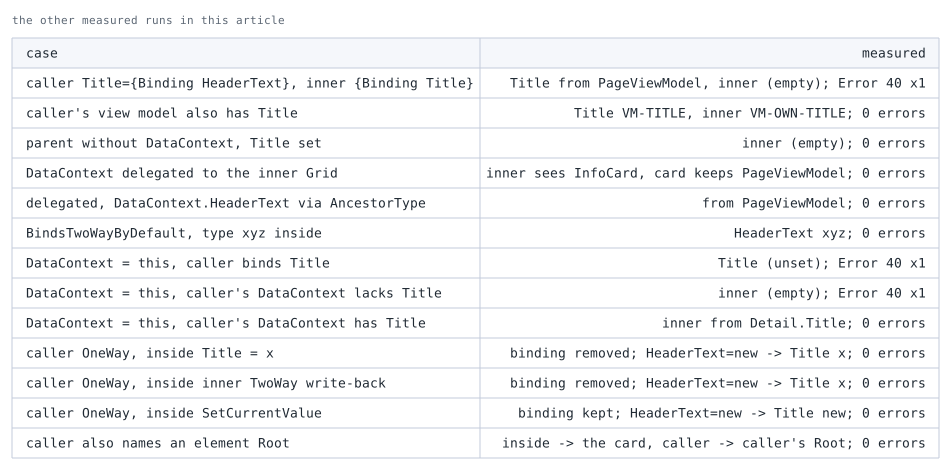
Every value reported here as measured was obtained by running the code in the environment described below (collected in the two tables at the end of the notes).
Prerequisites / Environment
- Framework: .NET 6 or later / WPF
- Language: C# / XAML (the samples use only syntax available in C# 7.0 and later)
- Target features:
UserControl,DependencyProperty.Register,BindingwithRelativeSource/ElementName - Architecture: MVVM, with a view model assigned to the consuming window’s
DataContext - Other constraints: the
UserControlis defined as a XAML file paired with code-behind - Verification environment: .NET 10 / Windows 11
The figures in this article come from reading the DataContext as seen from elements inside the UserControl, and whether each binding reaches its target, in the environment above.
The following points were confirmed in that environment:
- The
DataContextseen from elements inside theUserControlis the consuming view model. - In a
UserControlthat inherits the consumer’sDataContext, a plainBindingon an inner element does not reach the control’s own dependency property. - Writing
RelativeSource Selfon an inner element points at that element itself, so it does not reach it either. RelativeSource AncestorType=UserControldoes reach it.
The ... in the XAML samples marks omitted attributes that are irrelevant here, such as the standard xmlns declarations.
The samples therefore do not parse as pasted; replace the marker with the usual declarations in a real file.
Problem
An InfoCard receives a heading string from outside.
The code-behind registers Title as a dependency property.
public partial class InfoCard : UserControl
{
    public static readonly DependencyProperty TitleProperty =
        DependencyProperty.Register(
            nameof(Title), typeof(string), typeof(InfoCard), new PropertyMetadata(string.Empty));

    public InfoCard() => InitializeComponent();

    public string Title
    {
        get => (string)GetValue(TitleProperty);
        set => SetValue(TitleProperty, value);
    }
}
The registration is correct, and Title is settable from outside.
The XAML that displays the value follows.
<UserControl x:Class="Sample.InfoCard" ...>
    <Border BorderBrush="Gray" BorderThickness="1" Padding="6">
        <TextBlock x:Name="TitleText" Text="{Binding Title}" />
    </Border>
</UserControl>
The x:Name on the TextBlock exists only to make the trace shown below readable and has no effect on the display.
The caller passes HeaderText from the view model assigned to the window’s DataContext.
<local:InfoCard Title="{Binding HeaderText}" />
Running this renders the border of InfoCard with no text.
In the measured run, InfoCard.Title held the value of HeaderText while the internal TextBlock.Text was an empty string.
Changing the default value of Title to something other than an empty string does not change the display.
What the TextBlock shows is not the default of Title but the default of the binding target, because the binding never resolved.
The Output window records the following trace.
System.Windows.Data Error: 40 : BindingExpression path error: 'Title' property not found on
'object' ''PageViewModel' (HashCode=18705942)'. BindingExpression:Path=Title;
DataItem='PageViewModel' (HashCode=18705942); target element is 'TextBlock' (Name='TitleText');
target property is 'Text' (type 'String')
The DataItem names the consuming view model rather than InfoCard, which points directly at the cause.
The binding was looking for PageViewModel.Title, not InfoCard.Title.
Cause / Background
A binding written as {Binding Title}, with only a Path, specifies no source.
A binding with no source resolves its Path against the DataContext of the target element.
DataContext is an inherited value that flows down the element tree.
The moment InfoCard is placed in a view, the view model held by the consuming window flows into the DataContext of the InfoCard element, and the elements inside inherit it in turn.
In the measured run, the DataContext seen by the internal TextBlock was PageViewModel, not InfoCard.
Title, by contrast, is a property of the InfoCard element, not a property of the object sitting in DataContext.
Registering it as a dependency property does not change that relationship.
The outer Title="{Binding HeaderText}" works because its target is the InfoCard element and its source is the consuming DataContext.
Receiving a value and being reachable from inside are two different paths.
The starting point of each notation is summarized below.
| Notation | Where the value is looked up | Reaches the control’s own DP from inside |
|---|---|---|
{Binding Title} |
The element’s DataContext (inherited) |
No |
{Binding Title, RelativeSource={RelativeSource AncestorType=...}} |
An ancestor found by walking the element’s parent chain | Yes |
{Binding Title, ElementName=Root} |
A named element in the same name scope | Yes |
{Binding Title, Source=...} |
An explicitly supplied object | No (limited to a fixed object resolvable in markup) |
What makes the symptom awkward is that the failure surfaces differently depending on the situation.
When the consuming DataContext exposes a property of the same name, no error appears at all.
If the view model also has a property named Title, the internal {Binding Title} resolves against that one.
In the measured run, InfoCard.Title received VM-TITLE while the internal TextBlock displayed the view model’s own VM-OWN-TITLE, and not a single trace line was written.
Because a value is displayed, the binding is unlikely to be suspected.
When DataContext is null, no error appears either.
In the measured run, placing InfoCard under a parent with no DataContext left the internal display blank even with Title set, and the Output window gained zero trace lines.
The binding waits with an unresolved source rather than reporting a failure.
An empty Output window is not evidence that a binding is correct.
Reading the messages that do appear is covered in Reading WPF Binding Errors and Diagnosing Them with the Output Window.
The figure below records the value that arrives and the DataContext seen from inside, per way of writing the binding.
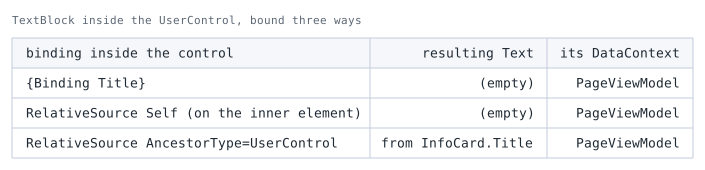
Title from a TextBlock placed inside InfoCard, a UserControl holding a Title dependency property. The consuming side sets PageViewModel as its DataContext.The DataContext column reads PageViewModel on every row. What an element inside sees is not the InfoCard but the consuming view model.
A plain {Binding Title} therefore looks for Title on that PageViewModel, and no value arrives.
The second row deserves attention too. RelativeSource Self points at the inner element itself, so it looks for Title on the TextBlock and likewise finds nothing.
Only the third row, which walks up to the UserControl with AncestorType, delivers the value.
Three Ways to Reference It
Give the internal binding an explicit starting point other than DataContext.
Three options exist.
- Walk up to an ancestor with
RelativeSource— search the element’s parent chain upward and use theUserControlitself as the source.
Specified per binding. - Reference the control by name with
ElementName— give the root element anx:Nameand refer to it.
Specified per binding. - Delegate
DataContextto the inner root element — switch only theDataContextof the panel placed directly under theUserControl.
Every binding below it can then stay as{Binding Title}.
None of these touch the DataContext of the UserControl element itself.
Overwriting that breaks the bindings supplied by the caller, as covered under Notes.
Option 1 suits a small number of reference sites, or cases where the internals also need the consuming DataContext.
Option 2 is near-equivalent to option 1 and is the choice where shorter markup is preferred; the two are compared under Alternatives.
Option 3 suits controls that reference three or more properties internally.
Options 1 and 2 are shown side by side inside the same control.
The root element gets x:Name="Root", and Title is displayed three different ways.
<UserControl x:Class="Sample.InfoCard" x:Name="Root" ...>
    <StackPanel>
        <TextBlock Text="{Binding Title}" />
        <TextBlock Text="{Binding Title, RelativeSource={RelativeSource AncestorType=UserControl}}" />
        <TextBlock Text="{Binding Title, ElementName=Root}" />
    </StackPanel>
</UserControl>
All three are written to target the same property of the same control, and the only difference is how the source is specified.
Placed as Title="{Binding HeaderText}", only the lower two produce a value.
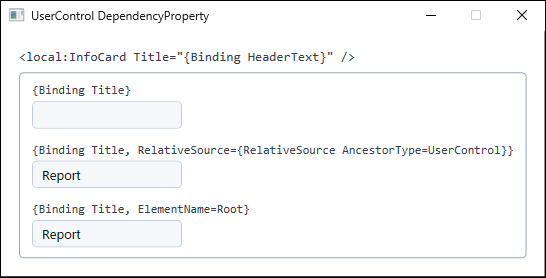
Title rendered through three notations. The outer frame marking the extent of InfoCard, the notation label above each field, and the consuming markup at the top were all added to the figure to show which notation produced which result (produced on .NET 10 / Windows 11).AncestorType=UserControl finds the nearest UserControl.
It therefore selects the wrong target when the element holding the binding sits inside another UserControl.
Naming the type avoids that.
<TextBlock Text="{Binding Title,
           RelativeSource={RelativeSource AncestorType={x:Type local:InfoCard}}}" />
Specifying the type stops the search at an ancestor of that type or a subclass of it, so changes to the internal nesting do not change the target.
This form requires the local namespace declaration (xmlns:local="clr-namespace:Sample").
Option 3 is shown next.
It points the DataContext of the Grid directly under the UserControl at the control itself.
<UserControl x:Class="Sample.InfoCard" x:Name="Root"
             xmlns:local="clr-namespace:Sample" ...>
    <Grid DataContext="{Binding RelativeSource={RelativeSource AncestorType={x:Type local:InfoCard}}}">
        <StackPanel>
            <TextBlock Text="{Binding Title}" />
            <TextBox Text="{Binding Title, UpdateSourceTrigger=PropertyChanged}" />
        </StackPanel>
    </Grid>
</UserControl>
The target of the DataContext assignment is the child, not the UserControl element.
In the measured run, everything under the Grid saw InfoCard as its DataContext while the DataContext of the InfoCard element itself remained the consuming view model.
Outer and inner bindings both resolve without interfering with each other.
Writing values back from inside requires the outer binding to be two-way.
That condition is met either by changing the default transfer direction in the dependency property metadata or by specifying Mode=TwoWay at the call site.
Registering with PropertyMetadata leaves outer bindings one-way by default.
public static readonly DependencyProperty TitleProperty =
    DependencyProperty.Register(
        nameof(Title), typeof(string), typeof(InfoCard),
        new FrameworkPropertyMetadata(
            string.Empty, FrameworkPropertyMetadataOptions.BindsTwoWayByDefault));
In the measured run, editing the internal TextBox with this option applied propagated the value all the way back to HeaderText on the view model.
Where the internals update Title, as the TextBox above does, omitting this option breaks the outer binding, as covered in the next section.
Specifying Mode=TwoWay at the call site produces the same result, but for input controls that are two-way by design, BindsTwoWayByDefault removes the risk of a caller forgetting it.
How to Choose
Which of the three applies is settled by how many properties the control references internally, and by whether the consuming DataContext is used as well.
One or two reference sites call for RelativeSource AncestorType.
The source is written per binding, so there is more markup, but DataContext stays as the consumer set it. Reading the consuming DataContext from inside calls for this or the ElementName below.
Referring to the root element by name calls for ElementName.
The markup is shorter, but it resolves differently from RelativeSource. ElementName looks a name up in a namescope, while RelativeSource AncestorType walks up the element tree matching a type. Where the name is closed off in a separate namescope and cannot be looked up, ElementName does not resolve — though in this arrangement it does resolve from a DataTemplate, as covered later. Reading the consuming DataContext is written as Path=DataContext.HeaderText.
Three or more internal references call for delegating DataContext on the inner root element.
One setting covers it, and everything inside can stay written as {Binding Title}. Of the three approaches compared in this article, it is also the only one that resolved from inside a ContextMenu (see the table below).
None of them touches the DataContext of the UserControl element itself. Writing there breaks the binding the consumer supplies.
Comparing the Approaches
The four ways of reaching a control’s own dependency property from inside compare as follows.
| Approach | Amount of markup | Bindings from the caller | Inside ContextMenu |
Best suited for |
|---|---|---|---|---|
RelativeSource AncestorType |
Per binding | Unaffected | Does not resolve | Few reference sites, or internals that also use the consuming DataContext |
ElementName + x:Name on the root |
Per binding | Unaffected | Does not resolve | Keeping the markup short |
Delegate DataContext to the inner root |
One place | Unaffected | Resolves | Internals that reference three or more properties |
DataContext = this |
One place | Breaks | Resolves | None; avoid |
RelativeSource and ElementName are equivalent in outcome in ordinary layouts, and they diverge in only two situations.
The first is the case raised under Implementation, where the element holding the binding sits inside another UserControl.
ElementName names the target directly and is unaffected.
In the measured run, evaluating AncestorType=UserControl from an element nested inside another UserControl selected the inner control rather than the outer one (see the table below).
Specifying AncestorType={x:Type local:InfoCard} stabilizes the target for RelativeSource, though a subclass of that type among the ancestors is still picked first when it is nearer.
The second is a configuration where a template is reused from another control.
ElementName stops resolving as soon as the name scope at the point of use has no Root, whereas AncestorType holds as long as an ancestor of the given type exists.
Delegating to the inner root has the advantage that internal markup stays as {Binding Title}.
The trade-off is that reaching the consuming DataContext from inside takes an extra step.
Because the DataContext of the UserControl element itself remains the consuming view model, {Binding DataContext.HeaderText, RelativeSource={RelativeSource AncestorType={x:Type local:InfoCard}}} reaches it, and it resolved in the measured run.
A design that needs that reference is unlikely to be a genuinely reusable part, however, and the data it needs is better received explicitly as dependency properties.
DataContext = this offers the same brevity as delegation but breaks bindings from the caller.
The symptom stays hidden while the control is used in a single view and surfaces as soon as it is reused.
Notes
Assigning DataContext = this in the constructor does make the internal {Binding Title} work.
The DataContext of the UserControl element is then pinned to the control, so the caller’s Title="{Binding HeaderText}" searches InfoCard for HeaderText and fails.
In the measured run, System.Windows.Data Error: 40 was logged and Title stayed at its default.
Writing <UserControl DataContext="{Binding RelativeSource={RelativeSource Self}}"> in XAML produces the same result.
This breakage appears or hides depending on the call site.
A literal Title="Report" involves no binding, so it succeeds regardless of DataContext.
The same control behaves differently based solely on whether the caller passes a literal or a binding.
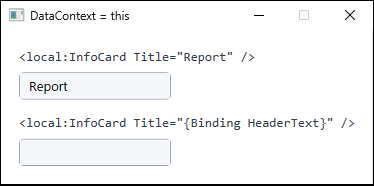
DataContext = this set in its constructor, used twice. The only difference between the two is how the caller passes the value. The markup above each instance was added to the figure to show that difference (produced on .NET 10 / Windows 11).The remaining pitfalls follow.
- A caller that sets
DataContextexplicitly overridesDataContext = this.
Writing<local:InfoCard DataContext="{Binding Detail}" ... />applies after the constructor assignment.
Both the outer binding and the internal{Binding Title}then resolve against the substituted object.
In the measured run, the internals went blank when the substitute lackedTitle, and displayed another object’s value with no error when it had one.
The same control fails in different ways depending on where it is placed, which obscures the reproduction conditions. - Updating the value from inside while the outer binding is one-way destroys that binding.
Writing a local value toTitlewhileTitle="{Binding HeaderText}"is in place as a one-way binding detaches that binding.
In the measured run,BindingOperations.GetBindingExpressionreturnednullboth after assigningthis.Title = "..."from code and after writing back through a two-way binding on an internalTextBox.
Later changes to the view model no longer reach the control.
Where the internals update the value, specifyBindsTwoWayByDefaultorMode=TwoWayat the call site. SetCurrentValueis not a substitute forBindsTwoWayByDefault.
SetCurrentValuechanges the effective value while leaving the binding in place.
In the measured run, unlike an assignment, the binding stayed attached and a later change on the source overwrote the value.
It does not, however, write back to the source while the binding is one-way.
UseSetCurrentValueto change the displayed value temporarily, andBindsTwoWayByDefaultto return a value to the caller.
Local values and dependency property value precedence are covered in Why WPF Style Triggers and DataTriggers Do Not Apply — Dependency Property Value Precedence.- From inside a
ContextMenu, neitherRelativeSourcenorElementNamereaches the surroundingUserControl.
Both fail, but for different reasons.
Ancestor search withRelativeSourcefollows the parent chain, and aContextMenuis attached through theFrameworkElement.ContextMenuproperty rather than as a child in the element tree, so that chain does not continue outward.
ElementNamelooks a name up in a XAML name scope, found through the element tree. The menu is shown in aPopupoutside theUserControl’s element tree, so in this setup the lookup did not reach the name scope whereRootis registered. The measured menu was created in code, where WPF does not create a name scope automatically, so the failure is not due to a name scope of the menu’s own.
In the measured run, aContextMenuattached to aButtoninside theUserControlproducedSystem.Windows.Data Error: 4for bothAncestorType=UserControlandElementName=Root, leavingMenuItem.Headerasnull(see the table below).
DataContext, on the other hand, is inherited from the placement site through a path separate from that parent chain, so the plain{Binding Title}resolved under option 3 once the menu was open.
That inheritance holds only after the menu opens and is associated with its placement site, not before it opens or duringContextMenuOpening.
{Binding PlacementTarget.DataContext.Title, RelativeSource={RelativeSource AncestorType=ContextMenu}}is sometimes offered as a workaround, but it reaches theDataContextof the placement element.
Under option 3 the plain{Binding Title}already suffices, and under options 1 and 2 it lands on the consuming view model instead.
The form is useful only for reaching that consuming view model from the menu, not the control’s own dependency property. - Inside an inline
Popup, both do resolve.
The content of aPopuprenders in a separate visual tree rooted atPopupRoot.
ThePopupitself is nonetheless written as a child element in theUserControlXAML, so the parent chain thatRelativeSourcefollows stays intact andRootremains in the same name scope as far asElementNameis concerned.
In the measured run, bothAncestorType=UserControlandElementName=Rootresolved from inside aPopupdeclared inline in theUserControl(see the table below).
What separates this fromContextMenuis whether the parent chain and the name scope extend outward, not whether a separate visual tree is involved. - Bindings inside a
DataTemplateresolve as well.
A template has its own name scope, yet in the measured run bothElementName=RootandAncestorType=UserControlresolved in aDataTemplatewritten inline and in one placed underUserControl.Resourceswith a key.
ForElementName, resolution depends on the name scope where the template is used, not on the file where it is defined.
Moving a template into a separate file is therefore harmless in itself;ElementNamealone breaks once the same template is reused from another control that has noRoot.
Reaching an outerDataContextfrom a template is covered in Binding to the Parent DataContext from Inside a WPF DataTemplate. - Logic placed in the CLR property wrapper is never invoked.
XAML parsing and binding callSetValuedirectly rather than theTitlesetter.
Official documentation states explicitly that the wrappers are bypassed.
Behavior that must run on value changes belongs in thePropertyChangedCallbackofPropertyMetadata. - A duplicated
x:Nameis not a conflict.
Thex:Name="Root"on theUserControlroot is confined to that control’s name scope.
In the measured run, placing an element of the same name in the consuming view resolved each to a different element with no error.
System.Windows.Data Error entries in the data binding trace. Input was sent through WPF's input processing (InputManager).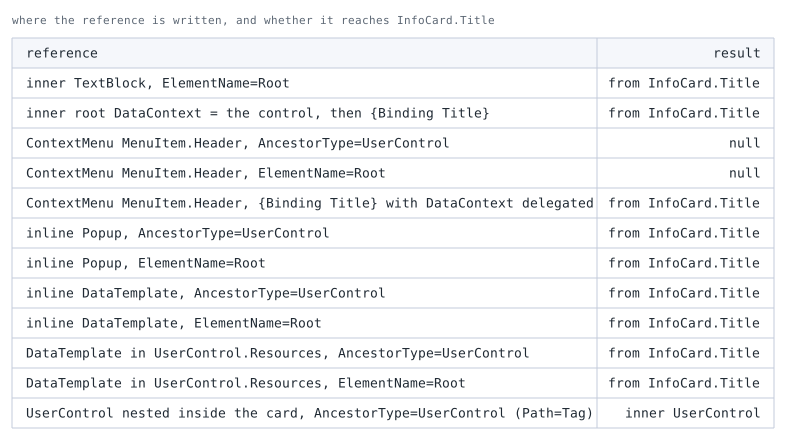
Root (equivalent to x:Name="Root"). The nested row tells the two controls apart by Tag.Summary
When an internal {Binding} renders nothing, start by inspecting DataContext.
Whether the value arrived can be determined by reading the dependency property directly.
- The dependency property holds the value but nothing is displayed — the internal binding is looking at the consuming
DataContext.
Specify the source withRelativeSourceorElementName. - The dependency property is still at its default — the outer binding did not resolve.
Check first whether theDataContextof theUserControlitself was overwritten, then check the path and theDataContextat the call site. - No error appears but the value is wrong — the consuming
DataContextexposes a property of the same name.
This state never reaches the Output window and stays invisible untilRelativeSourceis specified.
The deciding factor is how many properties the control references internally.
Three or more call for delegating DataContext to the inner root element; one or two call for specifying RelativeSource or ElementName per binding.
In every case, never assign to the DataContext of the UserControl element itself.
For input controls that write values back from inside, add FrameworkPropertyMetadataOptions.BindsTwoWayByDefault.