Overview
A Trigger or DataTrigger declared in Style.Triggers sometimes has no visible effect even though its condition is met.
The common assumption is a broken binding or a type mismatch in the trigger condition, but a frequent cause is that the trigger fires correctly and its value is simply outranked by a higher-precedence input.
This article explains the cause in terms of dependency property value precedence, shows how to repair markup that carries a local value, and gives criteria for choosing among the available fixes.
Prerequisites / Environment
- Framework: .NET 6 or later / WPF
- Language: C#
- Target feature:
Trigger/DataTrigger/MultiTriggerdeclared inStyle.Triggers - Default theme: Aero2 (the Fluent theme available from .NET 9 differs from what is described below in both the standard control colors and the structure of the default templates)
- Architecture: applicable to both MVVM and code-behind
- Verification environment: .NET 10 / Windows 11
- Also tested on: .NET Framework 4.8.1 (4.8.9363) / Windows 11 (built for .NET Framework 4.8)
A separate MVVM sample that reproduces the article’s conditions confirmed three rows of the effective-value table, with the same results as on .NET 10: a localBackgroundwith a trigger, and aSetterdefault with a trigger (condition met and not met).
TheClearValuerow and the second table, which coversSetCurrentValueand bindings, were not measured on .NET Framework.
The tables in this article come from reading the effective value and its BaseValueSource in the environment above.
The following points were confirmed in that environment:
- On an element that carries a local value for a property, a
Styletrigger setting that same property has no effect even when its condition is met. - The
BaseValueSourceof the effective value isLocalin that case. - Moving the default into a
Settermakes the trigger take effect, andBaseValueSourcechanges. - Removing the local value with
ClearValuealso makes the trigger take effect.
Problem
Consider a Style with a DataTrigger that changes the background of a frame according to a validation state.
<Window xmlns="http://schemas.microsoft.com/winfx/2006/xaml/presentation"
        xmlns:x="http://schemas.microsoft.com/winfx/2006/xaml">
    <Window.Resources>
        <Style x:Key="StatusBox" TargetType="Border">
            <Style.Triggers>
                <DataTrigger Binding="{Binding HasError}" Value="True">
                    <Setter Property="Background" Value="#FFD4D4" />
                </DataTrigger>
            </Style.Triggers>
        </Style>
    </Window.Resources>

    <Border Style="{StaticResource StatusBox}" Background="White">
        <TextBlock Text="HasError = True" />
    </Border>
</Window>
When HasError becomes true, the background of this Border stays White.
The binding resolves correctly and no binding error appears in the Output window (for reading those messages, see Reading WPF Binding Errors and Diagnosing Them with the Output Window).
The same result occurs with a property trigger such as Trigger Property="IsMouseOver", so the trigger type is not the cause.
Cause / Background
A WPF dependency property can receive values from several inputs: local values, styles, templates, and inheritance.
Which one becomes the effective value is decided by dependency property value precedence, and a higher-precedence input silences every lower one.
The order is as follows, highest precedence first.
| Rank | Source of the value | Example |
|---|---|---|
| 1 | Property system coercion | CoerceValueCallback |
| 2 | Active animations, or animations with a Hold behavior |
Storyboard |
| 3 | Local value | A XAML attribute or property element, SetValue, or a Binding / StaticResource / DynamicResource written on the element |
| 4 | TemplatedParent template property values |
Elements created by a ControlTemplate or DataTemplate |
| 5 | Implicit styles | Applies to the Style property only |
| 6 | Style triggers | Style.Triggers |
| 7 | Template triggers | ControlTemplate.Triggers / DataTemplate.Triggers |
| 8 | Style setter values | A Setter directly under Style |
| 9 | Default (theme) styles | Theme style triggers, then theme style setters |
| 10 | Inheritance | Inheritable properties such as FontSize |
| 11 | Default value from dependency property metadata | The default value in PropertyMetadata |
The problem lies entirely in the gap between rank 3 and rank 6.
A value written as a XAML attribute, such as Background="White", is a local value at rank 3 and therefore outranks a style trigger at rank 6.
The trigger condition is evaluated and its Setter is applied to that lower rank, but the effective value remains the local value, so nothing changes on screen.
The part that is easy to miss is that a Binding or a DynamicResource written directly on the element also counts as a local value.
Writing Background="{Binding NormalBrush}" only defers evaluation of the value; its precedence is still rank 3, and a style trigger cannot win against it.
A Setter directly under Style, on the other hand, sits at rank 8, below the trigger at rank 6.
Supplying the default through a setter rather than a local value therefore restores the intended relationship.
This precedence can be confirmed by displaying the elements and reading DependencyPropertyHelper.GetValueSource.
The table below records the result under varying conditions.
| configuration | effective value (BaseValueSource) |
|---|---|
| local Background + trigger | #FFFFFFFF (Local) |
| Setter default + trigger | #FFFFD4D4 (StyleTrigger) |
| Setter default, trigger not met | #FFFFFFFF (Style) |
| local Background, then ClearValue | #FFFFD4D4 (StyleTrigger) |
Measured on .NET 10 / Windows 11. HasError varies per row: it is False on the trigger not met row and True on the others. The value in parentheses is the BaseValueSource returned by DependencyPropertyHelper.GetValueSource.
On the row where the value does not change, BaseValueSource is Local. That is why the trigger value never replaces it.
Moving the default into the Setter changes the source to StyleTrigger, and the trigger color becomes the effective value.
Clearing the local value with ClearValue produces the same result, which confirms the local value is the cause.
Solution
Remove the local value from the target element and move the default into a Setter inside the Style.
The default then comes from rank 8 and the conditional value from rank 6, so the trigger wins whenever its condition holds.
Only the property that the trigger writes to is affected.
Setting unrelated properties such as Margin or Width as local values on the element causes no interference.
Implementation
The following markup places two Border elements one above the other under the same style: one keeps its local value, the other takes its default from the setter.
Both reference the same StatusBox style, and the relevant difference is whether Background is present as a local value (the Margin on the lower one only separates the two vertically and has no bearing on the trigger).
<Window xmlns="http://schemas.microsoft.com/winfx/2006/xaml/presentation"
        xmlns:x="http://schemas.microsoft.com/winfx/2006/xaml">
    <Window.Resources>
        <Style x:Key="StatusBox" TargetType="Border">
            <Setter Property="Background" Value="White" />
            <Setter Property="BorderBrush" Value="#9AA4B2" />
            <Setter Property="BorderThickness" Value="1" />
            <Setter Property="Padding" Value="18,6" />
            <Style.Triggers>
                <DataTrigger Binding="{Binding HasError}" Value="True">
                    <Setter Property="Background" Value="#FFD4D4" />
                </DataTrigger>
            </Style.Triggers>
        </Style>
    </Window.Resources>

    <StackPanel>
        <!-- The local value remains, so the trigger background is not applied -->
        <Border Style="{StaticResource StatusBox}" Background="White">
            <TextBlock Text="HasError = True" />
        </Border>

        <!-- The default moved into the setter, so the trigger background is applied -->
        <Border Style="{StaticResource StatusBox}" Margin="0,12,0,0">
            <TextBlock Text="HasError = True" />
        </Border>
    </StackPanel>
</Window>
The HasError used in the trigger condition is a property on the view model assigned to DataContext.
It implements INotifyPropertyChanged so that runtime changes reach the trigger.
public sealed class ValidationViewModel : INotifyPropertyChanged
{
    private bool _hasError;

    public bool HasError
    {
        get => _hasError;
        set
        {
            if (_hasError == value)
            {
                return;
            }

            _hasError = value;
            PropertyChanged?.Invoke(this, new PropertyChangedEventArgs(nameof(HasError)));
        }
    }

    public event PropertyChangedEventHandler? PropertyChanged;
}
Assigning this view model to the DataContext of the Window propagates changes of HasError to the DataTrigger.
With a plain property that raises no change notification, the trigger is never re-evaluated when the value changes.
Rendering this markup with HasError set to true shows the difference directly.
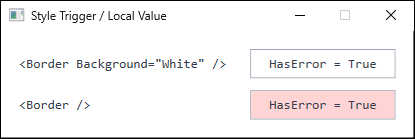
HasError set to True. The upper border keeps Background as a local value and does not pick up the trigger color; the lower one takes its default from the Setter, so the trigger color is applied. The labels on the left were added to the figure to show how the two Border declarations differ (captured on .NET 10 / Windows 11).Precedence also depends on how a value is assigned from code-behind.
The three statements below all target Background, but each stores the value at a different rank.
// Becomes a local value, so style triggers no longer affect Background on this element
border.Background = Brushes.White;

// Changes the effective value without writing a local value (a trigger can still take over)
border.SetCurrentValue(Border.BackgroundProperty, Brushes.White);

// Removes an existing local value, restoring the setter or trigger value
border.ClearValue(Border.BackgroundProperty);
SetCurrentValue is a special assignment that does not appear in the precedence list: it changes the current value without overwriting the source of the value.
It suits cases where a temporary value is needed without discarding an existing binding or trigger.
It only avoids creating a local value, however, and does not remove one that is already set.
Called on a property that has a local value, SetCurrentValue does change the effective value, but the value source stays the local value, so a trigger that fires afterward still does not take effect (see the table below). To let the trigger apply, remove the local value with ClearValue first.
| case | measured |
|---|---|
| local Red: right after SetCurrentValue(White) | #FFFFFFFF (Local) |
| local Red: SetCurrentValue(White), then Tag = on | #FFFFFFFF (Local) |
| no local value: right after SetCurrentValue(White) | #FFFFFFFF (Default) |
| no local value: SetCurrentValue(White), then Tag = on | #FF008000 (StyleTrigger) |
| TextBox.Text bound OneWay, then Text = "typed" in code | binding removed, source.Value = from source |
| TextBox.Text bound TwoWay, then Text = "typed" in code | binding kept, source.Value = from source |
| Button with an explicit Style (Foreground only): Template | set (DefaultStyle) |
Measured on .NET 10 / Windows 11. The trigger is a style trigger that turns Background green when Tag is on. The default UpdateSourceTrigger of TextBox.Text is LostFocus, so even with TwoWay the source has not changed at the moment of the assignment.
ClearValue removes only the local value, so whichever remaining input ranks highest — a theme style, for instance — becomes the effective value.
Notes
ClearValuealso removes a binding or aDynamicResource.
Calling it on a property that carries only a binding, with no literal local value, discards the binding itself.
To supply a default through a binding, write theBindingin theValueof aSetterinstead of on the element.
To express the trigger condition itself through a binding, use theBindingproperty of aDataTrigger, which is of typeBindingBase.
ABindingis accepted in that condition binding and inSetter.Value, but not in theValueof aTriggerorDataTrigger, which holds the value being compared against.- Assigning to a property with a OneWay binding replaces the binding.
A plain assignment to a property that holds a OneWay binding removed the binding and replaced it with the assigned local value.
A laterClearValuecall does not restore the binding.
A TwoWay binding survives the assignment, and the assigned value is written back to the source according toUpdateSourceTrigger(see the table above).
Updating a dependency property of aUserControlfrom inside the control with a plain assignment likewise detaches the caller’s binding when it is OneWay, whereasSetCurrentValuepreserves it (see Binding to a WPF UserControl’s Own Dependency Property from Inside the Control). - Triggers in a theme style, and in its
ControlTemplate, lose to local values as well.
SettingForegroundas a local value on aButtonsuppresses the trigger that greys out the text when the button is disabled.
Depending on how the default theme is implemented, that trigger sits at rank 7 (template triggers) or rank 9 (theme styles), but either way it ranks below a local value at rank 3.
Verify that the standard state feedback of a control is not being broken. - If a trigger still has no visible effect after the local value is gone, examine the
ControlTemplate.
The default template of a standard control may hard-code appearance such as the mouseover background.
In that case the trigger wins as a property value but never reaches the rendering, and replacing the template is required. - A one-way binding or a literal value in an
ItemContainerStylesetter also loses to a local value on the container.
When container state is supplied through a style on anItemsControl, assigning the same property from code produces a local value, and style values no longer reach that container afterwards.
AMode=TwoWaybinding in the setter is the exception: the binding survives and the assigned value is written back to the source.
The concrete impact onIsSelectedandIsExpandedofTreeViewItemis covered in Selecting and Expanding a WPF TreeView Node from Code, and Why SelectedItem Is Read-Only. - The same precedence does not apply to the
Styleproperty itself.
AStylewritten on the element is an explicit style with local-value precedence (rank 3), while a style applied from a resource whose key matches the element type is an implicit style at rank 5.
The default (theme) style applies at rank 9 regardless of whether an explicit or implicit style is present: on aButtonwith an explicit style that sets onlyForeground,Templatestill came fromDefaultStyle(see the table above).
An implicit style is not applied to an element that already has an explicit style. - Resource evaluation timing is a separate issue.
AStaticResourcethat is swapped at runtime and never updates is a matter of evaluation timing rather than precedence (see Why StaticResource Changes Are Not Reflected in WPF and How to Fix It).
The two problems should not be conflated.
Alternatives / Comparison
| Approach | Pros | Cons | Best suited for |
|---|---|---|---|
Move the default into a Setter |
Stays entirely in XAML and cannot invert the precedence | Harder to give each element a different default | The default choice in most situations |
Assign with SetCurrentValue |
Creates no local value, so triggers keep working | Requires code-behind | Applying a temporary value at runtime |
Remove the local value with ClearValue |
Leaves the existing XAML untouched | Also removes bindings, and the call timing must be managed | Clearing a local value applied at runtime |
Replace the ControlTemplate |
Controls even the appearance that a template hard-codes | Verbose, and does not follow theme updates | A default template that fixes the appearance |
Start an animation from EnterActions |
Rank 2, so it overrides a local value | Stopping and rewinding must be managed, and animating the Color of an unfrozen shared brush also changes every other element that references it |
State changes that need a transition effect |
Summary
A style trigger that appears broken is often not a mistake in the trigger itself; a local value on the target property is a frequent cause.
Local values sit at rank 3, style triggers at rank 6, and style setters at rank 8, and that ordering alone explains the behavior.
Selection criteria are as follows.
- The default is written in XAML:
remove the attribute from the element and move it into aSetterin theStyle.
This has the fewest side effects and should be considered first. - The value changes at runtime from code-behind:
useSetCurrentValueinstead of a plain assignment.
Because it does not overwrite the value source, a trigger that fires later still applies.
On a property that already carries a local value the effective value changes but the trigger still cannot apply, so clear that withClearValuefirst. - A local value is already in place:
clear it withClearValue, keeping in mind that any binding goes with it.
Supply the default from aSetterif one is needed.
Confirming that the target property carries no local value, and keeping every default in a Setter, removes this class of problem at design time.