Overview
A button placed inside the DataTemplate of an ItemsControl or ListBox often fails to invoke a command that lives on the parent view model.
The binding expression itself is correct: it is evaluated exactly as written, but the DataContext it starts from has been switched to the individual item, so the target member is never reached.
This article explains the cause in terms of DataContext inheritance and compares four ways to reach the parent — RelativeSource, ElementName, x:Reference, and PlacementTarget — based on measured behavior inside a DataTemplate and inside a ContextMenu or ToolTip.
Prerequisites / Environment
- Framework: .NET 6 or later / WPF
- Language: C# 9 or later / XAML (the code samples assume target-typed new and enabled nullable reference types; on C# 8 and earlier, state the type explicitly and drop
!) - Target features:
ItemTemplate/DataTemplateofItemsControl-derived controls, plusContextMenuandToolTip - Architecture: MVVM, where commands and shared display values belong to the parent view model rather than to each item
- Behavior verified on: .NET 10 / Windows 11
- Also tested on: .NET Framework 4.8.1 (4.8.9363) / Windows 11 (built for .NET Framework 4.8)
A separate MVVM sample that reproduces the article’s conditions confirmed the{Binding DeleteCommand}andRelativeSource AncestorType=ItemsControlrows of the table in the Cause / Background section, the unit text in the implementation figure, and the result of pressing the delete button, with the same results as on .NET 10.
TheElementName=Rootrow was not measured on .NET Framework.
Problem
Consider a list where each row carries a delete button, with the command bound inside the DataTemplate.
<ItemsControl ItemsSource="{Binding Items}">
    <ItemsControl.ItemTemplate>
        <DataTemplate>
            <StackPanel Orientation="Horizontal">
                <TextBlock Text="{Binding Name}" />
                <Button Content="Delete" Command="{Binding DeleteCommand}" />
            </StackPanel>
        </DataTemplate>
    </ItemsControl.ItemTemplate>
</ItemsControl>
DeleteCommand belongs to the parent view model assigned to the DataContext of the ItemsControl, not to the elements of Items.
Clicking the button does nothing.
The button is not rendered as disabled either, so it remains fully clickable and the failure is invisible on screen.
The Output window records the following binding error, emitted as a single line and wrapped here for readability.
System.Windows.Data Error: 40 : BindingExpression path error: 'DeleteCommand' property not found on
'object' ''Measurement' (HashCode=58682725)'. BindingExpression:Path=DeleteCommand;
DataItem='Measurement' (HashCode=58682725); target element is 'Button' (Name='');
target property is 'Command' (type 'ICommand')
The decisive detail is that DataItem names the item type (Measurement here) rather than the parent view model.
Reading these messages in general is covered in Reading WPF Binding Errors and Diagnosing Them with the Output Window.
Cause / Background
When a Binding specifies none of Source, RelativeSource, or ElementName, it resolves Path against the DataContext of the target element.
DataContext is inherited down the element tree, so a view model assigned to the Window normally reaches every descendant.
ItemsControl interrupts that inheritance.
It generates a container for each element of ItemsSource, such as a ContentPresenter or a ListBoxItem, and assigns the corresponding data item to that container’s DataContext.
Because the container’s own DataContext is the item, a binding written in an ItemContainerStyle setter resolves against the item as well (see Selecting and Expanding a WPF TreeView Node from Code, and Why SelectedItem Is Read-Only).
Because DataContext is an inherited property, elements expanded from the DataTemplate receive the container’s value unchanged.
As a result, {Binding DeleteCommand} inside the template looks for DeleteCommand on the item, does not find it, and leaves the binding unresolved.
The easily missed consequence is that a failed Command binding does not disable the button.
Through Command, a button renders as disabled when the ICommand assigned to it returns false from CanExecute.
With Command left at null there is nothing to evaluate, and IsEnabled stays true.
This applies to any control implementing ICommandSource, MenuItem included, not only to Button.
The visible state therefore looks correct, and the only symptom is that clicking has no effect.
A command that is assigned correctly but never toggles between enabled and disabled has a different cause, covered in Fixing a RelayCommand Whose CanExecute Does Not Update the Button State in WPF.
A plain {Binding} only walks the DataContext, so it has no way to cross this switch.
Crossing it requires either walking up the element tree or referring to the target element by name.
The following diagram shows where the DataContext switches and where the element tree itself is severed.
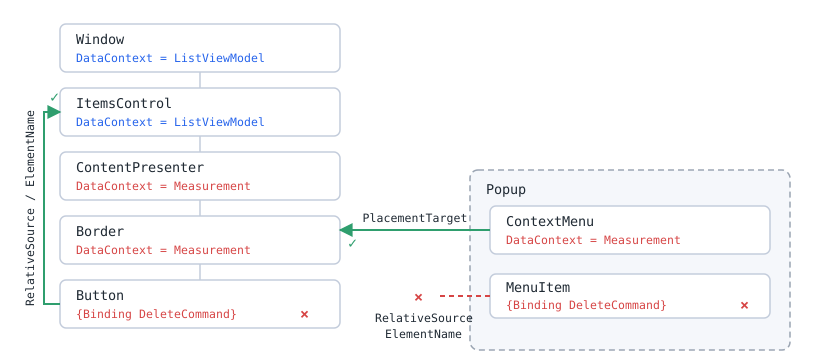
DataContext switch (blue is the parent view model, red is the item) and the element tree severed by the Popup. On the left, the walk up to the ItemsControl succeeds; inside the Popup on the right no such path exists, and only PlacementTarget reaches the owning element.The table below records whether the Command inside the template resolves, per way of writing the binding.
| binding written in the template | Command | IsEnabled |
|---|---|---|
| {Binding DeleteCommand} | null | True |
| RelativeSource AncestorType=ItemsControl | resolved | True |
| ElementName=Root | resolved | True |
Measured on .NET 10 / Windows 11 by reading Command off the Button placed in an ItemsControl.ItemTemplate. Nothing differs between the rows except how the binding is written.
Note the IsEnabled column. It stays True even on the row where Command is null.
A failed resolution changes nothing visible, so it cannot be spotted by looking at the screen.
All that remains is the symptom: clicking does nothing.
Solution
Use the FindAncestor mode of RelativeSource to walk up to an ancestor that still holds the original DataContext, then reach the member through that DataContext.
Prefer ItemsControl as the ancestor type.
Window or UserControl also works, but moving the template into another view or UserControl changes the surrounding structure, so ItemsControl survives reuse better.
Prefix the path with DataContext..
RelativeSource returns the ancestor element, and its DataContext is not traversed automatically.
Conversely, omit DataContext. when the target is a dependency property of the ancestor element itself.
Referencing a dependency property defined on a UserControl from inside that control is one such case (see Binding to a WPF UserControl’s Own Dependency Property from Inside the Control).
Implementation
The following XAML places a plain binding and a RelativeSource binding side by side inside the same DataTemplate.
Both attempt to display Unit, which only the parent view model owns, so the sole difference is how the parent is reached.
<ItemsControl ItemsSource="{Binding Items}">
    <ItemsControl.ItemTemplate>
        <DataTemplate>
            <StackPanel Orientation="Horizontal">
                <TextBlock Text="{Binding Name}" />
                <TextBlock Text="{Binding Value}" />

                <!-- The item has no Unit, so this stays empty -->
                <TextBlock Text="{Binding Unit}" />

                <!-- Walks up to the ItemsControl and reads Unit from its DataContext -->
                <TextBlock Text="{Binding DataContext.Unit,
                                  RelativeSource={RelativeSource AncestorType={x:Type ItemsControl}}}" />

                <Button Content="Delete"
                        Command="{Binding DataContext.DeleteCommand,
                                  RelativeSource={RelativeSource AncestorType={x:Type ItemsControl}}}"
                        CommandParameter="{Binding}" />
            </StackPanel>
        </DataTemplate>
    </ItemsControl.ItemTemplate>
</ItemsControl>
CommandParameter="{Binding}" deliberately uses a plain binding and passes the DataContext of that element, which is the item itself.
The division is that the parent view model supplies which member to invoke, while the item supplies what to invoke it on.
The matching view model is shown below.
Unit and DeleteCommand are declared here rather than on the item type.
public sealed class Measurement
{
    public Measurement(string name, int value)
    {
        Name = name;
        Value = value;
    }

    public string Name { get; }

    public int Value { get; }
}

public sealed class MeasurementListViewModel
{
    public MeasurementListViewModel()
    {
        DeleteCommand = new RelayCommand(item => Items.Remove((Measurement)item!));
    }

    public string Unit => "kg";

    public ObservableCollection<Measurement> Items { get; } = new()
    {
        new Measurement("A", 120),
        new Measurement("B", 80),
        new Measurement("C", 240),
    };

    public ICommand DeleteCommand { get; }
}
Measurement is deliberately not a record, because ObservableCollection<T>.Remove deletes the first element that compares equal.
Records compare by value, so with two identical rows the deletion removes the first one rather than the row that was clicked.
RelayCommand stands in for any ICommand implementation with a constructor that takes an Action<object?>; an implementation with a fixed parameter type, such as RelayCommand<Measurement> in CommunityToolkit.Mvvm, is the equivalent.
Assigning this instance to the DataContext of the Window lets the ItemsControl inherit it, which is where the RelativeSource bindings land.
Displaying the XAML above, with an added header identifying each expression and a frame around each value, makes the difference between the two bindings visible.
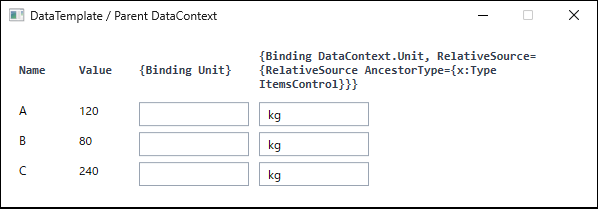
DataTemplate. The left box uses {Binding Unit} and resolves against the item, leaving it empty; the right box walks up to the ItemsControl and shows the value from the parent view model. The header text and the frames around each value were added to the figure to identify which expression produced each result and to make the empty box visible. The delete button is omitted from the figure because it plays no part in the contrast between the two bindings (produced on .NET 10 / Windows 11).Notes
ElementNamealso resolves from inside aDataTemplate.
ADataTemplateestablishes its own XAML namescope, but WPF resolvesElementNameby searching outward into enclosing namescopes, so{Binding DataContext.DeleteCommand, ElementName=RootWindow}works inside a template (verified on .NET 10 / Windows 11).
The common claim thatElementNamecannot be used inside templates does not apply to WPF.
The namescope restriction on markup-basedElementNameresolution is documented for the WinUIBinding.ElementName; the WPF documentation carries no equivalent restriction.
It does depend on the referenced name, so the binding breaks once the template moves to another view.- Neither
RelativeSourcenorElementNamereaches out of aContextMenuorToolTip.
Both are hosted inside aPopup, and aPopuprenders its content in a separate window on screen.
Elements inside the popup are therefore detached from the element tree of the application window, and since both ancestor lookup and name resolution walk that tree, neither crosses the boundary.
Unlike theDataTemplatecase, no outward path exists at all.
The Output window recordsCannot find source for binding with reference 'RelativeSource FindAncestor, AncestorType='System.Windows.Window', AncestorLevel='1''orCannot find source for binding with reference 'ElementName=RootWindow'. - A
ContextMenuinherits itsDataContextfrom the element that owns it.
When theContextMenuis attached to an element inside aDataTemplate, the inherited value is that element’sDataContext, which is the item.
A plain{Binding}inside the menu therefore resolves against the item exactly as it does inside the template, and still never reaches the parent view model. ContextMenuderives fromItemsControl.
SpecifyingAncestorType={x:Type ItemsControl}inside aContextMenumatches theContextMenuitself rather than the outer list.
Ancestor type lookup therefore does not behave as intended inside aContextMenu.- Both the inherited
DataContextandPlacementTargetare established as the menu opens.
For aContextMenuassigned toFrameworkElement.ContextMenu,ContextMenuServicesetsPlacementTargetto the owning element as the menu opens.
Before that,PlacementTargetandDataContextare bothnull, and neither is set yet at theContextMenuOpeningstage.
A binding that goes throughPlacementTargettherefore does not resolve until the menu opens.
BecausePlacementTargetis a dependency property, the binding is re-evaluated once it is assigned and resolves correctly from then on. x:Referencecarries a documented restriction.
x:Referenceis XAML 2009 syntax, and the documentation states that XAML 2009 features are usable in WPF only for XAML that is not markup-compiled.
In practice{x:Reference}written in a.xamlpage resolves both inside aDataTemplateand inside aContextMenu(verified on .NET 10 / Windows 11), but it falls outside what the documentation guarantees, so it should not be the first choice.
The same documentation also states thatElementNamebinding should still be used for most WPF applications.
Alternatives / Comparison
The table lists whether each mechanism reaches the parent view model, measured inside a DataTemplate and inside a ContextMenu or ToolTip.
| Approach | Inside DataTemplate | Inside ContextMenu / ToolTip | Pros | Cons |
|---|---|---|---|---|
Plain {Binding X} |
Not reachable | Not reachable | Shortest to write | DataContext switches to the item, so the parent is out of range |
RelativeSource AncestorType |
Reachable | Not reachable | No name dependency, survives template reuse | Depends on tree structure. Cannot cross the popup boundary |
ElementName |
Reachable | Not reachable | Short, and no ancestor type to choose | Depends on the referenced name. Cannot cross the popup boundary |
x:Reference |
Reachable | Reachable | Crosses the popup boundary | XAML 2009 feature with a documented restriction |
PlacementTarget + Tag |
Not applicable | Reachable | Works reliably in popups | Occupies Tag. PlacementTarget is null until the menu opens |
The table narrows the options by reachability; which one to pick under which condition follows the selection criteria in the summary.
To reach the parent view model from a ContextMenu, stash the parent DataContext in the owner’s Tag and read it back through PlacementTarget.
<Border Tag="{Binding DataContext,
              RelativeSource={RelativeSource AncestorType={x:Type ItemsControl}}}">
    <Border.ContextMenu>
        <ContextMenu>
            <MenuItem Header="Delete"
                      Command="{Binding PlacementTarget.Tag.DeleteCommand,
                                RelativeSource={RelativeSource AncestorType={x:Type ContextMenu}}}"
                      CommandParameter="{Binding}" />
        </ContextMenu>
    </Border.ContextMenu>
</Border>
The Border that sets Tag sits inside the DataTemplate, so RelativeSource can still reach the ItemsControl from there.
The MenuItem walks up to the ContextMenu, then reads the Tag of its PlacementTarget, which is that Border, and arrives at the parent view model.
CommandParameter="{Binding}" resolves against the item the ContextMenu inherited from its owner, so the target item still travels with the command.
The same structure applies to a ToolTip, with the ancestor type changed accordingly.
<TextBlock Text="{Binding PlacementTarget.Tag.Unit,
                  RelativeSource={RelativeSource AncestorType={x:Type ToolTip}}}" />
To cross the popup boundary without occupying Tag, use x:Reference.
It supplies the element itself as Source, so neither the element tree nor a name resolution path is walked.
<TextBlock Text="{Binding Source={x:Reference RootWindow}, Path=DataContext.Unit}" />
Summary
A binding that cannot reach the parent view model from inside a DataTemplate is not a syntax problem: the starting DataContext has been switched to the item.
For a Command, the button stays enabled and silently does nothing, so the diagnosis comes from the DataItem value in the Output window rather than from the visible state.
Choose as follows.
- Ordinary
DataTemplatecontent:
UseRelativeSource={RelativeSource AncestorType={x:Type ItemsControl}}.
It avoids name dependencies and survives reuse of the template in another list. - A template that never leaves its current view:
ElementNamereaches the parent as well.
It removes the need to pick an ancestor type, at the cost of tracking the referenced name. - Inside a
ContextMenuorToolTip:
Stash the parentDataContextin the owner’sTagand readPlacementTarget.Tag.
RelativeSourceandElementNamecannot cross the popup boundary and are not options here. - When
Tagis already in use:
x:Referencecrosses the popup boundary as well.
It is a XAML 2009 feature and falls outside what the documentation guarantees, so preferPlacementTargetwherever it is available.
The most stable structure is to give each item its own view model that owns the operations performed on it.
When the markup accumulates bindings that reach up to parent commands, the first thing to evaluate is whether those commands belong on the item view model instead.
- TreeView (WPF Standard Control Demo App): measures that a
ContextMenuset inItemContainerStylegets the node’s data only while it is open