Overview
Screens that narrow a list by a condition, such as an inventory grid or a list filtered through a search box, are commonly built with ICollectionView.Filter.
The display is correct immediately after the filter is assigned.
Yet later changes to item values or to the search condition leave the list showing stale contents.
The predicate is not at fault.
An ICollectionView holds the filter, but the triggers that cause it to be re-evaluated are limited, and by default a property change on an item is not among them.
This article isolates which operations re-evaluate the filter and which do not.
It then compares three approaches — full re-evaluation through ICollectionView.Refresh, incremental re-evaluation through ICollectionViewLiveShaping, and building a filtered collection by hand — in terms of re-evaluation cost, notification granularity, and the effect on selection state.
Prerequisites / Environment
- Framework: .NET 6 or later / WPF
- Verified on: .NET 10 / Windows 11 (all measurements and figures in this article were taken there)
- Language: C# 12 or later / XAML (the samples use collection expressions; on .NET 6 and .NET 7, whose default language versions are lower, raise
LangVersionor rewrite them as collection initializers) - The samples assume nullable reference types are enabled
- Types involved:
System.ComponentModel.ICollectionView,System.ComponentModel.ICollectionViewLiveShaping,System.Windows.Data.CollectionViewSource,System.Windows.Data.ListCollectionView - Architecture: MVVM (the collection lives in the view model and reaches an
ItemsControlthrough a view) - Namespaces:
System.Collections.ObjectModel,System.ComponentModel,System.Windows.Data - Item types are assumed to implement
INotifyPropertyChanged
The live filtering API — ICollectionViewLiveShaping, ListCollectionView.IsLiveFiltering, and CollectionViewSource.IsLiveFilteringRequested — was added in .NET Framework 4.5 and is unavailable on earlier versions.
The runtime behavior is identical on WPF for .NET Framework, but the samples below do not compile as written on .NET Framework 4.8, for three distinct reasons.
string.Contains(string, StringComparison) is an API that exists only on .NET Core 2.1 and later, so replace it with IndexOf(_keyword, StringComparison.OrdinalIgnoreCase) >= 0.
The init accessor requires System.Runtime.CompilerServices.IsExternalInit, a type absent from .NET Framework, so define it manually or fall back to set.
The rest is a language version question, and projects targeting .NET Framework default to C# 7.3.
Nullable reference annotations require C# 8.0, target-typed new() requires C# 9.0, and collection expressions require C# 12, so raise LangVersion to 12 or later.
Setting a LangVersion newer than the one associated with the target framework is not officially supported, however.
The features used in this article do work on .NET Framework 4.8, but rewriting the syntax as described above avoids relying on that.
Problem
Consider a screen that lists only products that are in stock.
Each product carries a Stock count that changes as goods are restocked or shipped.
public sealed class Product : INotifyPropertyChanged
{
    private int _stock;

    public string Name { get; init; } = string.Empty;

    public int Stock
    {
        get => _stock;
        set
        {
            if (_stock == value)
            {
                return;
            }

            _stock = value;
            PropertyChanged?.Invoke(this, new PropertyChangedEventArgs(nameof(Stock)));
        }
    }

    public event PropertyChangedEventHandler? PropertyChanged;
}
Stock raises a change notification.
A stock count already rendered in a cell therefore updates correctly.
The view model holds the collection and the default view obtained from it, and the view carries a “stock is one or more” filter.
public sealed class InventoryViewModel
{
    public InventoryViewModel()
    {
        Products =
        [
            new() { Name = "Bolt", Stock = 0 },
            new() { Name = "Nut", Stock = 5 },
            new() { Name = "Washer", Stock = 12 },
            new() { Name = "Screw", Stock = 3 },
        ];

        View = CollectionViewSource.GetDefaultView(Products);
        View.Filter = item => ((Product)item).Stock > 0;
    }

    public ObservableCollection<Product> Products { get; }

    public ICollectionView View { get; }
}
The initial display is exactly as intended: only Bolt, whose Stock is 0, is excluded.
This happens because assigning to the Filter property itself rebuilds the view.
Restocking Bolt exposes the problem.
viewModel.Products[0].Stock = 8;
The stock count rendered in the cell changes to 8, yet Bolt does not appear in the list.
Conversely, a product whose stock drops to 0 does not disappear from the list.
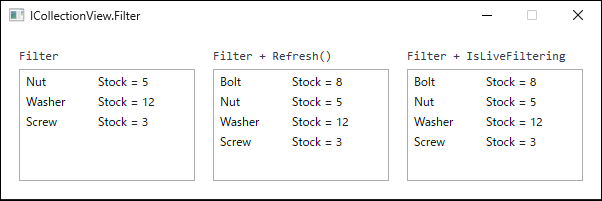
A search box produces the same symptom.
When the predicate reads a view model field, rewriting that field changes nothing on screen.
private string _keyword = string.Empty;

// The predicate reads _keyword.
View.Filter = item => ((Product)item).Name.Contains(_keyword, StringComparison.OrdinalIgnoreCase);

// Changing the keyword leaves the list untouched.
_keyword = "Nut";
Neither the collection nor any item has changed here, which makes this variant even harder to recognize than the inventory case.
Cause / Background
When the source collection implements INotifyCollectionChanged, as ObservableCollection<T> does, the view subscribes to it and receives notifications for added and removed items.
Only the item named by the notification is evaluated.
Counting predicate invocations while adding one item to a view holding 1,000 items yields exactly one call, and a removal yields zero.
Items the view already knows about are never re-examined.
A PropertyChanged notification from an item, by contrast, is not a re-evaluation trigger by default.
Writing to Stock produces zero predicate invocations, and the view raises no CollectionChanged event at all.
Bindings subscribe to PropertyChanged individually, so the rendered cell updates, but the membership of the view stays frozen at the decision made earlier.
That asymmetry is precisely what produces the symptom: the value changes while the row neither enters nor leaves the list.
The same reasoning extends to sorting.
Changing a sort key property on a view that carries SortDescriptions does not move the row.
When the predicate reads state outside the items, such as a field holding a search keyword, the situation is simpler still: neither the source collection nor any item has changed.
No path exists through which the view could learn that the condition moved.
What obscures the problem is that the filter is correct right after it is assigned.
As the official documentation states, assigning Filter, SortDescriptions, or GroupDescriptions triggers a refresh on its own.
Only that first evaluation is implicit, which makes the view look as though it keeps up automatically.
Counting how many times the filter predicate runs per operation shows the asymmetry directly.
| operation | filter calls | CollectionChanged | items in view |
|---|---|---|---|
| Add 1 item (passes filter) | 1 | 1 | 501 |
| Add 1 item (fails filter) | 1 | 0 | 500 |
| Remove 1 item | 0 | 1 | 499 |
| item.Stock = 0 (leaves filter) | 0 | 0 | 500 |
| item.Stock = 1 (enters filter) | 0 | 0 | 500 |
| view.Refresh() | 1000 | 1 | 500 |
Measured on .NET 10 / Windows 11 against a view over 1,000 items, half of which pass the filter. Each operation was performed once and the predicate calls counted; the initial evaluation performed when the filter is assigned is excluded.
On an item PropertyChanged, the predicate does not run at all and no CollectionChanged is raised. The item count in the view is unchanged.
On an add or a remove, only the item the notification points at is evaluated — once for an add, and not at all for a remove.
Of the operations in this table, only Refresh() re-evaluated the items already known to the view, and it evaluated all 1,000.
Replacing Filter or changing SortDescriptions / GroupDescriptions also rebuilds the view, but those are outside this table.
The second row deserves attention as well: adding an item that fails the filter runs the predicate but raises no CollectionChanged.
The predicate running and the view changing are separate things.
Solution
Supply the re-evaluation trigger explicitly.
There are two strategies.
- Re-evaluate every item — call
ICollectionView.Refresh. The view applies the filter to all items and raises a singleReset. Use this when the filter depends on state outside the items. - Re-evaluate only the items that changed — enable
ICollectionViewLiveShaping.IsLiveFilteringand register the property names the predicate reads inLiveFilteringProperties. The view subscribes to change notifications for those properties, re-tests only the affected item, and raisesAddorRemoveonly when that item enters or leaves the view. Use this when the filter depends solely on item properties.
ListCollectionView, which is the concrete type behind the default view of an ObservableCollection<T> or a List<T>, implements ICollectionViewLiveShaping and returns true from CanChangeLiveFiltering.
The two strategies are not exclusive.
Combining them — live filtering for item properties, Refresh only when the search keyword changes — is the arrangement that proves most practical.
Implementation
When the filter reads external state, call Refresh from the code that writes that state.
Implement INotifyPropertyChanged on the InventoryViewModel shown earlier, then add the Keyword property shown below.
Concentrating the re-evaluation in the keyword setter makes the call hard to omit.
public string Keyword
{
    get => _keyword;
    set
    {
        if (_keyword == value)
        {
            return;
        }

        _keyword = value;
        PropertyChanged?.Invoke(this, new PropertyChangedEventArgs(nameof(Keyword)));

        // The state the predicate reads has changed, so re-evaluate everything.
        View.Refresh();
    }
}
Refresh applies the predicate again.
In the ListCollectionView implementation the invocation count matches the size of the source collection rather than the size of the filtered view, so a source of 10,000 items costs 10,000 predicate calls per Refresh.
A search box using UpdateSourceTrigger=PropertyChanged calls Refresh on every keystroke, and the cost of the predicate then turns directly into input lag.
To track item properties, treat the view as ICollectionViewLiveShaping and register the properties the predicate reads.
ICollectionView view = CollectionViewSource.GetDefaultView(Products);
view.Filter = item => ((Product)item).Stock > 0;

var liveShaping = (ICollectionViewLiveShaping)view;
liveShaping.LiveFilteringProperties.Add(nameof(Product.Stock));
liveShaping.IsLiveFiltering = true;
What gets registered is the property the predicate reads, not the property that is displayed.
While LiveFilteringProperties is empty, no re-test happens on a property change.
Filtering itself is unaffected: the initial build, Refresh, and the evaluation of newly added items all still apply the predicate.
Registering the property first and enabling IsLiveFiltering afterwards keeps the initial full re-evaluation down to a single pass.
Reversing the order rebuilds the view twice, which cost 1,000 predicate calls each — 2,000 in total — on a source of 1,000 items.
Either way, the invocation count drops to just the items that changed only for changes that follow.
Assigning null to IsLiveFiltering throws ArgumentNullException, so assign false to turn it off.
The cast above throws InvalidCastException when the source does not implement IList.
Where the source type is only known at run time, replace that cast with if (view is ICollectionViewLiveShaping liveShaping && liveShaping.CanChangeLiveFiltering) and assign only when the test succeeds.
Testing CanChangeLiveFiltering as well is necessary because views over a DataView or a BindingList<T> implement ICollectionViewLiveShaping yet cannot switch live filtering on.
A type test alone lets those through, and setting IsLiveFiltering then throws InvalidOperationException, as noted below.
The XAML form uses IsLiveFilteringRequested and LiveFilteringProperties on CollectionViewSource.
This is also the form used when each screen requires an independent view.
<Window x:Class="SampleApp.MainWindow"
        xmlns="http://schemas.microsoft.com/winfx/2006/xaml/presentation"
        xmlns:x="http://schemas.microsoft.com/winfx/2006/xaml"
        xmlns:sys="clr-namespace:System;assembly=mscorlib">
  <Window.Resources>
    <CollectionViewSource x:Key="InStockProducts"
                          Source="{Binding Products}"
                          Filter="OnProductFilter"
                          IsLiveFilteringRequested="True">
      <CollectionViewSource.LiveFilteringProperties>
        <sys:String>Stock</sys:String>
      </CollectionViewSource.LiveFilteringProperties>
    </CollectionViewSource>
  </Window.Resources>

  <ListBox ItemsSource="{Binding Source={StaticResource InStockProducts}}"
           DisplayMemberPath="Name" />
</Window>
Declare the sys prefix as xmlns:sys="clr-namespace:System;assembly=mscorlib"; assembly=System.Runtime also resolves on both .NET and .NET Framework.
Because the resource is specified as the Source of a Binding, what reaches ItemsSource is not the CollectionViewSource itself but the CollectionViewSource.View it produces — the filtered view.
Writing ItemsSource="{StaticResource InStockProducts}" assigns the CollectionViewSource object instead, which raises XamlParseException when the XAML is loaded, wrapping an ArgumentException that reports the value as invalid for ItemsSource.
Filter here is an event that sets FilterEventArgs.Accepted, which is a separate entry point from the ICollectionView.Filter property.
private void OnProductFilter(object sender, FilterEventArgs e)
{
    e.Accepted = ((Product)e.Item).Stock > 0;
}
e.Accepted defaults to true, so only items for which it is set to false are excluded from the view.
The handler is invoked over the same range as an ICollectionView.Filter predicate: every item in the source when the view is rebuilt (on assignment or on Refresh), but only the affected item when an item is added or re-tested by live filtering.
e.Item is typed as object, so an unconditional cast like the one above throws InvalidCastException on a collection holding items of mixed types.
When filtering, sorting, and grouping are reconfigured together, wrap the changes in DeferRefresh.
The rebuild that would otherwise run once per assignment collapses into a single pass when the scope exits.
using (View.DeferRefresh())
{
    View.Filter = item => ((Product)item).Stock > 0;
    View.SortDescriptions.Add(
        new SortDescription(nameof(Product.Stock), ListSortDirection.Descending));
}
Performing those two assignments without DeferRefresh raises Reset twice; wrapping them raises it once.
Reading the contents or the current position of the view inside the scope throws InvalidOperationException, so restrict the body of the using to assignments.
Notes
- Live filtering is not applied synchronously. Enumerating the view in the same method right after writing a property returns the previous contents. The update runs on a
Dispatchercallback, so a unit test must pump the message queue, for example with aDispatcherFrame, before asserting. Repeated changes to the same item before theDispatcherprocesses them collapse into a single re-test. - Changes to unregistered properties are ignored. A configuration whose predicate reads
IsActivewhile onlyStockis registered inLiveFilteringPropertieswill not react toIsActive. Revisit the registrations whenever the filter condition changes. - Live filtering requires items to raise change notifications. For an ordinary CLR property that means implementing
INotifyPropertyChanged. A dependency property on aDependencyObjectis tracked even when the item does not implementINotifyPropertyChanged. A POCO with neither never updates the view when its properties change. - The default view is shared by every control bound to that collection. Handing the same
ObservableCollection<T>to twoListBoxcontrols and then setting a filter onCollectionViewSource.GetDefaultViewnarrows both. AssigningItemsControl.Items.Filterwrites to the same default view, so it cannot narrow one screen alone. Create separateCollectionViewSourceinstances to keep views independent. RefreshraisesReset, so anItemsControlrebuilds its realized item containers. Containers for items that remain in the view are regenerated as well. Live filtering raisesAddandRemoveonly for items that enter or leave the view, so containers for the surviving items are reused. Only realized containers are affected, so with virtualization enabled the items that were never generated are untouched (the realized containers cover the visible range plus the cache area before and after it set byVirtualizingPanel.CacheLength, so their number follows the size of the visible range, the item size, and the cache settings, not the number of items). Both figures come from aListBox; how containers are generated and reused in practice depends on the panel implementation and the virtualization settings. The difference becomes noticeable when item containers carry an expensive template.- “
Refreshdrops the selection” is not accurate. As long as the selected item keeps passing the filter,SelectedItem,SelectedItems, andCurrentItemall survive aRefresh. This was confirmed on aListBoxwithSelectionModeset toSingleand, separately, toExtended. Selection is lost when the selected item stops passing the filter and leaves the view, and live filtering behaves the same way in that case. The cause differs from selection loss under UI virtualization. - Views over a
DataViewor aBindingList<T>cannot useFilter. Their default view is aBindingListCollectionViewwhoseCanFilterisfalsein both cases, and assigningFilterthrowsNotSupportedException.CanChangeLiveFilteringisfalseas well, so settingIsLiveFilteringthrowsInvalidOperationException. CustomFilterworks only on a collection that implementsIBindingListView. The fallback forFilteris to pass a string expression toCustomFilter.DataViewimplementsIBindingListView, so itsCanCustomFilteristrue;BindingList<T>does not, so itsCanCustomFilterisfalseand assigningCustomFilterthrowsNotSupportedExceptionas well. TestCanCustomFilterbefore assigning.- Sources that do not implement
IListcannot use live filtering. The default view over a plainIEnumerable, such as the result of a LINQ query, is an internal class derived fromCollectionView; it supportsFilterbut does not implementICollectionViewLiveShaping. The runtime type is not public, so it cannot be named in a cast, but a type test againstICollectionViewLiveShapingis still valid and simply returnsfalse. - Sorting needs its own settings. Enabling live filtering does not keep the sort order current. Configure
IsLiveSortingandLiveSortingPropertiesseparately. Column-header sorting in aDataGridruns on the sameICollectionView, so when live filtering is combined with column sorting, keep in mind that both settings act on the same view.
Alternatives / Comparison
| Approach | Re-evaluation trigger | Predicate invocations | Notification | Constraints |
|---|---|---|---|---|
Refresh |
An explicit call | Every item in the source (10,000 calls for 10,000 items on ListCollectionView) |
One Reset; all realized item containers regenerated |
A missed call leaves stale contents on screen |
IsLiveFiltering + LiveFilteringProperties |
Change notifications for registered properties | Only the items that changed (10 calls when 10 distinct items each change once); every item when it is switched on | Add / Remove only for items entering or leaving; surviving realized containers reused |
Does not track conditions outside the items; applied asynchronously |
| A hand-built filtered collection | Whenever the rebuild is invoked | Determined by the rebuild implementation | Reset from Clear and re-adding |
Selection is lost for every item, including those that remain; sorting and grouping must be reimplemented |
Building a filtered ObservableCollection<T> by hand escapes the constraints of ICollectionView but handles selection worst of the three.
An implementation that clears and re-adds discards the selection even for items that keep passing the filter.
There is little reason to choose it where an ICollectionView is available.
Summary
An ICollectionView holds a filter but does not re-evaluate it when an item property changes.
When the display looks stale, what to examine is not the condition in the predicate, but whether a re-evaluation trigger was ever supplied.
- When the filter reads only item properties:
EnableIsLiveFilteringand register every property the predicate reads inLiveFilteringProperties.
Subsequent re-evaluation stays limited to the items that changed and realized item containers are reused, which makes this the default choice. - When the filter reads state outside the items, such as a search keyword:
CallRefreshfrom the code that writes that state.
Live filtering cannot track it. - When the filter depends on both:
Combine them.
Leave property changes to live filtering and callRefreshonly when an external condition moves. - When filtering, sorting, and grouping change together:
Wrap the assignments inDeferRefreshto collapse the rebuild into one.
Do not read the view inside the scope. - When the source is a
DataView:
NeitherFilternorIsLiveFilteringcan be assigned.
Pass a string expression toBindingListCollectionView.CustomFilter.
ABindingList<T>cannot use that fallback either, so move to anObservableCollection<T>when filtering is required. - When the same collection must be narrowed differently on several screens:
Do not use the default view, which is shared.
Create aCollectionViewSourceinstance per screen.