Overview
A WPF UI that lets the user pick an enum value is usually built by binding RadioButton.IsChecked to an enum property through a converter.
With this arrangement, the ViewModel can hold the correct value while the matching RadioButton is displayed as cleared.
Using measured results, this article traces that behavior to a grouping mistake — the omission of GroupName — and then covers how to set GroupName, what ConvertBack should return, and how to choose among four approaches: a converter, wrapper properties, an attached behavior, and replacing the radio buttons with a selection control.
Prerequisites / Environment
- Framework: WPF (checked on .NET 10 and .NET Framework 4.8)
- Verified on: Windows 11. The measured results come from running this article’s XAML, view model, and converter unchanged on .NET 10 and .NET Framework 4.8, and every measured item gave the same result on both (see the table below). The screenshot was taken on .NET 10
- Language: C# / XAML (code samples assume nullable reference types are enabled)
- Target controls:
System.Windows.Controls.RadioButton,System.Windows.Data.IValueConverter - Architecture: MVVM, with the selection held in an enum property on the ViewModel
- Namespaces:
System,System.ComponentModel,System.Globalization,System.Windows.Data - The
localprefix in XAML: the CLR namespace that declares the enums and the converter (for example,xmlns:local="clr-namespace:PrintSettingsApp")
Problem
Consider a print settings dialog.
Two enums back it — Quality for print quality and PageLayout for imposition — each presented as a set of radio buttons.
public enum Quality
{
    Draft,
    Standard,
    Fine,
}

public enum PageLayout
{
    Single,
    Dual,
}
Both are ordinary enums, with no Flags attribute and no explicit member values.
The fact that these two share a single view is the precondition for the problem described below.
The ViewModel holds both enum properties, initialized to Quality.Standard and PageLayout.Single.
Quality.Standard is the second member in declaration order, so an initial selection that arrives correctly shows Standard checked rather than Draft.
public sealed class PrintSettingsViewModel : INotifyPropertyChanged
{
    private Quality _quality = Quality.Standard;
    private PageLayout _pageLayout = PageLayout.Single;

    public Quality Quality
    {
        get => _quality;
        set
        {
            if (_quality == value) return;
            _quality = value;
            PropertyChanged?.Invoke(this, new PropertyChangedEventArgs(nameof(Quality)));
        }
    }

    public PageLayout PageLayout
    {
        get => _pageLayout;
        set
        {
            if (_pageLayout == value) return;
            _pageLayout = value;
            PropertyChanged?.Invoke(this, new PropertyChangedEventArgs(nameof(PageLayout)));
        }
    }

    public event PropertyChangedEventHandler? PropertyChanged;
}
Change notification is implemented for both properties, so a missing notification is not the cause of the problem covered here.
That fact is the starting point for isolating the real cause below.
A converter maps between an enum value and bool, with the target value passed through ConverterParameter.
The converter itself appears under Implementation.
The version used here returns Binding.DoNothing on clearing — the implementation generally regarded as correct.
The following markup, a layout commonly used in production code, places all five radio buttons in a single StackPanel.
<StackPanel>
    <StackPanel.Resources>
        <local:EnumToBooleanConverter x:Key="EnumToBoolean" />
    </StackPanel.Resources>

    <RadioButton Content="Draft"
                 IsChecked="{Binding Quality, Converter={StaticResource EnumToBoolean}, ConverterParameter={x:Static local:Quality.Draft}}" />
    <RadioButton Content="Standard"
                 IsChecked="{Binding Quality, Converter={StaticResource EnumToBoolean}, ConverterParameter={x:Static local:Quality.Standard}}" />
    <RadioButton Content="Fine"
                 IsChecked="{Binding Quality, Converter={StaticResource EnumToBoolean}, ConverterParameter={x:Static local:Quality.Fine}}" />

    <RadioButton Content="Single"
                 IsChecked="{Binding PageLayout, Converter={StaticResource EnumToBoolean}, ConverterParameter={x:Static local:PageLayout.Single}}" />
    <RadioButton Content="Dual"
                 IsChecked="{Binding PageLayout, Converter={StaticResource EnumToBoolean}, ConverterParameter={x:Static local:PageLayout.Dual}}" />
</StackPanel>
The markup is syntactically valid and produces no binding errors.
Even so, Single appears selected at startup while all three Quality buttons appear cleared.
The ViewModel still holds Standard for Quality, so the screen and the ViewModel disagree.
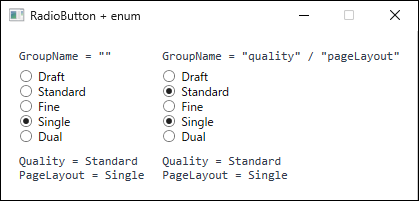
Quality = Standard and PageLayout = Single; only the GroupName attribute differs. Without GroupName, the PageLayout radio button that is checked later clears the Quality selection. The labels at the top and the two lines at the bottom were added for comparison and are not part of the markup shown here. Captured on .NET 10 / Windows 11.Cause / Background
The official documentation gives two ways to group RadioButton controls: placing them inside a parent, or setting the GroupName property on each control (RadioButton Class).
In WPF, the default value of RadioButton.GroupName is an empty string.
An empty GroupName disables grouping by name, and grouping falls back to the logical parent (FrameworkElement.Parent).
Radio buttons that share a logical parent form one group; buttons with different logical parents fall into different groups.
All five buttons above share the same StackPanel as their logical parent, so they form one group even though they bind to different properties.
Radio buttons within a group are mutually exclusive.
Initialization follows the order the buttons appear in the markup, so Standard on the Quality side becomes checked first, and Single on the PageLayout side becomes checked next.
The moment Single is checked, the grouping mechanism clears Standard, which it treats as a member of the same group.
The problem is that this clearing propagates back toward the source through the binding.
ToggleButton.IsChecked is a bool? dependency property whose metadata enables two-way binding by default, and its default UpdateSourceTrigger is PropertyChanged.
Clearing the control is therefore treated as an immediate source update, and the converter’s ConvertBack is invoked with false.
The measured run confirmed this: ConvertBack ran exactly once with value: false and parameter: Quality.Standard (see the table below).
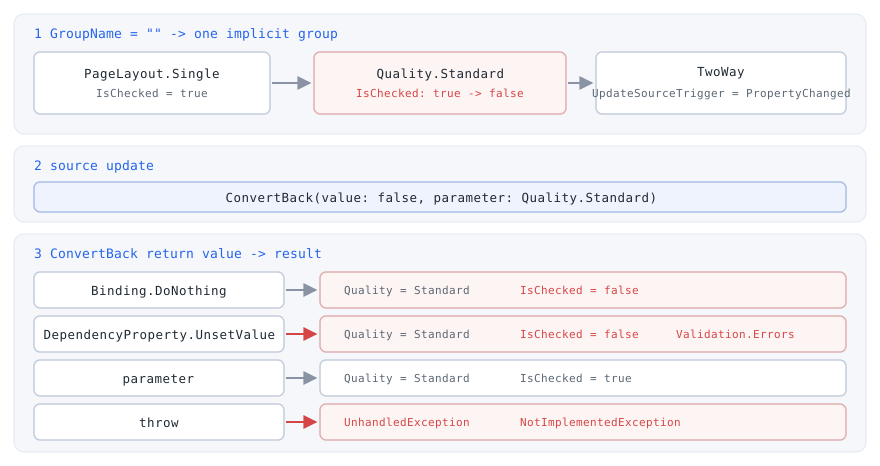
ConvertBack return value. No return value resolves the underlying missing GroupName. Returning parameter is the one case where the missing initial selection never appears, but the read-back merely hides the symptom. Each result was observed on .NET 10 / Windows 11.What follows traces the case this article assumes: a converter that returns Binding.DoNothing.
The other three return values are covered individually under Notes.
If ConvertBack returns Binding.DoNothing, the binding transfers no value and uses neither FallbackValue nor the default value (Binding.DoNothing Field).
Since nothing is written to the source, no read-back follows the write either, so the target stays cleared.
The ViewModel keeps Standard while the radio button alone remains cleared, which is precisely the disagreement described above.
Among radio buttons bound to the same enum property, this ConvertBack(false) does not normally occur.
Changing the selection first calls ConvertBack(true) on the newly checked button, updating the source; that change flows through Convert and clears the other buttons.
By the time the grouping mechanism tries to clear them, they are already false, so no value changes and no source update follows.
The measured run agreed: switching within one property invoked ConvertBack once with true and never with false (see the table below).
ConvertBack receives false when anything other than a button bound to the same property on the same source joins the group.
That covers a button bound to a different property, a button bound to the same property name on a different object, and a button with no binding at all.
A test run reproduced ConvertBack(false) in two setups (see the table below): two rows, each with one radio button bound to the same property name on its own ViewModel and all sharing one GroupName, and a panel with one bound radio button plus one checked radio button with no binding in the same group.
The table below records the converter calls and the checked state from running this article’s XAML unchanged. Every “measured run” mentioned in this article corresponds to a row of this table.
| case | measured |
|---|---|
| runtime | net48: .NET Framework 4.8.9345.0 / net10.0-windows: .NET 10.0.10 |
| GroupName default | (empty) |
| no GroupName: checked | Single |
| no GroupName: ConvertBack(false) | 1 (Standard) |
| no GroupName: ViewModel | Standard / Single |
| GroupName set: checked | Standard + Single |
| GroupName set: ConvertBack(false) | 0 |
| GroupName set: ViewModel | Standard / Single |
| GroupName set: select Fine | ConvertBack(true) 1, (false) 0; checked Fine + Single; ViewModel Fine / Single |
| GroupName set: select Draft | checked Draft + Single; ViewModel Draft / Single |
| no GroupName, one StackPanel per enum | checked Standard + Single; ConvertBack(false) 0 |
| GroupName='quality' in two Borders | checked B:Standard |
| ConverterParameter=Draft (string): checked | Single |
| ConverterParameter=Draft (string): select Fine | checked Single; ViewModel Fine / Single |
| same GroupName, two ViewModels: ConvertBack(false) | 1 (Standard) |
| unbound RadioButton in the group: ConvertBack(false) | 1 (Standard) |
| ConvertBack throws NotImplementedException | ConvertBack(false) 1; NotImplementedException thrown to the caller |
| ConvertBack returns UnsetValue (FallbackValue=True) | Standard unchecked; error "Value 'False' could not be converted."; source Standard / Single |
| ConvertBack returns parameter for false (no GroupName) | checked Standard + Single; ConvertBack(false) 1 |
| bool wrapper properties (no GroupName) | checked Standard + Single; setter(false) 1 |
| Grid, different cells | checked B (both set True) |
| GroupBox Header and Content | checked B (both set True) |
| ItemsControl, RadioButtons in Items | checked B (both set True) |
Measured on Windows 11 by building a temporary project that loads this article’s XAML, view model, and converter unchanged through XamlReader, for both net48 and net10.0-windows. A row with one value means both runtimes gave that value. Selections are made through UI Automation’s Select, which follows the same path as a click.
Without GroupName (the no GroupName rows), only Single remains checked. Standard has been cleared even though it is bound to a different property, and that is the initial selection failing to appear.
ConvertBack runs once with false at that moment.
What deserves attention is that the source values stay Standard / Single in both cases.
Because the converter returns Binding.DoNothing for false, the view model is never corrupted.
Only the display is wrong, which is why logging the view model never leads to the cause.
With GroupName set (the GroupName set rows), no ConvertBack call occurs while the view initializes, and both stay checked.
Changing the selection afterward calls ConvertBack(true) exactly once on the newly checked button (the select Fine row).
Solution
The root cause lies in UI-side grouping, so the fix belongs there as well.
- Assign a distinct
GroupNameper enum property.
This is the essential fix.
Radio buttons with differentGroupNamevalues form separate groups even when they share a parent. - Return
Binding.DoNothingfromConvertBackwhen the control is cleared.
With the groups separated correctly,ConvertBackis never called on clearing.
ReturningBinding.DoNothingstill protects the source if a later layout change merges the groups again. - Pass the enum value through
x:StaticinConverterParameter.
A plain string never compares equal, as described below.
Because grouping falls back to the logical parent, giving each enum property its own parent panel also resolves the symptom.
A measured run split the five buttons from Problem into one StackPanel for Quality and another for PageLayout, and both initial selections appeared without a single GroupName (the one StackPanel per enum row).
That arrangement depends on the layout structure, however, and merging the panels again in a later change brings the symptom back.
Nor does it help where the logical parent stays the same despite visual distance, such as a GroupBox split between Header and Content, or separate Grid cells (see Notes).
Setting GroupName makes the group boundary explicit, and that is why it is the recommended fix.
Implementation
The converter turns an equality check between the enum value and the parameter into a bool, and returns the parameter from ConvertBack only when the control is checked.
The value argument arrives as a boxed bool or as null.
The pattern value is true rejects both null and a boxed false in a single expression.
public sealed class EnumToBooleanConverter : IValueConverter
{
    public object Convert(object value, Type targetType, object parameter, CultureInfo culture)
        => value?.Equals(parameter) == true;

    public object ConvertBack(object value, Type targetType, object parameter, CultureInfo culture)
        => value is true ? parameter : Binding.DoNothing;
}
For the button being checked, ConvertBack returns parameter — the target enum value — and the ViewModel property is updated.
If it is called for a button being cleared, it returns Binding.DoNothing, leaving the source untouched.
That call does not occur once the groups are separated correctly, but getting the return value right is what prevents the pitfalls covered below.
In XAML, give each enum property its own GroupName.
The only difference from the markup shown under Problem is the added GroupName attribute.
<StackPanel>
    <StackPanel.Resources>
        <local:EnumToBooleanConverter x:Key="EnumToBoolean" />
    </StackPanel.Resources>

    <RadioButton Content="Draft" GroupName="quality"
                 IsChecked="{Binding Quality, Converter={StaticResource EnumToBoolean}, ConverterParameter={x:Static local:Quality.Draft}}" />
    <RadioButton Content="Standard" GroupName="quality"
                 IsChecked="{Binding Quality, Converter={StaticResource EnumToBoolean}, ConverterParameter={x:Static local:Quality.Standard}}" />
    <RadioButton Content="Fine" GroupName="quality"
                 IsChecked="{Binding Quality, Converter={StaticResource EnumToBoolean}, ConverterParameter={x:Static local:Quality.Fine}}" />

    <RadioButton Content="Single" GroupName="pageLayout"
                 IsChecked="{Binding PageLayout, Converter={StaticResource EnumToBoolean}, ConverterParameter={x:Static local:PageLayout.Single}}" />
    <RadioButton Content="Dual" GroupName="pageLayout"
                 IsChecked="{Binding PageLayout, Converter={StaticResource EnumToBoolean}, ConverterParameter={x:Static local:PageLayout.Dual}}" />
</StackPanel>
With this markup, both Standard and Single appear selected at startup.
Selecting Draft changes only Quality, leaving the PageLayout selection intact.
Notes
GroupNamegroups across parent elements.
Radio buttons that carry aGroupNamejoin the same group even when they sit in separateBorderelements or separate panels.
In the measured run, two sets markedGroupName="quality"under different parents cleared each other, leaving one check (thetwo Bordersrow).
The name given to one group must therefore differ from the name of every other group under the same visual tree root; the buttons that belong to one group all share the same name.
A naming convention applied across the application still assumes that no view shows two sets for the same enum.
Grouping does not cross the root of the visual tree.
That root is normally a window, but the contents of aPopupor aContextMenuform a separate root, so the boundary holds even within one window.- Do not write
ConverterParameteras a plain string.
WritingConverterParameter=Draftpasses the string"Draft"through unchanged, becauseConverterParameteris typed asobjectand no target type drives a conversion.
The comparison inConvertthen always yieldsfalse, and no button is ever displayed as selected.
On click,ConvertBackstill returns that string, and WPF’s default type conversion turns it into the enum value, so only the source update succeeds.
In the measured run, the ViewModel value changed while every button on theQualityside stayed cleared (theConverterParameter=Draft (string)rows).
Pass the enum value withx:Static, or callEnum.ParseinsideConvert. ConverterParametercannot be data bound.
Bindingderives fromBindingBaseand ultimately fromMarkupExtension, not fromDependencyObject.
ConverterParameteris therefore not a dependency property and cannot host a nested{Binding ...}.
When each item needs a different value, the converter approach does not apply; use an attached behavior or a selection control instead.- Do not leave
ConvertBackthrowingNotImplementedException.
Two-way bindings callConvertBack, and the data binding engine does not catch exceptions thrown by a converter.
Once groups are mixed, clearing a button triggers aConvertBack(false)call; in the measured run, that call happened while the window was being shown, andNotImplementedExceptionpropagated to the caller ofShow. Left uncaught, it terminates the application. - Do not return
DependencyProperty.UnsetValuewhen the control is cleared.
The official documentation states that anticipated problems should be handled by returningDependencyProperty.UnsetValue, and that the binding then usesFallbackValuewhen present and the default value otherwise (IValueConverter.ConvertBack Method).
In the measured run, however, returning it fromConvertBackleft the source untouched, applied noFallbackValue, and attached the validation errorValue 'False' could not be converted.(the text under an English UI culture) to the binding, where it remained inValidation.Errors.
ReturningBinding.DoNothingunder the same conditions raises no validation error.
Binding.DoNothingis the value that expresses only the intent to transfer nothing.
Reading such errors is covered in Reading WPF Binding Errors and Diagnosing Them with the Output Window. - Returning
parameterwhen the control is cleared hides the grouping mistake.
Returningparameterforfalseas well updates the cleared button’s source with the same value, and the read-back that follows restores the target to checked.
That restoration lands after the grouping mechanism has already cleared the button, so running this showed both theQualityand thePageLayoutselection checked despite the two sharing one group.
The screen looks as intended, and the missing-initial-selection symptom this article covers never appears.
Mutual exclusion is merely undone by the read-back, though, and the missingGroupNameremains.
The absent symptom is what makes it easy to overlook, and every selection change costs the source an extra write and read-back.
ReturnBinding.DoNothingon clearing and fix the grouping itself. - Wrapper properties still need
GroupName.
Exposing oneboolproperty per enum value does not change the fact that grouping is a UI-side mechanism, so omittingGroupNameclears buttons across enums in exactly the same way.
In the measured run, the setter of the cleared property ran once withfalseand ignored it, after which the source was read back and the selection was restored.
As with a converter that returnsparameter, the screen looks as intended, yet the redundant round trip and the missingGroupNameboth remain. - Implicit grouping is determined by the logical parent, not by the visual region or the visual parent.
Radio buttons in separateGridcells take the sameGridas their logical parent, because a cell is assigned through theGrid.RowandGrid.Columnattached properties, which add no element to the hierarchy.
A test run confirmed they form one group.
The check runs against the logical tree, so radio buttons split between aGroupBox’sHeaderand itsContentstill form one group.
Each sits under a separateContentPresenterin the visual tree, yet both share theGroupBoxas logical parent (see the table above).
Even in anItemsControl, radio buttons added directly toItemstake theItemsControlitself as their logical parent and form one group.
Giving each enum property its own parent panel, by contrast, changes the logical parent and so separates the groups. - Inside a template or a single-child element, the logical parent changes.
With anItemTemplate, a radio button placed at the template root has no logical parent at all, so implicit grouping never applies to it.
Buttons inside a panel within the template take that per-item panel as their parent, so they group within a row and stay independent across rows.
Wrapping each button individually in a single-child element such asBorderalso changes the logical parent, and the grouping mechanism no longer enforces mutual exclusion.
With the converter approach the binding keeps the selection exclusive, so the display still holds, but exclusivity no longer rests on the group.
An unbound radio button in the mix breaks it, which is why the boundary of a selection set belongs inGroupName. - Make
GroupNameunique per item where repeated rows need independent selections.
Giving every row the sameGroupNamein a list merges all rows into one group, sinceGroupNamecrosses parents, allowing only one selection across the entire list.
UnlikeConverterParameter,GroupNameis a dependency property, so the row identifier can be bound into it to give every item a unique name.
Alternatives / Comparison
| Approach | Pros | Cons | Best suited for |
|---|---|---|---|
Converter with ConverterParameter |
No extra ViewModel properties; new options need only markup | A wrong ConvertBack return breaks behavior; ConverterParameter cannot be bound |
Ordinary settings screens whose options are fixed in XAML |
| One wrapper property per enum value | No converter, simpler markup, no ConvertBack to reason about |
One property and notification per option; the ViewModel changes whenever the enum gains a value | Two or three fixed options, with a deliberately plain ViewModel |
| Attached behavior holding the enum value | The enum is specified directly in XAML, with no ConvertBack pitfalls; per-item values can be bound |
Requires implementing an attached property and event subscription | Applications that repeat this pattern across many views |
Replacing with a selection control such as ListBox |
Selection is handled entirely by SelectedItem / SelectedValue, and the grouping problem does not arise |
A radio button appearance requires an ItemContainerStyle |
Options that are dynamic or numerous |
The wrapper property approach replaces the Quality property of the PrintSettingsViewModel shown under Problem with the form below and adds one bool property per enum value.
The _quality field and the PropertyChanged declaration carry over unchanged from that same class.
A wrapper setter updates the enum property only when the value is true and ignores the false that arrives on clearing.
Because the number of notifications grows, PropertyChanged?.Invoke is collected into a Raise helper.
public Quality Quality
{
    get => _quality;
    set
    {
        if (_quality == value) return;
        _quality = value;
        Raise(nameof(Quality));
        Raise(nameof(IsDraft));
        Raise(nameof(IsStandard));
        Raise(nameof(IsFine));
    }
}

public bool IsDraft
{
    get => Quality == Quality.Draft;
    set { if (value) Quality = Quality.Draft; }
}

private void Raise(string propertyName)
    => PropertyChanged?.Invoke(this, new PropertyChangedEventArgs(propertyName));
IsStandard and IsFine follow the same shape as IsDraft.
Since the property and the enum are both named Quality, Quality.Draft resolves against the type.
A missed notification leaves other buttons showing a stale state after the selection changes.
Every added enum member brings another property and another notification, which is why this approach suits a small set of options.
The attached behavior approach stores the target enum value on the RadioButton through an attached property and writes it back to the ViewModel when Checked fires.
An attached property is a dependency property, so unlike ConverterParameter it accepts a binding and can carry a different value per item.
When the options are determined at run time, feeding the enum values to ListBox.ItemsSource and binding SelectedItem to the ViewModel is easier to manage.
The ways to retrieve the selected value are compared in WPF ComboBox ItemsSource Binding Patterns and Selected Value Retrieval.
Summary
A missing initial selection is not a flaw in the binding or the converter; it follows from omitting GroupName, which merges radio buttons for different enums into one group.
Choose as follows.
- Assign a
GroupNameper property for radio buttons that select an enum.
Skipping it leaves the group boundary to the layout structure, so the screen starts to disagree with the ViewModel as soon as the panels are merged again.
Keep the name of one group distinct from the name of every other group under the same visual tree root. - Options fixed in XAML:
Use the converter approach.
ReturnBinding.DoNothingfromConvertBackon clearing, and pass the enum value withx:StaticinConverterParameter. - Two or three options with a deliberately plain ViewModel:
Use wrapper properties.
Raise change notifications for every related property. - Dynamic options, or a different value per item:
ConverterParametercannot be bound, so use an attached behavior or a selection control.
The point at which a two-way binding pushes to the source is governed by UpdateSourceTrigger, and the default for IsChecked is PropertyChanged.
How that default affects the timing of input reaching the source is covered in Controlling When TextBox Input Reaches the Source with UpdateSourceTrigger in WPF.
- WPF ComboBox ItemsSource Binding Patterns and Selected Value Retrieval
- Controlling When TextBox Input Reaches the Source with UpdateSourceTrigger in WPF
- Reading WPF Binding Errors and Diagnosing Them with the Output Window
- RadioButton (WPF Standard Control Demo App): measures which buttons form a group and how
IsCheckedbound toboolproperties behaves