Overview
A WPF TextBox with the Fluent theme applied shows a clear button (×) at the right edge of the text when an editable, single-line box that contains text receives focus.
This default behavior helps with input, but it is unnecessary for search or filter fields that already provide their own clear action, where two buttons with the same role appear side by side.
This article explains how to hide only that clear button without effectively changing the template’s input behavior, targeting .NET 10 as the primary version.
There are two approaches.
One hides the button element (a named part) inside the template directly, and the other uses the hide trigger of the AcceptsReturn property.
Because the part name differs on .NET 9, that difference and the corresponding code are also documented.
Prerequisites / Environment
- Framework / Language:
.NET 10as the primary target (with.NET 9differences noted) / C# 13 - Target control: WPF
TextBox(with the Fluent theme applied) - Theme:
PresentationFramework.Fluent(viaThemeModeor a merge ofFluent.xaml) - Architecture: applicable to both MVVM and code-behind
- Verification environment: .NET 10 / Windows 11
The tables in this article were measured in the environment above.
Each caption states how its table was measured.
The following points were confirmed in that environment:
- The part name of the clear button on .NET 10 was read from the template itself.
- The part is present both when
ThemeModeis set and whenFluent.xamlis merged directly. - Placing an implicit style under the same key without
BasedOnremoves the part on either route. - An implicit style that inherits the original through
BasedOnkeeps the part on either route, while its own setters still apply.
Problem
A Fluent-themed TextBox automatically shows the clear button defined in its template when keyboard focus enters it.
This element does not exist in the standard theme (Aero2), so it appears unexpectedly after switching themes.
On a screen that already provides a “×” button or a command to clear the input value, a button with the same function is duplicated and layout consistency is lost.
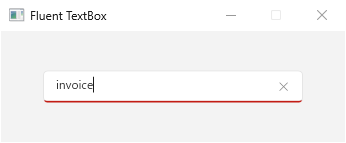
TextBox with keyboard focus under the .NET 10 Fluent theme. The clear button (×) appears at the right edge of the text by default.Cause / Background
This clear button is defined as a named part in the control template of the Fluent-themed TextBox.
The part name differs by version: it is DeleteButton on .NET 10 and ClearButton on .NET 9 (the button element was renamed in the update from .NET 9 to .NET 10).
In the .NET 10 template, the button’s default Visibility is Collapsed, and a trigger shows it only when IsKeyboardFocusWithin is true.
Therefore, when focus is not within the control, it stays hidden by its default value.
The template also defines triggers that hide it when Text is empty or IsReadOnly is set, as well as when AcceptsReturn=True or when TextWrapping is Wrap or WrapWithOverflow.
The .NET 9 template (whose part is named ClearButton) has none of the AcceptsReturn or TextWrapping triggers, and hides the button through an IsKeyboardFocusWithin false trigger when focus leaves.
Because of this, no public property is provided to hide only the clear button, so the options are to manipulate the part directly or to satisfy one of the hide conditions above.
Which named parts a template holds can be confirmed by applying it and looking them up.
| window | Style applied | named parts present | Padding.Left |
|---|---|---|---|
| no ThemeMode | theme style | PART_ContentHost | 0 |
| ThemeMode=Light | implicit style | DeleteButton, PART_ContentHost | 10 |
| ThemeMode=Light + implicit Style | implicit style | PART_ContentHost | 8 |
| no ThemeMode + implicit Style | implicit style | PART_ContentHost | 8 |
| merge Fluent.xaml directly | implicit style | DeleteButton, PART_ContentHost | 10 |
| merge Fluent.xaml + implicit Style | implicit style | PART_ContentHost | 8 |
| ThemeMode=Light + implicit Style, BasedOn | implicit style | DeleteButton, PART_ContentHost | 8 |
| merge Fluent.xaml + implicit Style, BasedOn | implicit style | DeleteButton, PART_ContentHost | 8 |
Measured on .NET 10 / Windows 11 by looking up named parts in the TextBox template. Style applied reports whether the Style property is filled in (there is an implicit style) or left null (no implicit style, so the theme style is used). null alone does not name a theme: in this table only the row without ThemeMode is null, and its theme is Aero2. Fluent arrives as an implicit style both through ThemeMode and through a direct merge.
DeleteButton is present wherever the Fluent template reaches the control and no implicit style overrides it — both with ThemeMode set and with Fluent.xaml merged directly. That part is the clear button, and this confirms its name on .NET 10.
The rows with an implicit style deserve attention. Whichever route the theme arrives by, an implicit style under the same key that carries no BasedOn makes DeleteButton disappear.
The Fluent template is no longer supplied at all, so looking the part up by name does not work in that state.
The last two rows are the contrast: an implicit style that inherits the original through BasedOn, on both routes.
Padding has changed to 8, so its own setter is in effect, and yet DeleteButton is still there.
What loses the template is not placing an implicit style, but failing to inherit the original one.
Two Families of Approaches
As noted above, there are two families of approaches.
-
Approach 1: hide the named part directly.
SetCollapsedas a local value on theVisibilityof the part (DeleteButtonon.NET 10,ClearButtonon.NET 9).
WPF dependency properties have a defined value precedence, and a local value wins over style and template triggers.
Therefore, even when focus enters and a trigger attempts to setVisible, the localCollapsedvalue wins and the element stays hidden.
The advantage is direct control of the display: it hides reliably regardless of trigger conditions or property values.
The trade-off is a dependency on the internal part name of the template. -
Approach 2: use the hide trigger of the
AcceptsReturnproperty.
SetAcceptsReturn=Trueto satisfy the template’s hide trigger (added in.NET 10) and remove the clear button.
The advantage is that it depends on a public property, so it is unaffected by future changes to the template’s part name.
The trade-off is that it turns a single-lineTextBoxinto multi-line input, and it does not work on.NET 9because that trigger does not exist there.
Both approaches obtain the part with Template.FindName.
Wrapping the operations in an attached property allows each to be applied declaratively by adding a single attribute in XAML.
Approach 1: Hide the Named Part (works on both .NET 10 and .NET 9)
The following defines an attached property HideClearButton that collapses the clear-button part once True is set.
Because the part name differs by version, it probes both DeleteButton (.NET 10) and ClearButton (.NET 9) and falls back accordingly.
Because the template may not be applied at the moment the property changes, the code waits for Loaded before processing if the control is not yet loaded.
The Loaded subscription uses a weak reference through WeakEventManager so that the handler does not extend the lifetime of the TextBox.
using System.Windows;
using System.Windows.Controls;

public static partial class TextBoxHelper
{
    // "DeleteButton" on .NET 10, "ClearButton" on .NET 9. Fall back depending on the runtime.
    private static readonly string[] ClearButtonPartNames = ["DeleteButton", "ClearButton"];

    public static bool GetHideClearButton(DependencyObject obj) =>
        (bool)obj.GetValue(HideClearButtonProperty);

    public static void SetHideClearButton(DependencyObject obj, bool value) =>
        obj.SetValue(HideClearButtonProperty, value);

    public static readonly DependencyProperty HideClearButtonProperty =
        DependencyProperty.RegisterAttached(
            "HideClearButton",
            typeof(bool),
            typeof(TextBoxHelper),
            new FrameworkPropertyMetadata(false, OnHideClearButtonChanged));

    private static void OnHideClearButtonChanged(DependencyObject d, DependencyPropertyChangedEventArgs e)
    {
        if (d is not TextBox textBox || !(bool)e.NewValue)
        {
            return;
        }

        if (textBox.IsLoaded)
        {
            HideClearButtonPart(textBox);
        }
        else
        {
            // Remove first to prevent duplicate registration, then add.
            WeakEventManager<FrameworkElement, RoutedEventArgs>.RemoveHandler(textBox, nameof(FrameworkElement.Loaded), OnLoaded);
            WeakEventManager<FrameworkElement, RoutedEventArgs>.AddHandler(textBox, nameof(FrameworkElement.Loaded), OnLoaded);
        }
    }

    private static void OnLoaded(object sender, RoutedEventArgs e)
    {
        if (sender is TextBox textBox)
        {
            WeakEventManager<FrameworkElement, RoutedEventArgs>.RemoveHandler(textBox, nameof(FrameworkElement.Loaded), OnLoaded);
            HideClearButtonPart(textBox);
        }
    }

    // Public so that it can be called again after the template is replaced (see Notes).
    public static void HideClearButtonPart(TextBox textBox)
    {
        textBox.ApplyTemplate();

        foreach (string partName in ClearButtonPartNames)
        {
            if (textBox.Template?.FindName(partName, textBox) is UIElement clearButton)
            {
                clearButton.Visibility = Visibility.Collapsed;
            }
        }
    }
}
ApplyTemplate forces the template to be applied before the part is obtained.
Because Visibility is set as a local value, the element stays hidden even when triggers are re-evaluated on focus changes.
Since AcceptsReturn is not modified, the behavior of the Enter key and pasting is not affected at all.
On the XAML side, the attached property is added to the target TextBox.
<TextBox xmlns:helper="clr-namespace:MyApp.Helpers"
         helper:TextBoxHelper.HideClearButton="True"
         Text="{Binding Keyword, UpdateSourceTrigger=PropertyChanged}" />
The xmlns:helper declaration maps the prefix to the namespace (clr-namespace) of the TextBoxHelper class.
Replace it with the actual namespace where the class is defined.
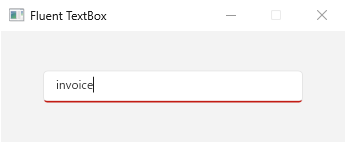
Once applied, the clear button no longer appears even while the control has focus and contains text.
Approach 2: Use the AcceptsReturn Hide Trigger (.NET 10 or later)
As an approach that does not depend on the part name, set AcceptsReturn=True to satisfy the template’s hide trigger.
Since that alone turns a single-line TextBox into multi-line input, line breaks from the Enter key are suppressed and newlines on paste are stripped to preserve single-line behavior.
The following is an implementation of an attached property SingleLineHideClear that enables all of this together.
using System.Windows;
using System.Windows.Controls;
using System.Windows.Input;

public static partial class TextBoxHelper
{
    public static bool GetSingleLineHideClear(DependencyObject obj) =>
        (bool)obj.GetValue(SingleLineHideClearProperty);

    public static void SetSingleLineHideClear(DependencyObject obj, bool value) =>
        obj.SetValue(SingleLineHideClearProperty, value);

    public static readonly DependencyProperty SingleLineHideClearProperty =
        DependencyProperty.RegisterAttached(
            "SingleLineHideClear",
            typeof(bool),
            typeof(TextBoxHelper),
            new FrameworkPropertyMetadata(false, OnSingleLineHideClearChanged));

    private static void OnSingleLineHideClearChanged(DependencyObject d, DependencyPropertyChangedEventArgs e)
    {
        if (d is not TextBox textBox)
        {
            return;
        }

        if ((bool)e.NewValue)
        {
            // Set AcceptsReturn via SetCurrentValue to satisfy the .NET 10 hide trigger.
            textBox.SetCurrentValue(TextBox.AcceptsReturnProperty, true);
            WeakEventManager<TextBox, KeyEventArgs>.AddHandler(textBox, nameof(UIElement.PreviewKeyDown), OnPreviewKeyDown);
            DataObject.AddPastingHandler(textBox, OnPasting);
        }
        else
        {
            WeakEventManager<TextBox, KeyEventArgs>.RemoveHandler(textBox, nameof(UIElement.PreviewKeyDown), OnPreviewKeyDown);
            DataObject.RemovePastingHandler(textBox, OnPasting);
        }
    }

    private static void OnPreviewKeyDown(object sender, KeyEventArgs e)
    {
        // Suppress line breaks from the Enter key to keep a single-line appearance.
        if (e.Key is Key.Enter)
        {
            e.Handled = true;
        }
    }

    private static void OnPasting(object sender, DataObjectPastingEventArgs e)
    {
        if (!e.SourceDataObject.GetDataPresent(DataFormats.UnicodeText))
        {
            return;
        }

        string text = (string)e.SourceDataObject.GetData(DataFormats.UnicodeText);
        if (text.Contains('\n') || text.Contains('\r'))
        {
            // Replace newlines in the pasted text with spaces before pasting.
            string singleLine = text.Replace("\r\n", " ").Replace('\r', ' ').Replace('\n', ' ');
            DataObject data = new();
            data.SetData(DataFormats.UnicodeText, singleLine);
            e.DataObject = data;
        }
    }
}
The AcceptsReturn=True hide trigger is declared after the focus-driven show trigger, and when both apply the later-declared trigger wins, so the clear button stays hidden even while focused.
Suppressing Enter and stripping newlines on paste keeps both the appearance and the input single-line.
AcceptsReturn is set with SetCurrentValue, so it does not overwrite any binding or style on AcceptsReturn with a local value.
PreviewKeyDown is subscribed through WeakEventManager as in Approach 1, so the handler does not extend the lifetime of the TextBox.
DataObject.Pasting is an attached event with no named CLR event, so the generic WeakEventManager cannot subscribe to it; however, OnPasting is a static method and does not hold the TextBox.
When disabled, both the PreviewKeyDown and Pasting handlers are removed reliably.
This trigger was added in .NET 10, so note that it does not hide the button on .NET 9.
On the XAML side, SingleLineHideClear is added to the target TextBox.
<TextBox xmlns:helper="clr-namespace:MyApp.Helpers"
         helper:TextBoxHelper.SingleLineHideClear="True"
         Text="{Binding Keyword, UpdateSourceTrigger=PropertyChanged}" />
As in Approach 1, the xmlns:helper declaration maps the prefix to the namespace of the TextBoxHelper class.
How to Choose
Which one applies is settled by the target version and by what you are willing to depend on.
Including .NET 9 as a target leaves only Approach 1.
The hide trigger Approach 2 relies on was added in .NET 10; on .NET 9, setting AcceptsReturn=True does not remove the clear button.
Keeping a single-line input calls for Approach 1.
Approach 2 makes the control multi-line internally through AcceptsReturn=True. Suppressing Enter and stripping newlines on paste preserves the single-line appearance, but IME behavior and multi-line paste handling have to be validated per application.
Avoiding a dependency on the template’s internal part name calls for Approach 2.
Approach 1 references the part name directly. It actually changed from ClearButton on .NET 9 to DeleteButton on .NET 10, and if it changes again the part will not be found and the clear button reappears. That degradation throws no exception, though: only the hiding stops working.
Building out an entire theme calls for full template replacement.
It gives complete control over the structure at the cost of far more markup. That is not a scale you choose for a single clear button.
Comparing the Approaches
| Approach | Pros | Cons | Best suited for |
|---|---|---|---|
| Collapse the named part (Approach 1) | Direct and reliable control of the display, easy to support both .NET 9 and .NET 10, no side effects on input |
Depends on the internal part name (which has been renamed across versions) | The common case of hiding it reliably while staying single-line |
Use the AcceptsReturn trigger (Approach 2) |
Depends on a public property, resilient to part-name changes | Requires counteracting the multi-line side effect, does not work on .NET 9 |
Avoiding part-name dependence on .NET 10 or later |
| Fully replace the control template | Full control over the structure | Verbose and high maintenance cost | Heavily customizing the theme |
Notes
- A
TextBoxwhose control template has been fully replaced may not contain a clear-button part. In that case, remove the button element itself within the replaced template. - The implementations above only hide the button when
Trueis set and do not include logic to restore it dynamically. If toggling on and off at runtime is required, add a branch that restoresVisibilityand the handler registrations. - When an implicit style overrides the
TextBoxstyle, omittingBasedOnloses the Fluent template altogether and the part ceases to exist. The corresponding row of the table above measures exactly that. - Approach 1 is undone when the template is replaced. Switching
ThemeModewhile the window is open gives theTextBoxthe new theme’s template, and the clear button is created again. In the measurement below, the new part was a different instance without the localCollapsed, and it appeared again on focus. CallingHideClearButtonPartagain after the switch hid it; the method ispublicin the code above for this reason.
| step | same part instance | local Visibility | Visibility with focus |
|---|---|---|---|
| approach 1 applied (ThemeMode=Light) | yes | Collapsed | Collapsed |
| after switching to ThemeMode=Dark | no | (none) | Visible |
| approach 1 applied again | yes | Collapsed | Collapsed |
Measured on .NET 10 / Windows 11 by applying Approach 1, switching the window’s ThemeMode from Light to Dark, and applying it again, with keyboard focus in the TextBox.
Summary
To remove the clear button on a Fluent-themed TextBox, setting Visibility=Collapsed as a local value on the target part (DeleteButton on .NET 10, ClearButton on .NET 9) is the default choice. It removes the button reliably, preserves input behavior, and covers both versions.
The deciding questions are whether .NET 9 is a target and whether a dependency on the part name is acceptable.
With .NET 9 in scope, Approach 1 is the only option; consider Approach 2 only for .NET 10-or-later designs that need to avoid part-name dependence. Choose full template replacement when redesigning the entire theme.