Overview
Application.ThemeMode can be rewritten while the app is running, which makes it usable for a light/dark toggle in a settings screen.
For control colors and styles, however, the rewrite reaches only the Fluent resource dictionary placed in Application.Resources.
Any part whose colors are decided without going through that dictionary stays Light after the switch.
No exception is thrown and no binding error is written, so finding what failed to follow means searching the screen.
In the configurations measured, the parts that do not follow fell into three groups of causes: the window carries its own Fluent dictionary, the Fluent dictionary is nested inside another dictionary, or a brush is pinned with StaticResource.
A fourth case looks like a correct reference: a color taken from a SystemColors key does not follow even through DynamicResource, because the SystemColors values do not change with ThemeMode.
This article measures what the ThemeMode switch actually replaces, derives a procedure for narrowing down the cause from that, and organizes the fix for each cause.
Prerequisites / Environment
- Framework: WPF on .NET 9 or later (
net9.0-windowsor later;ThemeModewas added in .NET 9) - APIs covered:
Application.ThemeMode,Window.ThemeMode, and the Fluent theme resource dictionaries - Architecture: the same for MVVM and code-behind (the switch itself is performed from code)
- Verified on: .NET 10.0.10 / Windows 11 (the OS app mode is set to dark)
- Build check: a new WPF project created with .NET SDK 10.0.302
- Measurement: windows were opened with the whole app set to Light, then
Application.ThemeModewas switched to Dark. Before and after the switch, the value of a brush referenced throughDynamicResource, the order of the merged dictionaries inApplication.Resources, and the type of theForegroundlocal value were read. The measurement is implemented as a scene intools/screenshot-capture
ThemeMode is published as an experimental API, and as What’s new in WPF for .NET 9 states, accessing the ThemeMode properties from code produces error WPF0001.
The project above confirmed that the ThemeMode="Dark" attribute in App.xaml alone does not trigger the error, while assigning this.ThemeMode in code-behind produces error WPF0001.
A runtime switch is always performed from code, so suppressing this error cannot be avoided.
The attribute is also on the ThemeMode struct (ThemeMode Struct), and in an ordinary class equivalent to a ViewModel, merely referencing ThemeMode.Dark produced the error.
Inside a class derived from Window, on the other hand, referencing ThemeMode.Dark alone did not produce the error; it appeared on the line that accessed the property.
With suppression in the project file, both built without errors.
The code in this article wraps the relevant lines in #pragma warning disable WPF0001.
When references are spread across classes, as in MVVM, specifying <NoWarn>$(NoWarn);WPF0001</NoWarn> in the project file is easier to manage.
Problem
The following XAML places text that references a Fluent brush through both DynamicResource and StaticResource, alongside standard controls that receive Fluent styles.
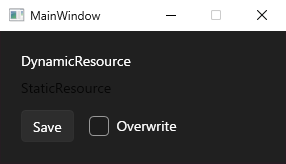
With the whole app set to Light, two windows with the same content are open.
<Border Background="{DynamicResource ApplicationBackgroundBrush}" Padding="20">
  <StackPanel>
    <TextBlock Text="DynamicResource"
               Foreground="{DynamicResource TextFillColorPrimaryBrush}" />
    <TextBlock Text="StaticResource" Margin="0,8,0,0"
               Foreground="{StaticResource TextFillColorPrimaryBrush}" />
    <StackPanel Orientation="Horizontal" Margin="0,14,0,0">
      <Button Content="Save" />
      <CheckBox Content="Overwrite" Margin="14,0,0,0" VerticalAlignment="Center" />
    </StackPanel>
  </StackPanel>
</Border>
TextFillColorPrimaryBrush and ApplicationBackgroundBrush are keys defined by the Fluent theme resource dictionaries.
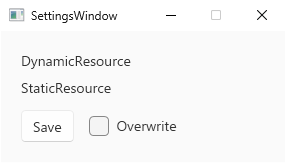
Only the second window (SettingsWindow) sets ThemeMode = ThemeMode.Light before it is shown.
In this state, the following code switches the whole app to Dark.
#pragma warning disable WPF0001
Application.Current.ThemeMode = ThemeMode.Dark;
#pragma warning restore WPF0001
After the switch, the first window turns dark, but the text referenced through StaticResource sinks into the dark background and becomes unreadable.
The second window keeps a light background and light buttons.
What the Symptom Narrows Down
The starting point for diagnosis is what gets replaced when Application.ThemeMode changes.
The following table shows the contents of Application.Resources.MergedDictionaries read after setting the application-wide ThemeMode in sequence.
| Application.ThemeMode | merged dictionaries |
|---|---|
| None | (empty) |
| Light | Fluent.Light.xaml |
| Dark | Fluent.Dark.xaml |
| None | (empty) |
Application.Resources.MergedDictionaries when Application.ThemeMode is set to None, Light, Dark, and None in that order. Measured on .NET 10 / Windows 11.
What ThemeMode does is swap Fluent.Light.xaml and Fluent.Dark.xaml placed directly under Application.Resources.
Control appearance and brushes are resolved from this dictionary through resource lookup.
Among values resolved through resource lookup, anything that stays Light after the switch is therefore in one of three situations: another Fluent dictionary is found before the swapped one, the result of an earlier lookup is being held as a value, or the key referenced is not one the Fluent dictionaries define, such as a SystemColors key.
Separately, a fixed value written without a resource, such as Foreground="Black", stays as it is regardless of the dictionary swap.
The way the symptom appears roughly indicates which one applies.
| Symptom | Suspected cause |
|---|---|
| One specific window stays Light entirely, including its background and standard controls | The window itself holds a Fluent dictionary |
Even in a window without Window.ThemeMode, Fluent brushes referenced through DynamicResource keep their Light values |
The Fluent dictionary is nested inside another dictionary |
| Standard controls switch, but text or backgrounds colored by the app stay the same | A brush is pinned by StaticResource or by assignment in code |
Colors referenced through DynamicResource stay the same, and they come from SystemColors keys |
SystemColors do not change with ThemeMode |
Diagnosis Procedure
To confirm the cause, three places are read immediately after the switch.
The following method turns each window’s ThemeMode, the dictionaries in Window.Resources, and the dictionaries in Application.Resources including nested ones into a string, and finally appends how the Foreground of a given element is set.
#pragma warning disable WPF0001
static string DumpThemeState(DependencyObject? probe = null)
{
    var text = new StringBuilder();
    Application app = Application.Current;
    text.AppendLine($"Application.ThemeMode = {app.ThemeMode.Value}");
    AppendDictionaries(text, app.Resources, "App");

    foreach (Window window in app.Windows)
    {
        text.AppendLine($"[{window.Title}] Window.ThemeMode = {window.ThemeMode.Value}");
        AppendDictionaries(text, window.Resources, $"[{window.Title}]");
    }

    if (probe is not null)
    {
        // ResourceReferenceExpression for DynamicResource, SolidColorBrush when the value is pinned.
        object local = probe.ReadLocalValue(TextBlock.ForegroundProperty);
        string kind = local == DependencyProperty.UnsetValue ? "(no local value)" : local.GetType().Name;
        text.AppendLine($"Foreground local value = {kind}");
    }

    return text.ToString();
}

static void AppendDictionaries(StringBuilder text, ResourceDictionary dictionary, string prefix)
{
    foreach (ResourceDictionary merged in dictionary.MergedDictionaries)
    {
        text.AppendLine($"{prefix} > {merged.Source?.OriginalString ?? "(no Source)"}");
        AppendDictionaries(text, merged, prefix + " >");
    }
}
#pragma warning restore WPF0001
StringBuilder lives in System.Text, TextBlock in System.Windows.Controls, Debug in System.Diagnostics, and the other types in System.Windows.
TextBlock.ForegroundProperty is the same dependency property as Control.ForegroundProperty, so passing a Button or similar element does not throw.
However, a standard control whose color comes from the Fluent style reports (no local value), so it cannot tell the reference kind apart (see the last row of the reference table later in this article).
The return value is inspected by writing it out, as in Debug.WriteLine(DumpThemeState(element)).
The following output was produced with Fluent.Light.xaml nested in Styles.xaml, Window.ThemeMode="Light" set on SettingsWindow, the app switched to Dark, and the StaticResource text of MainWindow passed as the probe.
All three causes appear in the output.
| output |
|---|
| Application.ThemeMode = Dark |
| App > pack://application:,,,/PresentationFramework.Fluent;component/Themes/Fluent.Dark.xaml |
| App > pack://application:,,,/ScreenshotCapture;component/Scenes/FluentThemeMode/Styles.xaml |
| App > > pack://application:,,,/PresentationFramework.Fluent;component/Themes/Fluent.Light.xaml |
| [MainWindow] Window.ThemeMode = None |
| [SettingsWindow] Window.ThemeMode = Light |
| [SettingsWindow] > pack://application:,,,/PresentationFramework.Fluent;component/Themes/Fluent.Light.xaml |
| Foreground local value = SolidColorBrush |
Output of DumpThemeState right after switching to Dark in a state that contains all three causes. Run on .NET 10 / Windows 11.
The output reads as follows.
- A window whose
[window name] Window.ThemeModeis anything other thanNone(Lightin this example) holds its own Fluent dictionary. The dictionary appears on the following[window name] >line. - A URI containing
Fluent.on a line with two or more>in a row, such asApp > >, means the Fluent dictionary is nested. Foreground local value = SolidColorBrushmeans the element holds the brush value itself and does not follow the switch.ResourceReferenceExpressionmeans the brush is referenced throughDynamicResource, but it does not tell which key: aSystemColorskey referenced this way reports the same type and still does not follow (see the reference table later in this article). This type name, however, is an internal WPF implementation type, not a public contract; the values in this article were read in the test environment (.NET 10).(no local value)means the value comes from something other than a local value, such as a style, a template, inheritance, or the default value.
Fixes by Cause
The following table shows, for each window setup, whether a brush referenced through DynamicResource followed a switch of Application.ThemeMode from Light to Dark.
The brush value is #E4000000 in Light and #FFFFFFFF in Dark.
| window setup | Window.ThemeMode | brush before | brush after | follows |
|---|---|---|---|---|
| (not set) | None | #E4000000 | #FFFFFFFF | yes |
| Window.ThemeMode=None | None | #E4000000 | #FFFFFFFF | yes |
| Window.ThemeMode=Light | Light | #E4000000 | #E4000000 | no |
| Fluent.Light.xaml in Window.Resources | Light | #E4000000 | #E4000000 | no |
| Fluent.Light.xaml in App resources | None | #E4000000 | #FFFFFFFF | yes |
| Fluent.Light.xaml nested in Styles.xaml | None | #E4000000 | #E4000000 | no |
Value of TextFillColorPrimaryBrush (referenced through DynamicResource) per window setup when Application.ThemeMode is switched from Light to Dark. The Window.ThemeMode column is read after the switch. For the two setups that place a dictionary in Application.Resources (App resources and Styles.xaml in the figure), the dictionary was merged before ThemeMode was set. Measured on .NET 10 / Windows 11.
The Window Holds Its Own Fluent Dictionary
Setting Window.ThemeMode loads the Fluent dictionaries into that window’s Resources (Window.ThemeMode remarks).
Resource lookup starts near the element, so once the window’s dictionary is found the lookup never reaches the application dictionary.
This is why a window with Window.ThemeMode="Light" stays light even after the whole app is set to Dark.
Merging Fluent.Light.xaml into Window.Resources by hand produced the same result, and Window.ThemeMode then read Light.
This value is worth checking even for a window whose code never sets ThemeMode.
The fix is to stop setting the theme per window and leave it to the application-level setting.
A per-window setting can be removed at runtime with Window.ThemeMode = ThemeMode.None.
When the application-level value is anything other than None, a window set to None receives the application-level ThemeMode (ThemeMode.None remarks).
In the measurement, the window with Window.ThemeMode=None followed the switch.
The Fluent Dictionary Is Nested Inside Another Dictionary
When Fluent.Light.xaml is placed inside a custom dictionary such as Styles.xaml and that dictionary is merged from App.xaml, the brush kept its Light value after switching to Dark.
Reading the order of the merged dictionaries in Application.Resources before and after the switch reveals the cause.
| window setup | ThemeMode | App merged dictionaries |
|---|---|---|
| Fluent.Light.xaml in App resources | Light | Fluent.Light.xaml |
| Fluent.Light.xaml in App resources | Dark | Fluent.Dark.xaml |
| Fluent.Light.xaml nested in Styles.xaml | Light | Fluent.Light.xaml, Styles.xaml[Fluent.Light.xaml] |
| Fluent.Light.xaml nested in Styles.xaml | Dark | Fluent.Dark.xaml, Styles.xaml[Fluent.Light.xaml] |
Application.Resources.MergedDictionaries for a setup that merges Fluent.Light.xaml directly into Application.Resources and a setup that nests it inside Styles.xaml. In both, the dictionary was merged before ThemeMode was set. Square brackets show the contents of a nested dictionary. Measured on .NET 10 / Windows 11.
ThemeMode swaps the Fluent dictionaries directly under Application.Resources, and a Fluent dictionary nested inside another dictionary is not a target.
In this setup, the ThemeMode dictionary went in before the existing Styles.xaml (at the front), and the Fluent.Light.xaml inside Styles.xaml remained after it.
Because MergedDictionaries searches the last-added dictionary first (ResourceDictionary.MergedDictionaries remarks), the Light brushes in the later Styles.xaml keep being found first.
The fix is to remove the Fluent reference from the nested dictionary and leave management of the Fluent dictionaries to ThemeMode alone.
The same Fluent.Light.xaml merged by hand directly under Application.Resources was replaced by Fluent.Dark.xaml through ThemeMode, and the brush followed.
However, the Application.ThemeMode remarks advise against merging Fluent dictionaries by hand, and also state that a hand-merged dictionary takes precedence over the one added by ThemeMode.
The replacement observed in this environment is no reason to choose a hand-merged setup.
When ThemeMode is used, the appropriate setup is one that does not merge Fluent dictionaries by hand.
A Brush Is Pinned by StaticResource or by Assignment in Code
If standard controls switch but text or backgrounds colored by the app stay the same, the way the brush is referenced is the likely cause.
The following table shows the same brush referenced in three ways, read before and after the switch.
A SystemColors key referenced through DynamicResource is added for comparison, and a Button without an explicit Foreground as the last row.
| how the brush is referenced | ReadLocalValue | before | after | follows |
|---|---|---|---|---|
| {StaticResource} | SolidColorBrush | #E4000000 | #E4000000 | no |
| {DynamicResource} | ResourceReferenceExpression | #E4000000 | #FFFFFFFF | yes |
| Foreground = FindResource(...) | SolidColorBrush | #E4000000 | #E4000000 | no |
| {DynamicResource SystemColors.ControlTextBrushKey} | ResourceReferenceExpression | #FF000000 | #FF000000 | no |
| Button (Fluent style) | (no local value) | #E4000000 | #FFFFFFFF | yes |
TextFillColorPrimaryBrush set to Foreground in each way, and SystemColors.ControlTextBrushKey through DynamicResource, with Application.ThemeMode switched from Light to Dark. The ReadLocalValue column is the type of the Foreground local value. The last row is a Button without an explicit Foreground. Measured on .NET 10 / Windows 11.
StaticResource assigns the brush found when the XAML is loaded, once.
Assigning the return value of FindResource in code behaves the same way, leaving the Light brush of that moment as the value.
When the dictionary is swapped for the Dark version, the element keeps the brush it already received and does not follow.
DynamicResource holds a reference to the key and looks the value up again when the dictionary changes.
That only helps if the key’s value changes: SystemColors.ControlTextBrushKey is not defined by the Fluent dictionaries, so the lookup returns the same black brush after the switch.
The fix is to reference every theme-dependent color through DynamicResource, using a key that the Fluent dictionaries define, such as TextFillColorPrimaryBrush, rather than a SystemColors key.
When the value is set from code, the key is passed instead of the value, as in element.SetResourceReference(TextBlock.ForegroundProperty, "TextFillColorPrimaryBrush").
The difference between StaticResource and DynamicResource itself is covered in Why StaticResource Changes Are Not Reflected in WPF and How to Fix It.
Implementation Example
Removing per-window pinning in one place requires centralizing the switch and clearing each window’s setting every time the application-level ThemeMode changes.
The following ApplyTheme sets the application-wide ThemeMode, then for every window in Application.Windows resets Window.ThemeMode to None and removes Fluent dictionaries merged into Window.Resources by hand.
#pragma warning disable WPF0001
public static class ThemeSwitcher
{
    public static void ApplyTheme(ThemeMode mode)
    {
        Application app = Application.Current;
        app.ThemeMode = mode;

        foreach (Window window in app.Windows)
        {
            // With None, the application-level ThemeMode applies.
            window.ThemeMode = ThemeMode.None;

            // A hand-merged Fluent dictionary sits closer than the application one, so remove it.
            foreach (ResourceDictionary dictionary in window.Resources.MergedDictionaries
                         .Where(IsFluentDictionary)
                         .ToList())
            {
                window.Resources.MergedDictionaries.Remove(dictionary);
            }
        }
    }

    private static bool IsFluentDictionary(ResourceDictionary dictionary) =>
        dictionary.Source?.OriginalString.Contains(
            "PresentationFramework.Fluent;component/Themes/",
            StringComparison.OrdinalIgnoreCase) == true;
}
#pragma warning restore WPF0001
Where and ToList require System.Linq (no explicit using is needed when ImplicitUsings is enabled).
The call site, ThemeSwitcher.ApplyTheme(ThemeMode.Dark), also references the ThemeMode struct.
In the build check described earlier, calling it from an ordinary class equivalent to a ViewModel required WPF0001 suppression at the call site as well.
Application.Windows enumerates windows instantiated on the UI thread that have not yet been closed (Application.Windows).
This property is available only from the thread that created the Application, so ApplyTheme must also be called on the UI thread.
When the switch is triggered from background work, it is run on the UI thread through Application.Current.Dispatcher.Invoke.
ApplyTheme processes only the windows that are open when it is called.
A window created afterward is not processed until the next ApplyTheme call.
A window created on another UI thread is not processed, because it is not included in Application.Windows.
This approach assumes that such windows do not set ThemeMode.
The following table shows the result for the same window setups as the previous section, calling this method instead of rewriting Application.ThemeMode directly.
| window setup | Window.ThemeMode | brush before | brush after | follows |
|---|---|---|---|---|
| (not set) | None | #E4000000 | #FFFFFFFF | yes |
| Window.ThemeMode=None | None | #E4000000 | #FFFFFFFF | yes |
| Window.ThemeMode=Light | None | #E4000000 | #FFFFFFFF | yes |
| Fluent.Light.xaml in Window.Resources | None | #E4000000 | #FFFFFFFF | yes |
| Fluent.Light.xaml in App resources | None | #E4000000 | #FFFFFFFF | yes |
| Fluent.Light.xaml nested in Styles.xaml | None | #E4000000 | #E4000000 | no |
Value of TextFillColorPrimaryBrush (referenced through DynamicResource) per window setup when ApplyTheme(ThemeMode.Dark) is called in a Light app. The Window.ThemeMode column is read after the switch. The dictionaries were placed in the same order as the previous figure. Measured on .NET 10 / Windows 11.
The two setups that pinned the theme per window now follow the switch.
The nested dictionary setup, however, is not fixed by this method.
Nesting is a problem with the application’s dictionary structure, and it must be fixed in the dictionary structure as described in the previous section rather than absorbed by the switching code.
Brushes pinned by StaticResource are not fixed by this method either.
Caveats
- Windows that intentionally pin their colors are released as well.
ApplyThemeresetsWindow.ThemeModetoNonewithout exception. If a window must always appear in Light, a condition that excludes it is needed. - Once the application sets
ThemeMode, settingNoneon a window does not remove Fluent. When the application-level value is notNone, the application’s Fluent theme is applied even to a window set toNone(ThemeMode.None remarks). ThemeModeis an experimental API. The Application.ThemeMode remarks state that it may be removed in future versions. Keeping the switch in one place, asThemeSwitcherdoes, limits the scope of changes if the API changes.ThemeMode.Systemchooses Light or Dark based on the Windows setting (ThemeMode.System remarks). Only an environment with the app mode set to dark was measured. The light side, and following an OS setting change while the app is running, were not measured, because they require changing the OS setting.
The following table shows the result of setting ThemeMode.System in the test environment.
Fluent.xaml, which does not fix the light/dark variant, was merged into Application.Resources, and the brush took the same value as Dark.
| AppsUseLightTheme | merged dictionary | TextFillColorPrimaryBrush |
|---|---|---|
| 0 | Fluent.xaml | #FFFFFFFF |
Merged dictionary and TextFillColorPrimaryBrush value when Application.ThemeMode is set to System. AppsUseLightTheme is read from the registry (0 means dark). Measured on .NET 10 / Windows 11.
Summary
Switching Application.ThemeMode swaps the Fluent dictionary directly under Application.Resources from the Light version to the Dark version.
The cause of any part that does not follow can be identified by reading Window.ThemeMode, the merged dictionary structure, and the type of the Foreground local value, as DumpThemeState does.
When a window holds a Fluent dictionary, the code that resets Window.ThemeMode to None and removes the dictionary belongs in the same place as the switch.
When the Fluent dictionary is nested, the dictionary structure needs fixing so that ThemeMode alone manages it.
When a brush is pinned, the pinned reference is replaced with DynamicResource or SetResourceReference.
For an app that expects runtime switching, the appropriate default is to set ThemeMode only at the application level, not to merge Fluent dictionaries by hand, and to reference theme-dependent colors through DynamicResource.