Overview
Jumping to a folder returned by a search, restoring the node selected in the previous session, selecting a newly added item — any screen built around a TreeView eventually needs to select an arbitrary node from code.
Writing treeView.SelectedItem = node; — the pattern that works for ListBox and DataGrid — fails to compile, and binding the property in XAML breaks the build in an ordinary project.
This article explains how the restriction follows from the way TreeView stores its selection, and presents two ways to request a selection from code, combined with an attached behavior that controls scroll position and focus.
Every behavior and exception message reported here was observed by running the code on .NET 10 / Windows 11.
Prerequisites / Environment
- Framework: .NET 6 or later / WPF (behavior verified on .NET 10 / Windows 11)
- Language: C# 9 or later / XAML (the samples use collection expressions, a C# 12 feature, and assume nullable reference types are enabled; on C# 11 or earlier, replace
[]with a target-typednew()) - Target controls:
TreeView/TreeViewItem/HierarchicalDataTemplate - Architecture: MVVM (selection state owned by the view model) and code-behind that manipulates containers directly
- Other constraints:
TreeViewdoes not virtualize by default; differences under virtualization are covered in Notes
What We Want to Do
The target is an ordinary TreeView that renders hierarchical data through a HierarchicalDataTemplate.
<TreeView x:Name="Tree" ItemsSource="{Binding Roots}">
    <TreeView.ItemTemplate>
        <HierarchicalDataTemplate ItemsSource="{Binding Children}">
            <TextBlock Text="{Binding Name}" />
        </HierarchicalDataTemplate>
    </TreeView.ItemTemplate>
</TreeView>
Three routes to selecting a node from code suggest themselves, and all of them are closed.
First, assigning the CLR property does not compile, because TreeView.SelectedItem exposes only a getter.
Tree.SelectedItem = target;
// error CS0200: Property or indexer 'TreeView.SelectedItem' cannot be assigned to
// -- it is read only
Second, writing the dependency property directly fails at run time.
Tree.SetValue(TreeView.SelectedItemProperty, target);
// InvalidOperationException: 'SelectedItem' property was registered as read-only
// and cannot be modified without an authorization key.
Third, binding the property in XAML is rejected as well.
In an ordinary project, where XAML is compiled, the markup below fails at build time.
<!-- Produces build error MC3065 -->
<TreeView ItemsSource="{Binding Roots}"
          SelectedItem="{Binding CurrentNode, Mode=TwoWay}" />
error MC3065: 'SelectedItem' property is read-only and cannot be set from markup.
Loading the same XAML at run time through XamlReader.Parse throws a XamlParseException instead, wrapping ArgumentException: 'SelectedItem' property cannot be data-bound. (Parameter 'dp').
Calling BindingOperations.SetBinding from code raises the same ArgumentException.
Switching Mode to OneWay changes nothing, which is what makes the restriction confusing.
A read-only dependency property cannot be the target of a binding in any direction, so no Mode setting works around it.
Why It Cannot Be Done
TreeView does not hold the selection itself.
The state of being selected belongs to each TreeViewItem through its IsSelected property.
TreeView.SelectedItem is only a projection that exposes the data item behind the currently selected container.
That is why SelectedItem is registered as a read-only dependency property; TreeView.SelectedItemProperty.ReadOnly returns true.
A read-only dependency property can be written only by code that holds the DependencyPropertyKey produced at registration.
The InvalidOperationException from SetValue, the rejection of the property in markup, and the ArgumentException from establishing a binding all follow from that registration.
Selecting from code therefore becomes a different task: make the TreeViewItem for the target node exist, then set its IsSelected to true.
This is where the second obstacle appears, because TreeViewItem containers are not laid out statically in XAML — ItemContainerGenerator creates them on demand.
The measured generation timing is as follows.
| State | ItemContainerGenerator.Status |
Result of ContainerFromItem |
|---|---|---|
| Root item (already displayed) | ContainersGenerated |
Container |
| Child of a collapsed parent | NotStarted |
null |
Immediately after IsExpanded = true |
NotStarted |
null |
After a subsequent UpdateLayout() |
ContainersGenerated |
Container |
No container exists for the children of a collapsed node.
Expanding the parent does not create them on the spot either; they appear only once a layout pass has run.
That is why calling ContainerFromItem immediately after IsExpanded = true returns null.
The problem is therefore not “how to write to a read-only property” but a design question: where the selection state should live, and how to deal with container generation timing.
Everything described so far can be confirmed from code.
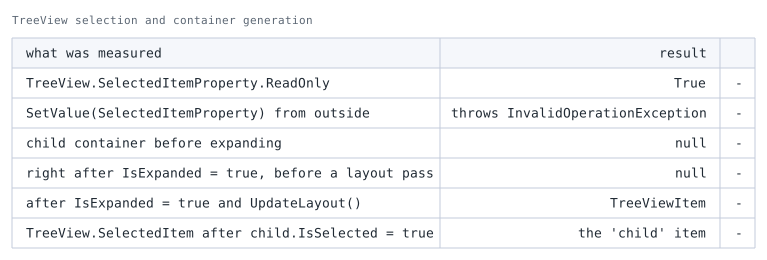
child container is the type returned by the parent's ItemContainerGenerator.ContainerFromIndex(0).The table shows the two obstacles arising separately.
The first two rows show that the property cannot be written because it is read-only.
The next two show that IsSelected has nothing to be set on while the container does not exist.
Setting IsExpanded to true is not enough on its own. The container is still null immediately afterward and only becomes available once a layout pass runs.
As the last row shows, once the container does exist, IsSelected propagates to SelectedItem on its own.
Replacing the Design
Store the selection and expansion state on the node view model, and bind them two-way to IsSelected and IsExpanded of TreeViewItem through ItemContainerStyle setters.
This works because the binding is applied when the container is created.
A view model property change made while no container exists is not lost: once the container is generated, the style setter is evaluated and picks up the current value.
The caller never has to reason about generation timing, and UpdateLayout becomes unnecessary.
A Binding written in an ItemContainerStyle setter resolves against the DataContext of the container, which is the corresponding data item.
{Binding IsSelected} therefore refers to IsSelected on the node view model, so those properties must exist on the node type.
How ItemsControl switches the DataContext of a container to its data item is covered in Binding to the Parent DataContext from Inside a WPF DataTemplate.
Implementation
The node view model carries display data plus the selection state, the expansion state, and a reference to its parent.
The parent reference is used to expand every ancestor so the target becomes visible.
public sealed class FolderNode : INotifyPropertyChanged
{
    private bool isSelected;
    private bool isExpanded;

    public FolderNode(string name) => Name = name;

    public string Name { get; }

    public FolderNode? Parent { get; private set; }

    public ObservableCollection<FolderNode> Children { get; } = [];

    public bool IsSelected
    {
        get => isSelected;
        set
        {
            if (isSelected != value)
            {
                isSelected = value;
                OnPropertyChanged();
            }
        }
    }

    public bool IsExpanded
    {
        get => isExpanded;
        set
        {
            if (isExpanded != value)
            {
                isExpanded = value;
                OnPropertyChanged();
            }
        }
    }

    public FolderNode Add(FolderNode child)
    {
        child.Parent = this;
        Children.Add(child);
        return child;
    }

    /// <summary>Expands every ancestor up to the root and selects this node.</summary>
    public void SelectAndReveal()
    {
        for (FolderNode? ancestor = Parent; ancestor is not null; ancestor = ancestor.Parent)
        {
            ancestor.IsExpanded = true;
        }

        IsSelected = true;
    }

    public event PropertyChangedEventHandler? PropertyChanged;

    private void OnPropertyChanged([CallerMemberName] string? propertyName = null)
        => PropertyChanged?.Invoke(this, new PropertyChangedEventArgs(propertyName));
}
Implementing INotifyPropertyChanged is mandatory here.
The write-back direction of the two-way binding works without notifications, but propagating a view model change to the container depends on them.
The XAML places two setters in ItemContainerStyle.
This separates responsibilities: ItemTemplate defines how a node looks, ItemContainerStyle defines the state of its container.
<DockPanel Margin="12">
    <TextBlock DockPanel.Dock="Bottom" Margin="4,10,0,0"
               FontFamily="Consolas, Courier New" FontSize="12" Foreground="#333D4D"
               Text="{Binding SelectedItem.Name, ElementName=Tree,
                      StringFormat='TreeView.SelectedItem = {0}'}" />

    <TreeView x:Name="Tree" ItemsSource="{Binding Roots}"
              behaviors:RevealSelectedItemBehavior.IsEnabled="True">
        <TreeView.ItemContainerStyle>
            <Style TargetType="TreeViewItem">
                <Setter Property="IsExpanded" Value="{Binding IsExpanded, Mode=TwoWay}" />
                <Setter Property="IsSelected" Value="{Binding IsSelected, Mode=TwoWay}" />
            </Style>
        </TreeView.ItemContainerStyle>
        <TreeView.ItemTemplate>
            <HierarchicalDataTemplate ItemsSource="{Binding Children}">
                <TextBlock Text="{Binding Name}" />
            </HierarchicalDataTemplate>
        </TreeView.ItemTemplate>
    </TreeView>
</DockPanel>
behaviors is the XAML namespace prefix mapped to the namespace that declares the attached behavior shown below (xmlns:behaviors="clr-namespace:(namespace)").
The StringFormat value is quoted because an unquoted = inside a markup extension is parsed as the separator of a named argument.
This TextBlock reads the read-only SelectedItem as the source of a binding.
The restriction applies to using such a property as a binding target; reading its value is unaffected.
Selection is requested on the node view model, touching neither the TreeView nor any container.
Roots is the collection of root nodes exposed by the view model assigned to the window’s DataContext, and FindNode is a lookup helper provided by the application.
FolderNode target = FindNode(root, "drivers");
target.SelectAndReveal();
The order in which SelectAndReveal expands ancestors is irrelevant, whether it walks toward the root or toward the leaf.
It only sets view model properties, and those values are read when containers are generated.
Scrolling the selected node into view and moving focus to it belong in an attached behavior.
TreeViewItem.Selected is a bubbling routed event, so a single handler registered on the TreeView covers every node.
public static class RevealSelectedItemBehavior
{
    public static readonly DependencyProperty IsEnabledProperty =
        DependencyProperty.RegisterAttached(
            "IsEnabled",
            typeof(bool),
            typeof(RevealSelectedItemBehavior),
            new PropertyMetadata(false, OnIsEnabledChanged));

    public static void SetIsEnabled(DependencyObject element, bool value)
        => element.SetValue(IsEnabledProperty, value);

    public static bool GetIsEnabled(DependencyObject element)
        => (bool)element.GetValue(IsEnabledProperty);

    private static void OnIsEnabledChanged(DependencyObject d, DependencyPropertyChangedEventArgs e)
    {
        if (d is not TreeView treeView)
        {
            return;
        }

        if ((bool)e.NewValue)
        {
            treeView.AddHandler(TreeViewItem.SelectedEvent, new RoutedEventHandler(OnItemSelected));
        }
        else
        {
            treeView.RemoveHandler(TreeViewItem.SelectedEvent, new RoutedEventHandler(OnItemSelected));
        }
    }

    private static void OnItemSelected(object sender, RoutedEventArgs e)
    {
        if (e.OriginalSource is not TreeViewItem item)
        {
            return;
        }

        item.Dispatcher.BeginInvoke(
            DispatcherPriority.Loaded,
            new Action(() =>
            {
                item.BringIntoView();
                item.Focus();
            }));
    }
}
BringIntoView is deferred to DispatcherPriority.Loaded because layout is not final right after a container is created, so the scroll position cannot yet be computed.
Calling Focus in addition renders the selection with the active highlight color.
Screens that must not move focus can drop that line.
Running the XAML and the code above and calling SelectAndReveal on drivers, three levels deep, produces the following result.
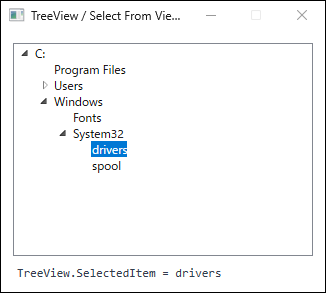
IsExpanded and IsSelected on the view model: ancestors expanded and the target node selected. The bottom line reads the read-only TreeView.SelectedItem as a binding source, showing that it follows the container state. The highlight color follows the accent color configured in the OS (produced on .NET 10 / Windows 11).Notes
- Selecting a node does not scroll it into view.
In aTreeViewholding 200 nodes, selecting one near the end left theScrollViewer’sVerticalOffsetat0.
Unlike selection through the keyboard or the mouse, changingIsSelectedhas no effect on the scroll position, soBringIntoViewmust be called explicitly. - Selection has no effect while ancestors stay collapsed.
SettingIsSelectedtotrueon a leaf whose ancestors were collapsed leftTreeView.SelectedItematnull, because no container existed for the setter to apply to.
Expanding the ancestors generates the container and applies the selection at that moment.
The value is deferred rather than lost, so requesting expansion and selection together, asSelectAndRevealdoes, avoids the issue entirely. - The effect of assigning to a container depends on how the setter is written.
With aMode=TwoWaybinding in the setter, assigning toIsSelectedon the container keeps the binding alive and writes the value back to the view model.
The assignment is treated exactly like a selection made through the UI, and later view model changes still reach the container.
With aMode=OneWaybinding or a literal value in the setter, the same assignment becomes a local value that outranks the style setter.
Measurement confirms this: underTwoWay, the base value source reported byDependencyPropertyHelper.GetValueSource(ValueSource.BaseValueSource) stayedStyleafter the assignment, whereas underOneWayit changed toLocaland subsequent selections requested from the view model no longer had any effect.
The precedence rules are covered in Why WPF Style Triggers and DataTriggers Do Not Apply — Dependency Property Value Precedence. TreeViewis single-select.
Marking several nodes asIsSelectedin the view model still selects only one.
When another node is selected,IsSelectedon the previously selected container becomesfalseand the two-way binding writes that back to the view model, so mutual exclusion does not have to be implemented by hand.- Missing properties on the node type produce binding errors.
Setter bindings resolve against theDataContextof the container, that is, the data item.
When levels of the tree use different types, declareIsSelectedandIsExpandedon a shared base class or interface.
Bindings that fail to resolve are reported in the Output window; reading those messages is covered in Reading WPF Binding Errors and Diagnosing Them with the Output Window. - Nodes outside the viewport cannot be selected as is once virtualization is enabled.
In aTreeViewwithVirtualizingStackPanel.IsVirtualizing="True", settingIsSelectedon an off-screen node leftTreeView.SelectedItematnull.
No container exists yet; the selection is applied once scrolling materializes that node.
With theItemContainerGeneratorapproach,ContainerFromItemreturnsnull, so the container is out of reach.
It can be reached by assigning a customVirtualizingStackPanelthat exposesBringIndexIntoViewas theItemsPanelof both theTreeViewand itsTreeViewItemcontainers, realizing each level in turn.
That comes at the cost of a substantially larger implementation.
Related interactions between virtualization and selection state are covered in How to Prevent SelectedItems from Appearing Lost in a Virtualized WPF ListBox.
Comparing the Implementations
The two ways to request a selection and the attached behavior are compared below, together with SelectedItemChanged, which only reads the resulting selection.
| Approach | How selection is requested | Behavior under virtualization | Pros | Cons |
|---|---|---|---|---|
Two-way binding in ItemContainerStyle |
View model property | Applied once the node is realized | Container timing is irrelevant; stays within MVVM | Requires state properties on the node type |
Walking ItemContainerGenerator |
Direct assignment on the container | Off-screen nodes must be realized first | Leaves the view model untouched | Needs UpdateLayout per level; without a two-way binding, assigned values become local values |
| Attached behavior | Wraps one of the above | Follows the wrapped approach | Reusable control of scroll position and focus | Not a selection mechanism on its own |
SelectedItemChanged |
Cannot request it (read-only) | Unaffected | Propagates UI selection to the view model | Cannot request a selection from code |
Walking ItemContainerGenerator remains a valid option when the view model cannot be modified, or when an existing code-behind needs the smallest possible addition.
The method receives the path from the root to the target node and expands each level while obtaining containers.
public static bool SelectByPath(TreeView treeView, IReadOnlyList<object> path)
{
    ItemsControl parent = treeView;

    for (int i = 0; i < path.Count; i++)
    {
        // Force container generation for the level expanded in the previous iteration (the root on the first pass).
        parent.UpdateLayout();

        if (parent.ItemContainerGenerator.ContainerFromItem(path[i]) is not TreeViewItem container)
        {
            return false;
        }

        if (i == path.Count - 1)
        {
            container.IsSelected = true;
            container.BringIntoView();
            return true;
        }

        container.IsExpanded = true;
        parent = container;
    }

    return false;
}
The UpdateLayout call is the essential part of this implementation.
Removing it from the same code made ContainerFromItem return null for the children of the root, and the method returned false without selecting anything.
A layout pass has to run between expanding a level and retrieving its containers.
UpdateLayout runs a full layout pass synchronously, which is not free on deep or large trees.
Since the number of calls grows with the depth of the path, confine the calls to selection operations rather than to code that runs continuously.
Summary
TreeView.SelectedItem is read-only not as an implementation shortcut, but because the selection state belongs to TreeViewItem.
Selecting from code means making the container for the target node exist and setting its IsSelected to true.
The criteria for choosing an approach are as follows.
- Screens built on MVVM:
DeclareIsSelectedandIsExpandedon the node view model and bind them two-way throughItemContainerStyle.
Requests are not lost when containers are missing and noUpdateLayoutis needed, which makes this the default choice. - View model that cannot be modified:
WalkItemContainerGeneratorto obtain theTreeViewItem.
Use it only when two costs are acceptable: the per-levelUpdateLayout, and the local values that a container assignment produces without a two-way binding. - Scroll position and focus:
Extract them into an attached behavior that handlesTreeViewItem.Selectedon theTreeView.
Being independent of how selection is requested, it combines with either approach. - Virtualized trees:
Off-screen nodes have no containers, so an implementation that assumes direct container access does not work without extra machinery.
Standardize on the two-way binding approach.